Your Sales Team Has 200 Leads. Your Channel Partners Have 80 More. Nobody Knows Which Ones Are Being Followed Up.
You run a 5 to 20 person real estate sales operation. Maybe you are a small developer with one or two residential projects and an in-house sales team of six to ten people. Maybe you are a brokerage with twelve agents covering multiple projects across the city. Maybe you are a developer-developer who does both: direct sales and a network of 30 to 50 channel partners each feeding you leads from their own client base.
At this scale, the single-person CRM problem from the previous article doubles and then multiplies. It is no longer just about whether one person remembers to follow up. It is about whether your sales manager knows the status of every lead across every salesperson's pipeline, whether the channel partner leads are being treated with the same urgency as the direct leads, whether the same prospect has been called twice by two different team members, whether the deal that closed last week has a collection schedule set up in Finance, and whether the developer's accounts team knows that three instalments are due from three different buyers in the next 30 days.
This is a coordination and visibility problem. And the tool that solves it is not a better spreadsheet or a WhatsApp group for the sales team. It is a CRM that gives the sales manager complete visibility across the full team pipeline, a channel partner management workflow built for the real estate relationship model, and a connection to Finance that means a booking confirmed in CRM automatically starts the collection schedule in accounts.
This post is about how a 5 to 20 person real estate sales team, whether developer in-house or broker network, uses Zopkit CRM and Zopkit Financial Accounting to run a professional sales and collections operation from a single connected platform.
Table of Contents
I. The Three Coordination Problems That Kill a Small Real Estate Sales Team's Conversion
II. What a Team-Level CRM Does That a Solo CRM Cannot
III. Zopkit CRM: Team Pipeline Management Across Every Salesperson
IV. Zopkit CRM: Channel Partner Management as a Structured Workflow
V. Zopkit CRM: Deal Tracking From Inquiry to Booking
VI. Zopkit Finance: Collection Schedules, Demand Letters, and Payment Tracking
VII. How CRM Deal Data Connects to Finance Collections
VIII. Management Reporting: What the Sales Head Sees Every Morning
IX. Implementation: A Two-Week Setup Plan
X. The Evaluation Checklist
I. The Three Coordination Problems That Kill a Small Real Estate Sales Team's Conversion
Bigger Team, Bigger Gaps. Here Is Where the Money Gets Lost.
A solo broker losing deals to poor follow-up is a personal discipline problem with a personal solution. A 10-person sales team losing deals to coordination failure is a systems problem. The individual salesperson may be disciplined. The gap is between salespeople, between the direct channel and the channel partner channel, and between the CRM and Finance.
Coordination problem 1: The lead ownership ambiguity.
A lead walks into the site office on Saturday afternoon. The site manager gives them a call back on Monday morning. On Tuesday the channel partner who originally referred the same lead also calls them. The buyer is confused. They feel they are being handled carelessly by an organisation that does not track its own contacts. They go to the competitor developer across the road who has one point of contact.
This happens when leads from different sources — walk-in, portal, channel partner referral, direct inquiry — are not entered into a single system with clear ownership assignment. The salesperson who owns the lead is responsible for follow-up. The system prevents duplicate outreach. Without the system, duplicate outreach and ownership confusion are the default.
Coordination problem 2: The channel partner management gap.
For a developer with 30 to 50 active channel partners, the channel partner relationship is a sales channel in its own right. Channel partners need project information, inventory availability, price updates, and commission confirmation. They need to know that the leads they send are being properly followed up, because if two of their referrals are mishandled they will stop sending business.
Managing the channel partner relationship from WhatsApp is the current standard. It creates three problems: the developer does not know how many leads each channel partner has sent in the last 90 days, the channel partner does not know the status of their leads once sent, and commission payment disputes arise because there is no documented record of which channel partner sent which booking lead.
Coordination problem 3: The CRM-to-Finance handoff gap.
A deal closes. The buyer books a 2BHK at ₹92 lakhs with a payment plan: 10% on booking, 20% at launch, 30% at foundation, 40% at possession. The sales team marks the deal closed in their spreadsheet and sends the booking form to accounts. Accounts creates a new file for this buyer. In three months when the foundation milestone is reached, the accounts team calls the sales manager to confirm the payment schedule for the Mehta booking because their records do not have the full instalment table.
The connection between a booking in sales and the collection schedule in Finance should not require a phone call. The data entered at booking should flow directly to Finance as the collection record. The accounts team should be working from the same booking record the sales team created, not a copy that may or may not match.
II. What a Team-Level CRM Does That a Solo CRM Cannot
Visibility, Assignment, and Coordination Across a Sales Team
A team-level CRM does everything a solo CRM does, and adds the coordination layer that a team requires.
Shared pipeline with individual ownership. Every lead in the organisation is in one pipeline. Each lead has an assigned owner. The sales manager sees the full pipeline. Each salesperson sees their own leads. No lead falls between two people. No lead is called by two people.
Activity visibility across the team. The sales manager can see the last activity on any lead in the team's pipeline. A lead that has had no activity in seven days is visible. A lead that has had five follow-up calls with no status change is visible. Coaching conversations are grounded in actual pipeline data, not in what each salesperson reports.
Lead source attribution at the team level. Which portal is generating the most qualified leads? Which channel partner has sent the most bookings in the last quarter? Which sales executive has the highest inquiry-to-site-visit conversion? These questions have answers from the pipeline data, not from individual salesperson estimates.
Role-based access for clean data governance. Salespeople see their own leads. The sales manager sees the full team pipeline. Finance sees the booking and collection data. Channel partners, if given limited portal access, see the status of their referral leads without seeing the full pipeline. Each person sees what they need to do their job.
III. Zopkit CRM: Team Pipeline Management Across Every Salesperson
One Pipeline. Every Lead. Every Salesperson. One View for the Manager.
Zopkit CRM is built for B2B and B2C sales teams that have grown beyond spreadsheets. For a real estate sales team of 5 to 20 people, the pipeline management features directly address the team coordination problems described above.
Configurable Pipeline Stages for the Property Sales Cycle:
The pipeline in Zopkit CRM is configured to the stages that match how your sales process actually works. For a real estate developer's in-house team a practical stage structure is:
- New Inquiry — Lead received from any source, not yet assigned or called
- First Contact Made — Called or met, requirement not yet qualified
- Requirement Qualified — Budget, configuration, location, timeline confirmed
- Site Visit Scheduled — Visit confirmed, unit shortlist prepared
- Site Visit Done — Visit completed, unit shortlisted
- Proposal Shared — Unit proposal and payment plan sent
- Negotiation — Price, payment plan, or specific unit discussion in progress
- Booking in Process — Client has decided, booking form and payment being arranged
- Booked — Booking amount received, deal confirmed
- Cancelled — Deal cancelled post-booking (for tracking, not deletion)
For a broker team covering multiple developer projects, additional fields per lead indicate which project they are being considered for and which developer.
Territory and Project-Based Lead Assignment:
Leads from different sources are assigned to specific salespeople based on configurable rules: by project, by geography, by channel partner affiliation, or by round-robin rotation. When a new portal lead comes in for Project Sunrise in Wakad, it is assigned to the salesperson responsible for that project automatically. The ownership is set at the moment of lead entry, not three days later when the lead has gone cold.
Kanban and List View for Daily Team Management:
The sales manager views the full team pipeline as a Kanban board showing every lead at every stage with assigned owner. The daily morning review identifies: leads that moved stages yesterday, follow-ups due today across the team, leads with no recent activity, and deals in Negotiation that have been stalled for more than five days.
Each salesperson views only their own leads in the same Kanban format. The individual daily task list shows their specific follow-ups due. The manager view and the salesperson view are the same data at different scope levels.
AI Deal Risk Alerts:
Zopkit CRM includes AI-powered alerts that flag deals at risk based on stage age, last activity date, and pipeline velocity. When a lead has been in Site Visit Done for twelve days without moving to Proposal Shared, the alert reaches both the assigned salesperson and the sales manager. This is not a manual reporting exercise. The system surfaces the gap.
Lead Deduplication:
When a lead is entered from a channel partner referral who was previously a direct portal lead from three months ago, Zopkit CRM identifies the duplicate and flags it for the sales manager to review. The lead exists once in the system, with both source attributions documented. The channel partner who originated the referral gets credit. The direct source is also recorded. Commission disputes arising from duplicate lead attribution are resolved from the CRM record.
Web Forms for Direct Inquiry Capture:
Embeddable web forms that capture leads from the developer's website, landing pages, and campaign pages directly into the Zopkit CRM pipeline, assigned to the appropriate project and salesperson automatically. Portal leads entered manually, direct walk-ins entered at the site office, and web form submissions from digital campaigns all flow into the same pipeline with source attribution.
See content credentials

IV. Zopkit CRM: Channel Partner Management as a Structured Workflow
From WhatsApp Group to a Managed Sales Channel
For a developer or multi-project broker firm, channel partners are not just referral sources. They are a sales channel with their own pipeline economics, their own relationship management requirements, and their own commission structure. Managing them from a WhatsApp group means no performance data, no accountability, and no documentation when a commission dispute arises.
Channel Partners as Accounts in Zopkit CRM:
Every channel partner is an Account record in Zopkit CRM. The account record captures: the firm name and principal broker's contact details, RERA registration number, GSTIN for commission invoicing, the project(s) they are empanelled for, the commission percentage per project, the onboarding date, the agreement terms, and the full history of leads sent, bookings generated, commissions earned, and commissions paid.
When the developer's sales manager wants to know which channel partners have generated bookings in the last 90 days and which have gone quiet, the channel partner account list sorted by bookings is the answer in one view.
Lead Attribution From Channel Partner Referrals:
When a channel partner sends a referral lead, the lead is entered in Zopkit CRM with the channel partner account tagged as the source. The channel partner ID, the salesperson assigned to follow up, and the project under consideration are all set at lead creation. Every follow-up action logged against this lead is documented with a timestamp.
Commission Records Linked to Bookings:
When a channel partner referral lead reaches the Booked stage, the commission entitlement is computed in the deal record: the booking value, the agreed commission percentage for that channel partner on that project, and the gross commission amount. This commission record in CRM links to the AP payable entry in Zopkit Finance. The channel partner receives their commission invoice. The developer's accounts team processes the payment from the Finance module. The CRM record shows the payment status. Commission disputes are resolved from the documented deal and commission record, not from a WhatsApp conversation thread from three months ago.
Channel Partner Performance Scoring:
Zopkit CRM's account analytics show, per channel partner: leads sent in the last 30 / 60 / 90 days, lead quality (what proportion reached site visit stage), bookings generated, total commission earned, and last activity date. The developer's channel partner manager uses this data for quarterly partner reviews: which partners are producing, which are sending low-quality leads that consume salesperson time without converting, and which partners should be invited to the next project launch event.
Communication History With the Channel Partner Team:
Every email, call, and meeting with the channel partner team is logged in their account record in Zopkit CRM. When the developer sends a project update or price revision to the channel partner network, the communication is logged. When the channel partner calls to ask about the status of one of their referral leads, the salesperson opens the lead record and reads out the current status. The answer is accurate because it is from the system, not from memory.
Marketing Campaigns to the Channel Partner Network:
Zopkit CRM's campaign features allow the developer's marketing team to send project launch announcements, inventory updates, and promotional communications to the full channel partner network from the platform. Delivery status and open rates are tracked. The channel partner network is a communication audience managed from the same CRM where their leads and bookings are tracked.
See content credentials

V. Zopkit CRM: Deal Tracking From Inquiry to Booking
Every Unit, Every Buyer, Every Negotiation Detail in One Record
In real estate, the deal record is the centre of the sale. It captures the specific unit being sold, the specific buyer, the specific price negotiated, the payment plan agreed, and the booking confirmation. For a developer with multiple units across a project and a broker firm managing multiple projects, the deal layer is what makes the pipeline commercially meaningful.
Deal Records With Full Booking Details:
Each Deal in Zopkit CRM is linked to the buyer contact record and captures: the project name, the unit type and number, the negotiated price, the payment plan (booking amount, construction-linked instalments, and possession amount), the expected booking date, the expected possession date, and the deal value. When the sales manager reviews the Negotiation stage, each deal shows the commercial terms in the deal record, not just a name and a stage.
Multiple Deals Per Buyer:
A buyer comparing two configurations in two towers of the same project, or evaluating units in two different projects, has a separate Deal record for each option. The deals are linked to the same Contact record. If the buyer eventually books one unit, the other deals are marked closed and the reason is recorded. This creates the data for analysis: what proportion of buyers who compared two options chose the higher-priced one? Which unit configurations attracted the most interest before the buyer chose something different?
Win and Loss Recording With Reason Codes:
Deals that reach the Booking stage are marked Won. Deals that fall away are marked Lost with a reason code: price too high, preferred competitor project, home loan not sanctioned, decided to wait, personal circumstances, or other. The loss reason data is the input to the sales manager's monthly review: if 40% of last month's lost deals were due to price objections and 30% were competitor preference, those are conversations to have with the developer's pricing and product teams.
Deal Forecasting for Monthly Booking Targets:
Deals in Negotiation and Booking in Process stage with expected close dates in the current month are the monthly booking forecast. The total deal value in the forecast pipeline is what the sales head presents at the monthly management review. The forecast is from live CRM data, not from individual salesperson WhatsApp messages assembled the night before the review meeting.
Quotations and Proposals From the Deal Record:
Zopkit CRM allows quotation and sales order creation directly from a deal record, with PDF generation for the proposal document. For a developer presenting a formal unit proposal with price, payment plan, and booking terms, the proposal is created from the CRM in minutes, with the buyer's details, the unit specification, and the payment schedule pre-filled from the deal record. The proposal is sent via email from the CRM. The communication is logged automatically against the deal.
See content credentials

VI. Zopkit Finance: Collection Schedules, Demand Letters, and Payment Tracking
Every Buyer's Instalment Schedule, Every Demand Letter, Every Payment, Tracked
For a developer, the Finance function after booking is primarily a collection management exercise. Each buyer has a payment schedule. Each payment schedule has instalment triggers linked to construction milestones. Each instalment generates a demand letter when the trigger is reached. Each demand letter needs to be followed up until payment is received. A developer with 50 active bookings across a project may be managing 150 to 200 instalment cycles simultaneously.
Accounts Receivable for Buyer Collections:
Each buyer booking creates an AR record in Zopkit Finance with the full payment schedule: instalment amounts, trigger events, expected payment dates, and the total booking value. The AR aging report shows, for every active buyer, which instalments have been paid, which are due, and which are overdue.
Demand Letter Generation at Instalment Trigger:
When a construction milestone is reached, the demand letters for all buyers with that instalment due are generated from Zopkit Finance. Each demand letter includes the buyer's name, unit details, the instalment amount, the GST component, and the bank details for payment. For a developer reaching the slab completion milestone on a 50-unit project, 50 demand letters are generated from a single action rather than individually drafted and emailed.
GST on Instalment Collections:
Under GST, for an under-construction property, each instalment collected from the buyer attracts GST at the applicable rate (currently 5% on affordable housing and 12% on other residential, with various conditions). Zopkit Finance computes the GST component on each demand letter and receipt automatically based on the property type and the transaction amount.
Payment Receipts and AR Reconciliation:
When a buyer makes an instalment payment, the receipt is entered in Zopkit Finance and matched to the demand letter. The AR record for that buyer updates. The bank reconciliation matches the incoming transfer to the AR entry. The developer's accounts team at any moment can see: which buyers have paid their current instalment, which have not, and how many days each is overdue.
Overdue Collection Alerts and Follow-Up:
Instalments overdue by more than a defined number of days trigger collection alerts. The accounts team can send payment reminders from the Finance platform. Overdue instalments beyond a threshold are escalated to the sales manager for relationship follow-up. The sales executive who handled the original booking often has the buyer relationship and is better placed for the first collection follow-up call.
TDS Under Section 194IA:
When a buyer purchases a property valued above ₹50 lakhs, the buyer is required to deduct TDS at 1% under Section 194IA on each instalment payment. For the developer, this means receiving 99% of the demand amount with the 1% TDS certificate from the buyer. Zopkit Finance tracks TDS amounts per buyer per instalment, reconciles the net receipt against the gross demand, and computes the net AR balance correctly.
Revenue Recognition From Collections:
Each instalment received against a booking contributes to the developer's revenue recognised for that project. With each buyer's payment schedule tracked in Finance, the revenue recognition computation for the month is derived from actual collection data, not from a manual workbook.
See content credentials

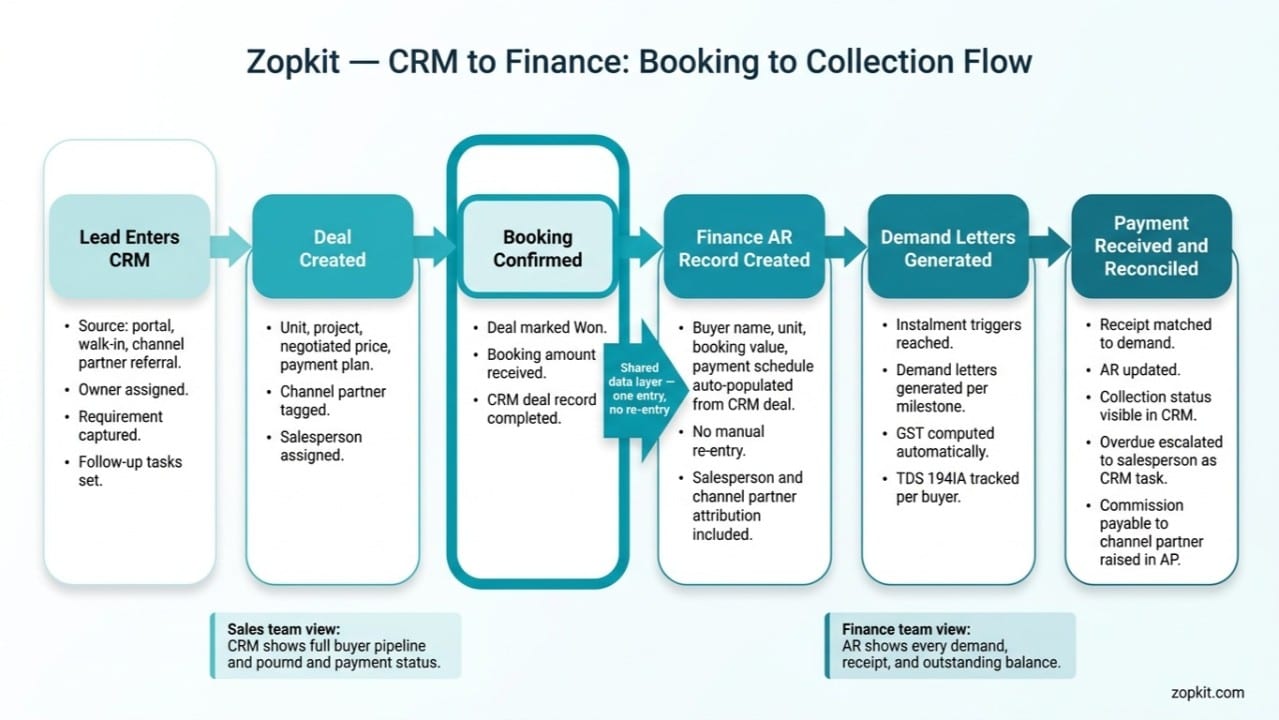
VII. How CRM Deal Data Connects to Finance Collections
One Booking Entry. No Re-Entry. The Collection Schedule Starts Automatically.
The structural advantage of Zopkit CRM and Finance being connected modules on the same data layer is most visible at the booking-to-collection handoff.
Booking Conversion Creates the AR Record:
When a deal in Zopkit CRM is moved to the Booked stage, the booking details, buyer information, unit details, negotiated price, and payment schedule entered in the deal record flow to Zopkit Finance as the AR collection record for that buyer. The accounts team does not re-enter the buyer name, unit number, booking value, or instalment schedule. It is already there.
The collection schedule in Finance is the payment plan from the CRM deal record. The instalment percentages, trigger events, and approximate amounts are set when the CRM deal is confirmed. The exact demand amounts are confirmed when each construction milestone is certified.
Salesperson and Channel Partner Attribution Flows to Finance:
The salesperson who closed the deal and the channel partner who originated the referral are both documented in the CRM deal record. When the accounts team raises the commission payable to the channel partner in Zopkit Finance AP, they reference the CRM deal record. The commission amount, the channel partner's GSTIN, and the project are all pre-populated. The commission AP entry matches the booking record in CRM.
Collection Updates Visible in CRM:
When a buyer makes a payment that is entered in Finance, the payment status updates in the buyer's CRM contact record. The salesperson handling the buyer relationship can see from the CRM that the Foundation instalment has been paid and that the Slab instalment demand will be raised when the milestone is certified. The salesperson has a complete commercial picture of their buyer relationship without calling the accounts team.
Overdue Collections Escalated to Sales:
When a buyer's instalment is overdue by more than a defined period, the escalation from Finance creates a task in Zopkit CRM for the assigned salesperson to do a relationship follow-up call. The accounts team sends the formal written reminder. The sales team handles the relationship conversation. The escalation is structured and documented, not an ad hoc phone call from the CFO to the sales manager at the end of the month.
See content credentials

VIII. Management Reporting: What the Sales Head Sees Every Morning
The Monday Morning Dashboard for a Real Estate Sales Head
The test of a CRM and Finance system for a small real estate sales team is what the sales head sees in the first 10 minutes of Monday morning.
The Weekly Sales Review in 10 Minutes:
From Zopkit CRM:
- Full team pipeline status: leads at each stage, leads with no recent activity, deals in Negotiation beyond a week
- Last week's bookings: units booked, buyer names, booking values, originating channel partners
- This week's follow-up load: how many follow-ups are due this week across the team
- Channel partner activity: leads received from channel partners last week, their pipeline status
- AI alerts: deals at risk of going cold, duplicate leads to resolve, overdue follow-ups
From Zopkit Finance:
- Collections received last week: which buyers paid, which instalments were cleared
- Overdue collections: buyers with outstanding instalments more than 7 days overdue
- Demand letters due this week: which buyers have instalment triggers coming due
- Channel partner commission payables: commissions earned but not yet paid
Monthly Management Report:
At the end of every month, the data for the management report is available from the CRM and Finance modules without a manual assembly exercise. Bookings for the month, booking values, salesperson-wise breakdown, channel partner-wise bookings, leads generated and their source distribution, lost deal reasons, collections received, overdue AR balance, and commission payables. The report is the export from live data, not a compilation from six sources.
IX. Implementation: A Two-Week Setup Plan
Two Weeks From WhatsApp to a Professional Sales System
Week 1: CRM Foundation
Day 1 and 2: Create Zopkit account. Configure pipeline stages for your sales cycle. Set up projects as the primary deal categorisation. Configure custom fields on lead and deal records for property-specific data: configuration, budget, possession preference, home loan status, unit number.
Day 3 and 4: Add all channel partners as Account records in Zopkit CRM. Enter RERA registration numbers, GSTINs, commission rates per project, and contact details. This is the channel partner master register.
Day 5 and 6: Enter all active leads from your current pipeline into Zopkit CRM. For each lead: contact details, source, requirement details, pipeline stage, assigned salesperson, and next follow-up task. This is the historical migration step that takes the most time but only needs to happen once.
Day 7: Brief the sales team on the daily workflow: log every call, set the next follow-up task at the end of each call, move deals to the right stage after every significant development. Ten minutes of onboarding per salesperson.
Week 2: Finance and Integration
Day 8 and 9: Set up Zopkit Finance. Add the developer company's GSTIN, bank accounts, and project-level cost centre structure. Configure the GST treatment for each project (residential under-construction at applicable rate). Enter buyer payment plan templates for each project configuration.
Day 10 and 11: Enter existing active bookings as AR records in Finance, with each buyer's instalment schedule. This is the opening AR balance entry. Any demand letters due in the current month are raised from the system.
Day 12 and 13: Run the full booking-to-collection flow with a live deal: mark a new booking in CRM, verify the AR record creates correctly in Finance, generate the first demand letter, verify the GST computation.
Day 14: Full review of both modules with the sales head and accounts head. Confirm the Monday morning dashboard is showing the right data. The system is live.
X. The Evaluation Checklist
What to Verify Before Choosing a CRM for a Real Estate Sales Team
Require live demonstrations for every item. A pre-recorded video is not a demonstration.
Team Pipeline Management:
- Can I assign leads to specific salespeople with rules based on project or territory, not just manual assignment?
- Does the sales manager view show the full team pipeline with last activity date per lead and overdue follow-up flags?
- Does the system detect duplicate leads when the same contact is entered from two different sources?
Channel Partner Management:
- Can I create a channel partner account with their RERA number, GSTIN, commission rate per project, and full lead and booking history?
- Can I see, per channel partner, how many leads they have sent in the last 90 days and how many bookings have resulted?
- When a channel partner referral lead reaches booking stage, how is the commission entitlement documented and how does it flow to accounts payable?
Deal Tracking:
- Can I record the specific unit, negotiated price, and instalment schedule in the deal record?
- When a deal is marked Won, does the buyer's collection schedule flow to Finance automatically without re-entry?
- Can I record loss reasons for deals that fall away and see the distribution of loss reasons in a report?
Finance Collections:
- Can I generate demand letters for all buyers with a specific instalment due from a single action, with GST correctly computed per buyer?
- Does the AR aging report show instalment-level status per buyer, not just total outstanding per buyer?
- When a buyer's instalment becomes overdue, can the escalation task be created in CRM automatically for the assigned salesperson?
Conclusion
Visibility Is the Product. The Conversion Rate Is the Outcome.
A 5 to 20 person real estate sales team is at exactly the size where informal systems stop working and formal systems produce a step change in performance. The team is large enough that no single person can hold the full pipeline in their head. The channel partner network is large enough that WhatsApp management creates attribution disputes and missed follow-ups. The booking volume is large enough that Finance needs to be running a structured collection process, not chasing buyers from a spreadsheet.
Zopkit CRM gives the sales head complete visibility across every lead in the team's pipeline, every channel partner's contribution, and every deal's commercial status. The channel partner network is a managed sales channel with documented attribution, not a WhatsApp group. Every salesperson's pipeline is visible to the manager without a daily status call. AI alerts surface deals at risk before they go cold.
Zopkit Financial Accounting converts the booking data into a collection engine: demand letters at construction milestones, GST computed on every instalment, buyer AR tracked to the day, and overdue collections escalated to the sales team as CRM tasks. The Finance team and the sales team are working from the same booking record. The re-entry gap that currently exists between the CRM spreadsheet and the accounts file is closed.
The two-week setup plan gets the full system live before the month ends. The evaluation checklist is what to verify if you are comparing alternatives. The booking-to-collection data flow in Section VII is the structural capability that makes this more than a contact list.
Start at zopkit.com