Your Doctor List Is in Your Phone's Contacts. Your Sample Records Are in a WhatsApp Chat.
Your Activity Report Is Something You Build on Sunday Night Before the Monday Call With Your Company.
You are managing 80 doctors across a territory that takes 6 hours to cover end to end. You are carrying samples for 2 product lines from 1 company, plus the device demos for a second company that started using you 4 months ago. You have a visit target — 15 to 20 doctor contacts per day — that your company tracks monthly but never tells you how they are measuring.
Your current system: the doctors are in your phone contacts, annotated with notes like "Cardio — good — needs follow up on sample" that made sense when you wrote them and mean nothing 3 weeks later. The samples you dispensed last Tuesday to Dr. Mehta and Dr. Rao are recorded in a pocket notebook that is now in the bag you used last week, which is in your car. The order follow-up for the 2 boxes of Tablet X that Dr. Sharma said she would consider after the next visit — you remember it but it is not written down anywhere that will remind you when you are standing outside her clinic on Thursday.
The company's activity report that your area manager wants every Monday — doctor name, speciality, product discussed, samples given, doctor's feedback — you build this from memory and the contacts app on Sunday evening. It takes 90 minutes. It is approximately 70% accurate. You know this. Your area manager suspects this.
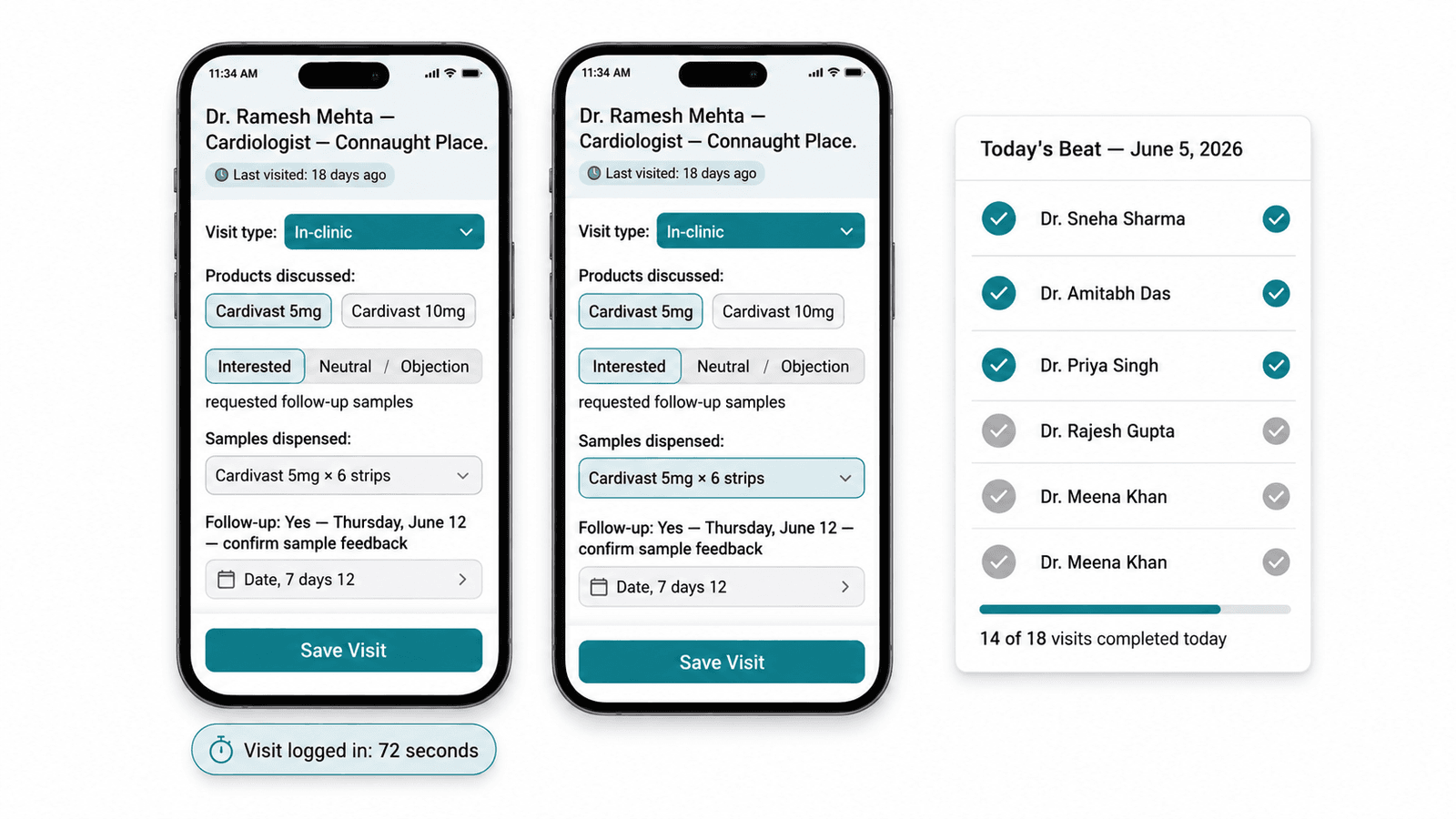
There is a better way to do this. It takes 90 seconds per visit, runs on your phone, and produces the Monday report in 3 minutes rather than 90. It is Zopkit CRM — built for field sales, mobile-first, designed for the solo MR and independent pharma rep who is managing doctor relationships across a territory with no admin support and no tolerance for tools that require more than a few taps to use.
Table of Contents
- The Solo MR's Operational Reality
- The Visit Log: 90 Seconds at the Doctor's Gate
- Doctor Account Management: Your Beat in a CRM
- Sample Tracking: From Notebook to Accountable Record
- Order Follow-Up: The Reminder That Shows Up at the Right Time
- The Monday Activity Report: 3 Minutes, Not 90
- Managing Multiple Company Clients as an Independent Rep
- Beat Planning: Covering Your Territory Efficiently
- The Professional Advantage of a Documented Visit History
I. The Solo MR's Operational Reality
What the Independent Pharma Rep Is Actually Managing
The solo MR or independent pharma sales rep in India is running a small business — a territory, a doctor portfolio, a sample inventory, an order pipeline, and one or more company client relationships — with no administrative infrastructure. Everything runs through one person's phone, memory, and Sunday-evening preparation ritual.
The scale of this operation is not trivial. A typical MR territory in a Tier 1 Indian city covers 60 to 120 doctors across 3 to 5 locality clusters. Visit frequency targets range from once every 2 weeks (for high-prescribing specialists) to once a month (for GPs in less productive areas). At 15 to 20 visits per day, a full beat cycle covers all doctors in the territory every 3 to 4 weeks. Managing 100 doctor relationships at this cadence — keeping track of what was discussed at each visit, what samples were given, what was promised, and what follow-up is pending — is a relationship management operation that benefits enormously from a structured tool.
The independent rep who also handles 2 to 3 different company product lines has an additional complexity layer: different companies want different information in their activity reports, different sample inventory records, and different visit frequency targets. Managing all of this from one phone's contacts app and a pocket notebook is not a sustainable system as the rep's book of business grows.
Why Most MRs Do Not Use CRM Tools
The dominant reason MRs do not use CRM tools is not lack of awareness — it is that the CRM tools they have been shown are desktop-first, require too many fields to fill out per visit, and were designed for an inside sales team, not a field rep standing outside a doctor's clinic with 3 minutes before the next appointment.
The second reason: company-provided CRM portals are built for the company's reporting needs, not the MR's field efficiency. They require the MR to log the visit in a format useful for the area manager's dashboard but not useful for the MR's own follow-up management.
Zopkit CRM solves both problems: it is mobile-first, the visit log is genuinely 90 seconds (4 taps and a voice note if needed), and the data serves both the rep's own follow-up needs and the company's activity report requirements simultaneously.
II. The Visit Log: 90 Seconds at the Doctor's Gate
What the Ideal Field Visit Log Captures and What It Costs in Time
The visit log is the central operational record of the pharma rep's work. Every interaction with a doctor — whether a full 10-minute in-clinic visit, a 2-minute corridor contact, or a clinic gate exchange — should be recorded for three reasons: it updates the follow-up queue, it documents the sample dispensed, and it builds the activity report that the company requires.
The ideal visit log for a pharma rep captures:
- Doctor name and visit timestamp (auto-populated from the CRM if the doctor is already in the system)
- Visit type (in-clinic, corridor, gate, phone)
- Product discussed
- Samples dispensed (quantity and lot number if required)
- Doctor's response or feedback (free text or structured: interested / neutral / objection raised)
- Follow-up action required and date
In a paper notebook or phone contacts, capturing all of this takes 3 to 5 minutes and requires the rep to either write during the visit (interrupting the conversation) or reconstruct from memory afterward (accuracy degrades within the hour). At 15 visits a day, 5 minutes per log entry is 75 minutes — over an hour of administrative work on top of the field day.
In Zopkit CRM's mobile visit log:
Step 1: Open the doctor's profile (1 tap from the day's planned visit list, or a quick search by name — 5 seconds)
Step 2: Tap "Log Visit" — the timestamp, date, and doctor name are auto-populated (3 seconds)
Step 3: Select visit type, products discussed, and doctor response from pre-configured options (15 to 20 seconds — no typing required for standard entries)
Step 4: Add samples dispensed — product name and quantity from a dropdown (10 seconds)
Step 5: Add follow-up if needed — type, date, and note (15 seconds for a standard follow-up; skip if no follow-up required)
Step 6: Save. (2 seconds)
Total: 50 to 90 seconds per visit log. At 15 visits per day, this is 12 to 22 minutes — compared to 60 to 75 minutes with manual methods.

III. Doctor Account Management: Your Beat in a CRM
The Doctor Profile: More Than a Contact Card
In Zopkit CRM, every doctor in the rep's territory has a profile that is a complete relationship record — not a contact card with a phone number and a category tag.
The doctor profile contains:
Basic information:
Doctor name, qualification (MBBS, MD, DM, MS), speciality (cardiologist, diabetologist, GP, gynaecologist, etc.), clinic name, clinic address, ward or locality, nearest landmark (critical for navigating Indian clinic clusters), clinic phone, preferred visit timing, and hospital affiliations (the doctor who has an OPD at one hospital and a private clinic at a different address — both locations tracked).
Prescription behaviour profile:
Current prescriber category (A-class: high prescriber, active promoter of your products; B-class: moderate prescriber, potential to grow; C-class: low prescriber, maintain contact only). Prescribing speciality focus (which of your products are relevant to this doctor's patient profile). Known competitor brand preferences.
Visit history:
Every visit logged in Zopkit, in chronological order. Date, visit type, products discussed, doctor response, samples dispensed. The rep who is standing outside Dr. Mehta's clinic on Thursday and cannot remember the last conversation opens the profile and sees: "Last visit June 5 — discussed Cardivast 10mg — doctor requested data on 6-month outcomes — gave 6 strips Cardivast 5mg — follow-up: bring outcomes paper." The conversation resumes with context.
Sample and order history:
Total samples dispensed to this doctor in the current sample cycle, by product. Any orders placed or referenced by this doctor (order date, product, quantity, status).
Relationship notes:
Free-text notes — doctor's preferences, personal details relevant to the relationship (birthday if noted, office manager's name who controls access, best time to catch the doctor), objections raised and how they were addressed.
Doctor Segmentation: A-B-C Classification and Specialty Grouping
The beat of 80 to 100 doctors is not uniform in value. The Zopkit CRM doctor list filters by speciality, classification, locality, and visit status — the rep who wants to see all their A-class cardiologists in Lajpat Nagar who have not been visited in the last 14 days has this view in 2 taps.
The speciality segmentation is particularly useful for the multi-product rep: if Company 1's product is relevant only to diabetologists and Company 2's device is relevant to orthopaedic surgeons, the rep can see their doctor list segmented by specialty — planning the day's visits so that diabetologist visits are logged against Company 1's activity and orthopaedic visits against Company 2's.

IV. Sample Tracking: From Notebook to Accountable Record
Why Sample Management Is a Compliance and Relationship Issue Simultaneously
Sample management for the Indian pharma MR operates under two pressures simultaneously. The first is compliance: the Indian Pharmaceutical Alliance's voluntary code and the Uniform Code of Pharmaceutical Marketing Practices (UCPMP) 2024 require that samples are given only to registered medical practitioners, in quantities appropriate to the product, and with documentation of what was dispensed to whom. Samples are pharmaceutical products — they have batch numbers, expiry dates, and regulated dispensing rules.
The second is relationship management: samples are the primary currency of the MR-doctor relationship at the early stage of product adoption. The doctor who received samples 3 weeks ago and has not been asked for feedback — whether the samples were actually used, whether patients tolerated the product — is a missed follow-up opportunity. The MR who tracks samples at the individual doctor level (not just total units from the company's dispatch record) can follow up specifically: "Dr. Mehta, the 6 strips of Cardivast I left last time — did you have a chance to try them with any patients?"
In Zopkit CRM's sample management module:
Inventory entry:
When the MR receives their sample allocation from the company (typically monthly), they enter the batch receipt in Zopkit: product name, batch number, expiry date, quantity received. This is the opening balance of the sample cycle.
Dispensing record:
Every sample dispensed during a visit is recorded in the visit log (as described above). The sample inventory updates automatically — current balance visible at any time.
Cycle summary:
At the end of the sample cycle (or on demand), Zopkit generates a sample dispensing summary: total dispensed per product, per doctor, per date. This is the documentation that the company's medical representative reporting system requires and that the UCPMP compliance requires.
Expiry alerts:
Products approaching their expiry date are flagged in the Zopkit sample inventory. The MR who is carrying Tablet Y with a 45-day expiry is reminded — either these samples need to be dispensed within the current visit cycle, or they need to be returned to the company depot.

V. Order Follow-Up: The Reminder That Shows Up at the Right Time
The Order Pipeline for the Pharma MR
The pharma MR's order pipeline is different from a conventional B2B sales pipeline. The doctor does not place an order with the MR — they prescribe a product to a patient who then purchases it at a pharmacy. The MR's influence on the order is indirect: they build the doctor's awareness of and confidence in the product through samples and clinical data, the doctor prescribes, and the prescription generates pharmacy sales that the company tracks as the MR's territory performance.
But there are direct order scenarios that the MR does manage:
Stockist orders: The MR manages the relationship with the local stockist (pharma distributor) who supplies the chemist shops in the territory. When a product is running low at key stockists, the MR follows up with the company's supply team to ensure replenishment. Stockist relationship management and order status tracking are a distinct operational track from the doctor relationship.
Institutional orders: For hospital accounts and nursing homes that buy directly from the company (not through chemist prescriptions), the MR may actively manage purchase orders. The hospital pharmacy manager who expressed interest in stocking Product X is an order follow-up account.
Doctor-referred purchase decisions: When a doctor says "if the patient feedback on the samples is good, we will switch prescriptions to your product for this indication" — this is not a confirmed order but it is a tracked opportunity with a follow-up date.
In Zopkit CRM, all three order types are tracked as follow-up tasks in the doctor or account profile:
- Reminder-based follow-ups: "Dr. Sharma — follow up Thursday on Diabecare sample feedback." Alert fires on Thursday morning before the day's beat is planned.
- Stockist follow-up pipeline: "Metro Pharma Stockist, Lajpat Nagar — Cardivast 10mg stock low — follow up with area manager for replenishment by June 8." Status: pending. Due date: June 8.
- Institutional order tracking: "Max Saket Hospital Pharmacy — submitted Product X information dossier May 28 — follow up with pharmacy manager June 12." Status: proposal submitted.
The MR who opens Zopkit on Thursday morning sees their prioritised follow-up list alongside the day's planned visits — no missed callbacks, no forgotten "Dr. Sharma said she'd consider switching" opportunities.
VI. The Monday Activity Report: 3 Minutes, Not 90
The Activity Report Problem
The weekly or monthly activity report is the primary accountability document in the pharma MR's relationship with the company. It summarises visits made, doctors contacted, products detailed, samples dispensed, and doctor feedback received. It is the basis on which the area manager evaluates the MR's territory coverage and the basis on which the company calculates sample utilisation.
For the MR running on manual methods — contacts app, pocket notebook, memory — the activity report is a Sunday evening reconstruction project. It takes 60 to 90 minutes. It produces a document that is approximately accurate for the last 3 to 4 days of the week (recent memory) and increasingly estimated for the earlier days (degraded memory). The MR knows this. The area manager, who has no other data source to verify against, accepts it.
This creates a second-order problem: the activity report that is estimated rather than recorded is not useful for the MR's own planning. If the MR cannot accurately remember which doctors they visited in week 3 of the previous month and what those doctors said, they cannot use last month's visit data to plan this month's beat more effectively.
The Zopkit Activity Report: Automatic from Visit Logs
In Zopkit CRM, the activity report is not built — it is exported. Because every visit was logged in 90 seconds at the point of occurrence, the report is complete, accurate, and available immediately.
The standard Zopkit activity report contains:
- Date-wise visit summary: doctor name, speciality, visit type, product discussed, doctor response, samples dispensed
- Weekly totals: total visits, unique doctors contacted, samples dispensed by product, follow-ups created
- Product coverage: which doctors received information on which products, and how many times in the reporting period
- Follow-up status: open follow-ups, completed follow-ups, overdue follow-ups
Report generation: Filter by date range (last week, last month, or custom). Select company (for multi-company reps). Export as PDF or Excel. 3 minutes from visit log to report in the area manager's inbox.
For the multi-company independent rep:
Company 1 gets their activity report showing only their product-related visits and samples. Company 2 gets their activity report showing only their product-related visits. The rep's total visit activity is in one Zopkit account — the report is filtered by product/company at export time. No data is cross-shared between companies.

VII. Managing Multiple Company Clients as an Independent Rep
The Multi-Company Independent Rep's Specific Challenge
The independent pharma sales rep who works for 2 to 3 companies simultaneously — a common arrangement in Indian pharma field sales, particularly for senior reps who have built a strong territory — has a complexity layer that the employed MR does not have.
The data segregation requirement:
Company 1 and Company 2 cannot see each other's data. The doctor list may overlap (the same cardiologist may be a target for both Company 1's cardiac product and Company 2's cardiac device), but the visit logs, sample records, and activity reports must be cleanly separated by company. The independent rep cannot show Company 1 that they are also promoting Company 2's products to the same doctors (potential conflict of interest concern) or share visit history between clients.
The sample inventory separation:
Company 1's samples and Company 2's samples are separate inventories, allocated separately, and must be reported separately. A single sample inventory view in the CRM would mix them — the rep needs a per-company sample inventory with per-company dispensing records.
The activity report format variation:
Company 1 may want a daily visit log in Excel. Company 2 may want a weekly summary by speciality in PDF. The independent rep who builds these manually from the same underlying visit data is doing the same job twice in two formats.
In Zopkit CRM, the multi-company structure is handled through a company tag on every profile and visit log:
- Every doctor in the beat is tagged with which company's products they are targeted for (one doctor may be tagged for both companies if they are in both target lists)
- Every visit log is associated with a company (when logging a visit, the rep selects which company's product was detailed — if both were detailed in the same visit, two visit logs are created: one per company)
- Every sample dispensed is tagged to the company's inventory
- Activity report exports are filtered by company — Company 1 receives their report, Company 2 receives theirs, with no cross-visibility
The independent rep's total visit activity is in one Zopkit account. The reporting layer segregates it by client.
VIII. Beat Planning: Covering Your Territory Efficiently
The Beat Plan: From Monthly Target to Daily Route
The pharma MR's beat plan is the master schedule for the territory — which doctors to visit in which week, in which locality cluster, at which cadence. A well-structured beat plan ensures:
- A-class doctors (high prescribers) are visited every 2 weeks
- B-class doctors are visited monthly
- C-class doctors are visited every 6 to 8 weeks or as capacity allows
- The day's visits are geographically clustered — not crisscrossing the city between calls
In Zopkit CRM's beat planning view, the rep sets the visit frequency target for each doctor (A-class: every 14 days; B-class: every 28 days; C-class: every 45 days). Zopkit's due visit list then generates automatically: every morning, the rep sees which doctors are due for a visit today or in the next 3 days, sorted by locality cluster.
The overdue visit alert:
Any doctor who has not been visited within their target frequency window is flagged as overdue. The A-class cardiologist who was last visited 21 days ago (7 days past the 14-day target) is a priority flag on the morning view. The rep who sees this alert before planning the day's beat can route the visit into the day's schedule.
Locality clustering:
Doctors are tagged by locality in their profiles (Lajpat Nagar, Connaught Place, Saket, Vasant Kunj, etc.). The beat planning view groups due visits by locality — the rep can plan a day of Lajpat Nagar visits and a separate day of Saket and Vasant Kunj visits, minimising travel time.

IX. The Professional Advantage of a Documented Visit History
What a Clean Visit Record Does for Your Career as an Independent Rep
The independent pharma rep's most valuable professional asset is not their product knowledge or their territory map. It is the doctor relationships they have built and maintained over years of consistent contact. But relationships that exist only in one person's memory are fragile — they cannot be demonstrated, transferred, or leveraged when negotiating with a new company client.
The rep who has 2 years of Zopkit visit records — 80 doctors, 28 to 36 visits each, with logged feedback, sample history, and relationship notes — has a demonstrable track record. When approaching a new pharma company as a contract rep, they can show:
- Total territory doctor base: 82 active doctors across 4 locality clusters
- A-class prescribers: 24 doctors, average visit frequency 11 days, full visit history available
- Product adoption documentation: 18 doctors who have confirmed prescribing a previous product following Zopkit-logged sample follow-ups
- Sample dispensing compliance record: 24-month dispensing log, product-by-product, with doctor-level attribution
This is a professional portfolio. It is the difference between an independent rep who says "I have good relationships with the doctors in this territory" and one who can show exactly which doctors, how often, with what outcomes — in a 5-minute Zopkit report export.
When the Company Audits the MR's Territory
For the employed MR, when the area manager or medical services team audits the territory's visit activity, the rep whose records are in Zopkit produces a complete, date-stamped, audit-ready report. There is no discrepancy between what they reported and what they actually did — because the report was generated from the visit logs that were logged at the point of the visit, not reconstructed from memory.
For the independent rep, the same audit readiness applies when a company client questions activity levels or sample utilisation. The Zopkit export settles the question in 3 minutes.
Conclusion
The 90-Second Habit That Builds a Professional Field Sales Career
The choice the solo MR and independent pharma rep faces is not between a CRM and no CRM. It is between two modes of professional operation:
Mode 1 — Memory-based: Doctor relationships in your phone contacts. Sample records in a notebook. Follow-ups in your head. Activity reports built from memory on Sunday evening. Professional track record: invisible, unless you remember to tell someone about it.
Mode 2 — Record-based: Every visit logged in 90 seconds. Every sample recorded at the point of dispensing. Every follow-up scheduled when the promise is made. Activity report generated in 3 minutes on Monday morning. Professional track record: documented, demonstrable, and portable.
Zopkit CRM makes Mode 2 the default — without requiring a laptop, an IT setup, or more than 90 seconds at the gate of each doctor's clinic.
Your beat. Your doctors. Your career. Start at zopkit.com.