Your CRM Does Not Know Your Stock Is Out. Your Tally Does Not Know the Deal Was Closed.
Your Inventory Sheet Does Not Know the Customer Has Not Paid in 60 Days. This Is What Running a 10–50 Person Manufacturing Business on Broken Tools Actually Costs.
You have 20 people. Maybe 35. Your production floor is running. Your distributors and dealers are placing orders. You have a sales person — or you are the sales person — and orders are moving.
But something is always slightly wrong.
Your sales team promises a delivery date without knowing if raw material is in stock. Your warehouse dispatches an order without knowing the customer has an unpaid invoice from last month. Your CA reconciles Tally at month-end and finds three invoices that were never entered. Your procurement team places a purchase order for material you already have sitting in a corner of the warehouse because no one updated the stock sheet.
None of these are failures of effort. They are failures of connection. Your CRM does not talk to your inventory. Your inventory does not talk to your accounts. Your accounts do not talk to your sales team. Three tools, three separate realities, and the gaps between them are costing you money, customer trust, and management bandwidth every single week.
This is what Zopkit CRM, Zopkit Operations Management, and Zopkit Financial Accounting do for 10 to 50 person manufacturing companies — and why the right combination of these three connected modules replaces the CRM plus Tally plus spreadsheet setup that most small manufacturers are running today.
Table of Contents
I. The 10–50 Employee Manufacturer's Software Reality in 2026
II. Why the CRM + Tally + Spreadsheet Combination Breaks at This Stage
III. What a Connected Three-Module Stack Actually Changes
IV. Zopkit CRM: Managing Distributors, Dealers, and the Sales Pipeline
V. Zopkit Operations Management: Inventory, Procurement, and Order Fulfillment
VI. Zopkit Financial Accounting: GST, Accounts Receivable, and Vendor Payments
VII. How the Three Modules Connect — The Data Flows That Replace Manual Work
VIII. GST Compliance at the 10–50 Employee Stage: What "Built In" Actually Means
IX. The Evaluation Checklist: What to Ask Before Choosing Operations and Sales Software
X. Total Cost of Ownership: Fragmented Stack vs. Zopkit Platform
I. The 10–50 Employee Manufacturer's Software Reality in 2026
The Most Underserved Segment in Indian Manufacturing Software
Indian manufacturing software has two well-served categories and one neglected one.
Category 1 — The large manufacturer: A 500-person factory running SAP or Oracle ERP, with a dedicated IT team, an implementation partner, and a six-figure annual software budget. The enterprise ERP vendors serve this segment exceptionally well.
Category 2 — The micro manufacturer or sole proprietor: One to five people, running on Tally for billing and Excel for everything else. This segment is served adequately by Tally, Vyapar, and basic GST billing apps.
Category 3 — The 10 to 50 employee manufacturer: This company has a production floor, a small warehouse, a team managing distributor and dealer relationships across a region, a procurement function buying raw materials from 5 to 15 suppliers, and a Finance function responsible for GST compliance and vendor payments. They cannot afford SAP. Tally is not enough. A standalone CRM does not know anything about their inventory. And the WhatsApp-based order management that worked at 10 people is actively creating problems at 30.
This company is underserved. Not because good software does not exist — but because the right software at this scale has historically meant paying for enterprise tools designed for companies five times their size, or stitching together multiple entry-level tools that do not talk to each other.
Zopkit CRM plus Operations plus Finance is built specifically for this segment.
II. Why the CRM + Tally + Spreadsheet Combination Breaks at This Stage
Three Tools, Three Realities, No Single Source of Truth
Most 10 to 50 person manufacturers arrive at the same fragmented setup through completely logical decisions made one at a time.
They started with Tally because every CA in India recommended it and it handles GST invoicing. They added a CRM — or a spreadsheet that acts like a CRM — when the sales team grew and WhatsApp stopped being enough to track dealer pipelines. They manage inventory on a separate Excel sheet, or on a basic stock module bolted onto the billing software, because Tally's inventory is difficult to maintain in real time.
Each decision was reasonable. The result is not.
Here is what the daily operational reality looks like at a 30-person manufacturer running this stack:
Your sales manager calls the warehouse to check if stock is available before confirming a dealer order. The warehouse checks a spreadsheet that was last updated yesterday morning. The answer is approximate. The commitment is made. The order is confirmed in the CRM — or on a WhatsApp message. The actual dispatch happens two days later, at which point the warehouse discovers that 30% of the order is out of stock because of a dispatch that went out this morning that nobody told the sales manager about.
Your procurement person buys raw material based on a production schedule shared in a WhatsApp group and a gut sense of current stock levels. There is no formal reorder point. There is no purchase order in the system. When the supplier's invoice arrives, someone enters it in Tally. The input tax credit is claimed — if the entry is made before the GST filing date. If not, it is missed.
Your CA reconciles the books at month-end. She finds that three customer invoices were raised by the sales team outside Tally — in Word or Excel — and never entered. The GST for those invoices was never filed. You are now either filing a revised return or carrying the liability forward.
Your dealer in Hyderabad has not paid the last two invoices. The sales person does not know this because the AR data is in Tally and the sales person does not have access to Tally. When the dealer places a new order, it is accepted and processed. The outstanding balance keeps growing.
The pattern in every scenario is identical: a piece of information that exists in one system — inventory, invoice status, outstanding balance — fails to reach the person who needs it at the moment they need it, because the systems are not connected.

III. What a Connected Three-Module Stack Actually Changes
One Platform. Three Modules. Zero Manual Handoffs Between Them.
Zopkit CRM, Zopkit Operations Management, and Zopkit Financial Accounting are three modules on one platform. They share one identity layer — every person in the business has one login — and one data layer — every transaction, every record, and every inventory movement is visible to every module that needs it.
The operational differences this creates are not marginal. They are structural.
What changes when these three modules are connected:
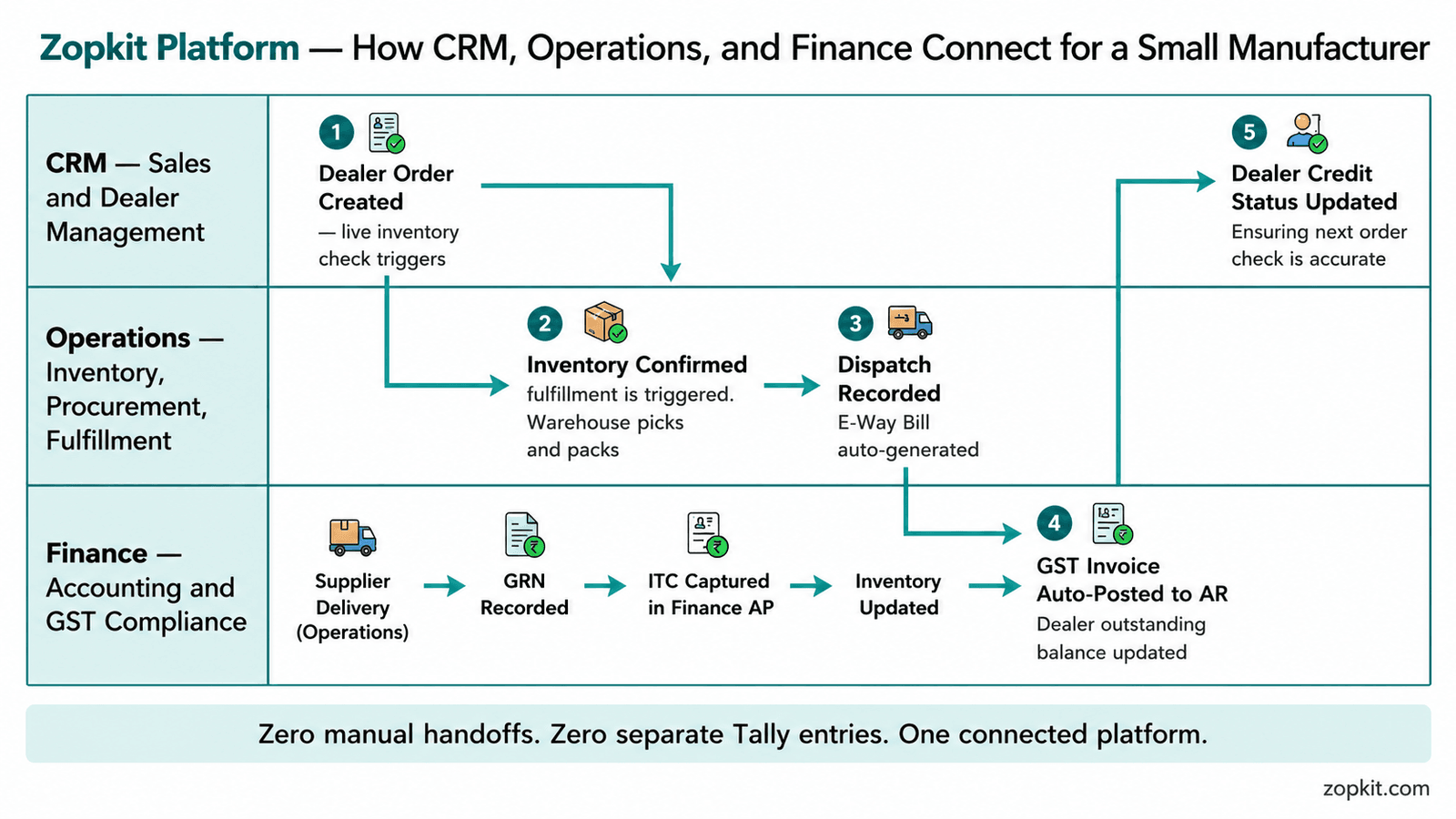
When a sales person creates a dealer order in Zopkit CRM, the system checks live inventory in Zopkit Operations at that moment — not at end-of-day sync, not after a phone call to the warehouse. If stock is available, the order is confirmed. If not, the sales person sees the exact shortfall and the expected restock date from the open purchase orders in Operations. The commitment is accurate before it is made.
When the dealer has an outstanding invoice that is overdue, the CRM shows this on the dealer's account record — pulled in real time from Zopkit Finance. The sales person who is about to take a new order sees: "Outstanding balance: ₹84,000. Credit limit: ₹1,00,000. Available credit: ₹16,000." The order either proceeds within the credit limit or is routed to Finance for approval. No phone call to the CA. No end-of-month surprise.
When a purchase order is raised in Operations and the supplier delivers goods, the GRN updates inventory in real time. The supplier's invoice is entered in Finance. The input tax credit is captured against the GRN. The three-way match between PO quantity, GRN quantity, and supplier invoice quantity happens automatically — flagging any discrepancy before the payment is approved.
When an order is dispatched and the GST invoice is generated from Operations, it posts to Accounts Receivable in Finance automatically. The dealer's outstanding balance updates. The GSTR-1 data is updated. No separate Tally entry. No risk of a missed invoice.
This is not integration. It is one system. The data does not move between tools because it was never in separate tools to begin with.
IV. Zopkit CRM: Managing Distributors, Dealers, and the Sales Pipeline
What a B2B Sales CRM for Small Manufacturers Actually Needs to Do
At 10 to 50 employees, a manufacturer's sales operation has a specific structure. You are selling to distributors or dealers — B2B accounts with fixed credit limits, order cycles, and relationship histories. You have one to five sales people managing a regional network of 20 to 100 accounts. Your deals are not one-time transactions — they are repeat orders from accounts you already know, punctuated occasionally by new account acquisition.
A CRM at this stage needs to do five things well: track every account and every interaction, manage the order-to-invoice pipeline, show the sales person the information they need at the moment they need it, keep the manager visible on pipeline status without requiring manual reports, and not require a full-time administrator to maintain.
Zopkit CRM covers all five:
Account and Contact Management:
Every distributor and dealer account is a named record with contact details, region, assigned sales person, credit limit pulled from Finance, and a full interaction timeline — every call log, every email, every visit note, every order. When a new sales person takes over an account, the entire relationship history is available on day one.
Lead and Opportunity Pipeline:
For new account acquisition, Zopkit CRM provides a configurable pipeline — prospect identified, initial contact made, quotation sent, sample order placed, first full order received. Each stage has a defined set of expected activities. The sales manager sees every opportunity in the pipeline, what stage it is at, and when the last action was taken.
Quotations and Sales Orders Linked to Operations and Finance:
When a sales person raises a quotation for a dealer in Zopkit CRM, the product catalog is pulled from Zopkit Operations — with current prices, applicable discounts, and available stock levels. The quotation is sent as a PDF. When the dealer confirms, it converts to a sales order with one click. The sales order flows into Zopkit Operations for fulfillment. When the order is dispatched, the GST invoice is generated in Zopkit Finance automatically — linked to the original CRM sales order.
Credit Limit Enforcement:
Before a new order is accepted, Zopkit CRM checks the dealer's outstanding balance and credit limit from Finance in real time. If the new order would take the dealer over their credit limit, the order is flagged for Finance approval before confirmation. Sales people cannot override this check unilaterally — the Finance team approves the exception or rejects the order. This single feature eliminates the most common source of bad debt at the 10 to 50 employee stage.
Territory and Region Management:
Sales accounts are assigned to territories. Each sales person sees only their accounts. The sales manager sees all accounts. Territory-wise performance — revenue, open pipeline, outstanding collections — is visible without a custom report.
Email Sync and Activity Logging:
Connect your Gmail or business email and every email with a dealer or distributor is logged against their CRM record without manual copy-paste. Every call logged, every visit recorded, every WhatsApp follow-up noted — all visible on the account timeline.
Ask Zop AI Assistant:
The CRM has a built-in AI assistant that can answer cross-module questions in plain language. "Which of my dealers placed an order this month but have an invoice outstanding more than 45 days?" — answered in 15 seconds by querying CRM order data and Finance AR data simultaneously.

V. Zopkit Operations Management: Inventory, Procurement, and Order Fulfillment
What a Manufacturing Operations Module Needs to Do at 10–50 Employees
At this scale, your operations function covers four things: maintaining accurate real-time inventory, procuring raw materials and components from suppliers, fulfilling customer orders correctly and on time, and managing the warehouse well enough that you can find what you need when you need it.
None of this requires an enterprise WMS. But all of it requires more than a spreadsheet.
Zopkit Operations Management covers the full scope:
Real-Time Inventory Tracking:
Every inbound delivery, outbound dispatch, production consumption, and inter-location transfer updates inventory in real time. Not at end-of-day. Not on the next morning's report. At the moment the transaction is recorded. The sales person checking stock availability before confirming a dealer order sees a number that is accurate right now.
Product Catalog With Variants and Pricing:
Your product catalog in Zopkit Operations carries every finished good, raw material, and work-in-progress item with variants — size, grade, specification — and the pricing rules that apply to each. Dynamic pricing rules handle volume discounts, dealer-tier pricing, and special rates without manual override on every order.
Reorder Point Automation:
Every product in your catalog has a configurable reorder point and reorder quantity. When stock of a raw material falls below the reorder point, Zopkit Operations generates a purchase requisition automatically — flagged for procurement team review. You do not run out of MS rods because no one checked the stock sheet.
Procurement Management — Full Cycle:
The procurement cycle from requisition to payment runs entirely within Zopkit. Purchase Requisition (raised by production or warehouse) → Purchase Order to supplier (raised by procurement team, sent as PDF) → Goods Receipt Note when the delivery arrives (updates inventory immediately) → Supplier Invoice entry in Finance (triggers three-way matching against PO and GRN) → Payment approval.
Supplier performance is tracked automatically: on-time delivery rate, quality rejection rate, and price variance from contracted rates. The owner who wants to compare two raw material suppliers' reliability over the last six months has this data without building a custom report.
Order Fulfillment Workflow:
When a sales order is confirmed in CRM and flows to Operations, it enters a configurable fulfillment workflow: picking (items allocated and assigned to picker), packing (packed and verified), dispatch (shipment created, carrier assigned, e-way bill generated if applicable). At each stage, the status updates in real time — visible in CRM so the sales person can answer "where is my order?" without calling the warehouse.
Backorder Management:
When a sales order cannot be fully fulfilled because a product is out of stock, Zopkit Operations creates a backorder automatically for the unfulfilled quantity. When the restock arrives and is received on a GRN, the backorder is fulfilled from the new stock. No manual tracking in a separate sheet.
Batch and Lot Tracking:
For manufacturers handling raw materials that require traceability — specific supplier batches, production lot numbers, expiry dates — Zopkit Operations tracks inventory at the batch level. Every batch knows where it came from (GRN from which supplier, which PO), where it went (which sales order, which customer), and what its current status is.

VI. Zopkit Financial Accounting: GST, Accounts Receivable, and Vendor Payments
Full-Stack Accounting Built for the Indian Manufacturing Business
Zopkit Financial Accounting is not a billing add-on. It is a complete books-of-record platform with GST compliance, accounts receivable, accounts payable, bank reconciliation, and financial reporting built into every transaction by default.
For a 10 to 50 employee manufacturer, this module does three critical things: it ensures every dealer invoice is GST-compliant and posted to the books the moment it is generated; it tracks every vendor payment and input tax credit accurately; and it gives the owner or Finance manager a real-time view of where the business stands — without waiting for the CA's month-end visit.
Accounts Receivable — Connected to CRM Credit Management:
Every customer invoice generated from a sales order in Zopkit Operations posts to AR in Finance automatically. The invoice appears in the dealer's outstanding balance. The CRM reads this balance in real time — so when the sales person opens the dealer's account to take a new order, the credit position is current to the last payment received, not to last month's CA update.
AR aging reports show every dealer's outstanding balance segmented by aging bucket — under 30 days, 30 to 60 days, 60 to 90 days, and over 90 days. The owner who wants to run collections at the start of the month sees exactly which accounts to prioritize, how much is overdue, and for how long — without opening Tally and asking the CA.
Accounts Payable — Connected to Operations Procurement:
When a purchase order is raised in Operations and the supplier delivers goods on a GRN, the supplier invoice is entered in Finance AP and matched against the PO and GRN in a three-way check. If the supplier's invoice quantity or price differs from the PO, the system flags the discrepancy before the payment is approved. No more paying for goods that were not delivered. No more over-payments because the supplier's invoice had a pricing error.
Input tax credit on every vendor bill with a valid GST invoice number is calculated and added to the ITC ledger automatically. At the end of the month, your ITC position is accurate — not an estimate, not a CA reconstruction, but a live number drawn from every entered bill.
GST Compliance — Built Into Every Transaction:
Every product in Zopkit carries its HSN code. Tax determination is automatic on every invoice — CGST and SGST for intra-state, IGST for inter-state, based on your registration state and the customer's billing state. E-way bills for qualifying shipments are generated directly from dispatch data. GSTR-1 and GSTR-3B data is compiled from live transactions — ready for export and portal upload, without manual assembly.
Financial Reporting — Live, Not Month-End:
Profit and Loss, Balance Sheet, Cash Flow Statement, Trial Balance, and financial ratio analysis are generated from live transaction data at any time. The owner who wants to know gross margin on a specific product line, or cash flow position before approving a large purchase, does not need to wait for the CA.

VII. How the Three Modules Connect — The Data Flows That Replace Manual Work
The Specific Integrations That No Longer Exist Because the Platform Is One System
The value of a connected three-module platform is not visible in any individual module. It is visible in the data flows that happen automatically — the information that previously required a phone call, an email, a spreadsheet update, or a CA visit to transfer between systems.
Here are the specific data flows that replace manual work at a 10–50 person manufacturer:
Flow 1 — From sales order to fulfilled dispatch to posted invoice:
Sales person creates a dealer order in CRM → system checks live inventory in Operations → order is confirmed → Operations fulfillment team picks and packs → dispatch is recorded, e-way bill generated if applicable → GST invoice is auto-generated and posted to Finance AR → dealer's outstanding balance updates in CRM → no separate Tally entry required at any step.
Flow 2 — From raw material receipt to ITC claim:
Purchase order raised in Operations → supplier delivers, GRN recorded in Operations → inventory updates immediately → supplier invoice entered in Finance AP → three-way match runs automatically → ITC on the supplier's GST invoice is captured in the ITC ledger → available for offset against next month's GST liability.
Flow 3 — From dealer payment to updated credit position:
Dealer pays via NEFT or UPI → payment recorded in Finance → bank transaction auto-categorized against outstanding invoice via matching rule → dealer's outstanding balance updates in Finance → CRM credit status check reflects the updated position immediately → sales person who opens the dealer account next day sees the correct credit available.
Flow 4 — From low stock to approved purchase order:
Inventory of a raw material falls below reorder point → Zopkit Operations generates a purchase requisition automatically → procurement manager reviews and converts to purchase order → PO sent to supplier as PDF from the platform → no stock-out because no one remembered to check the spreadsheet.


VIII. GST Compliance at the 10–50 Employee Stage: What "Built In" Actually Means
Three Types of GST Software — and Why Two of Them Create Problems
Most manufacturers at this stage encounter GST compliance software in one of three forms. Understanding the difference is essential before choosing a platform.
Type 1 — Tally dependency: Your billing or CRM tool captures orders and pushes data to Tally, where GST is processed. Tally is your compliance tool; the other software is a front end. When data entry in Tally is delayed — which it always is when the CA visits monthly rather than daily — your GST data is always out of date. When the Tally connector breaks, which it does on version updates, you are re-entering data manually under a filing deadline.
Type 2 — GST plugin or third-party connector: A separate GST filing tool — ClearTax, the GSTN portal directly, or a Tally add-on — is connected to your invoicing software. This is another integration dependency, another vendor relationship, another failure surface.
Type 3 — Native GST: The invoicing, fulfillment, and accounting platform natively handles tax determination, GST-compliant invoice generation, e-way bills, and GSTR-ready reporting. No external tool required. No connector to maintain. No CA visit needed to assemble the GSTR summary.
Zopkit is Type 3.
What "native GST" means in practice for a small manufacturer:
HSN Code Management: Every product in your Zopkit catalog carries its HSN code entered once. From that point, the correct GST rate applies to every invoice for that product automatically. No manual GST rate field. No risk of an error on a line item.
Automatic CGST/SGST vs. IGST Determination: When you sell to a dealer in your home state, CGST and SGST apply. When you sell to a dealer in another state, IGST applies. Zopkit determines the correct split based on your GST registration state and the dealer's billing address — on every invoice, automatically.
E-Way Bill Generation: For any dispatch above ₹50,000 in value moving inter-state, an e-way bill is required. In Zopkit Operations, the e-way bill is generated directly from the dispatch screen — no re-entry on the GSTN portal, no separate e-way bill software. The e-way bill number is stored on the shipment record.
GSTR-1 and GSTR-3B Data Always Ready: At the end of every month, your GSTR-1 summary — outward supplies sorted by invoice, HSN code, and customer GSTIN — is compiled from your actual transaction data. Export and upload to the portal. Your GSTR-3B liability — gross output tax minus eligible input tax credit — is calculated from your AR invoices and AP vendor bills. No manual assembly. No CA reconstruction.
Compliance Calendar: GSTR-1 and GSTR-3B filing deadlines are visible on your Finance dashboard. The approaching deadline is flagged with the number of days remaining. You do not need a separate reminder.

IX. The Evaluation Checklist: What to Ask Before Choosing Operations and Sales Software
Fifteen Questions That Expose the Gaps in Every Vendor Demo
Whether you are evaluating Zopkit or a competing platform, these questions reveal what the sales demo never shows.
Inventory and Sales Connection:
- When my sales person creates a dealer order, does the system show live inventory at that exact moment — not a yesterday-morning stock count?
- If a product is out of stock, does the system show the expected restock date from open purchase orders — or does it just say "no stock"?
- Can I set a credit limit per dealer that the system enforces at order time — not a warning the sales person can ignore, but an actual block that routes to Finance for approval?
Procurement and Inventory:
- Does the system generate a purchase requisition automatically when stock falls below a configurable reorder point — or does someone have to check manually?
- Is three-way matching between Purchase Order, Goods Receipt Note, and Supplier Invoice native to the platform — or does the Finance team reconcile these separately?
- When a supplier delivers goods and a GRN is recorded, does inventory update immediately — or only after a Finance entry?
GST Compliance:
- Is HSN code management and GST rate determination native to your invoicing engine — or do I need a Tally connector?
- Are e-way bills generated directly from dispatch data in your system — or do I re-enter shipment details on the GSTN portal?
- Is my GSTR-1 summary compiled automatically from my invoicing data — or does my CA assemble it manually from exports?
Finance and Operations Integration:
- When an invoice is generated from a dispatched order, does it post to Accounts Receivable automatically — or is there a separate billing step?
- When a dealer pays, does their outstanding balance update in real time in the CRM — or only after a CA enters the payment in Tally?
- Can I see a P&L broken down by product line or dealer region — or only a company-wide P&L?
Platform and Total Cost:
- How many separate login credentials does my team need across all the tools in your recommended stack?
- When your system releases a new version, are there any integrations between modules that can break and require IT maintenance?
- If I need to add an HRMS module when I hire my 30th employee, is it part of the same platform — or is it a separate contract with a separate vendor?
This checklist is not Zopkit-specific. Run it past every vendor you evaluate. The answers will tell you more than any demo.
X. Total Cost of Ownership: Fragmented Stack vs. Zopkit Platform
What the CRM + Tally + Spreadsheet Stack Actually Costs — Beyond the Subscription Fee
The software evaluation error most 10 to 50 person manufacturers make is comparing Year 1 subscription prices while ignoring the costs that do not appear on any invoice.
Year 1 direct costs — typical fragmented stack (30-person manufacturer):
The hidden costs that compound annually:
CA reconciliation overhead. The CA who spends four to six hours every month reconciling Tally entries against CRM sales records and the inventory sheet. At ₹2,000 to ₹4,000 per hour, this is ₹96,000 to ₹2,88,000 per year — in addition to their regular retainer — for work that a connected platform eliminates entirely.
Missed ITC. A manufacturing business processing 20 to 40 vendor bills per month that are entered late or incorrectly misses input tax credit on a statistically predictable percentage of purchases. At a 5% ITC miss rate on ₹50 lakh of annual GST-eligible purchases, this is ₹2.5 lakh in unclaimed credit per year. This number is invisible until a CA does a full reconstruction — which most small manufacturers never commission.
Stockout and over-delivery costs. A sales team that cannot see real-time inventory confirms orders they cannot fulfill. The cost of a stockout — expedited procurement, customer delay, damage to the dealer relationship — is impossible to quantify precisely but is a recurring expense for any manufacturer running inventory on a spreadsheet.
Management time on data stitching. The owner or Operations Manager who spends two to four hours every week moving information between systems — confirming stock over phone, entering invoices in Tally, chasing the CA for overdue account reports — is spending ₹3 to ₹6 lakh worth of their time annually on tasks that a connected platform automates.
Year 1 and total costs — Zopkit platform (same 30-person manufacturer):
One platform subscription covering CRM, Operations, and Finance on a credit-based model scaled to actual usage. Zero integration projects. Zero integration maintenance costs. CA reconciliation reduced to an oversight function rather than a full monthly reconstruction.
Conclusion
The Right Choice for a 10–50 Person Manufacturer Evaluating Software in 2026
A 10 to 50 person manufacturing company in India has already proven the hardest things: product quality good enough for the market, a distribution network that orders regularly, and production discipline that delivers on time.
What has not been solved is the connection layer. The information gap between what your sales team knows, what your warehouse knows, and what your accounts know is not a management problem. It is a systems problem. And it has a systems solution.
Zopkit CRM, Operations, and Finance on one connected platform means your sales person never confirms an order without knowing stock availability. Your dealer never gets a new order approved when their outstanding is overdue. Your inventory never runs out of a raw material because no one remembered to check. Your GSTR-1 data is always ready because it is compiled from every invoice automatically, not assembled manually at month-end.
This is not a description of a future state. It is what the platform does, built for the way a 10 to 50 person Indian manufacturer actually operates.
Start at zopkit.com — see CRM, Operations, and Finance running as one connected system from the first day.