Your 12 Field Reps Are Visiting Doctors and Chemists Every Day. You Have No Idea Which Ones, What Was Discussed, What Was Ordered
or Whether the Chemist They Just Sold to Has a 60-Day Overdue Invoice.
You run a pharma distribution company with 12 field reps covering a territory. The reps are out from 8 AM. By 5 PM, you have received 12 WhatsApp messages, 4 call summaries, 3 voice notes, and 2 silences. From this, you are supposed to know the day's coverage, the orders that came in, the samples dispensed, and the follow-ups your team has committed to.
The billing is on Tally. The field activity is on WhatsApp. The order pipeline is in a physical order book that each rep carries. The stockist credit limits — who can order on credit and how much — are in a notebook at the billing counter. None of these talk to each other.
The result: your rep promises 30-day credit to a chemist account that has a 60-day overdue invoice because the rep's phone does not know what the billing counter's notebook knows. Your top-performing rep's territory data — the doctors who have shifted to your products, the chemists who are stocking consistently, the institutional account you have been developing for 8 months — lives on that rep's phone. If they leave tomorrow, the data leaves with them. You cannot see, from your office, which of your 12 reps is productive and which is on a long tea break in Lajpat Nagar.
Zopkit CRM for field force management, connected to Zopkit Finance for billing, solves the operational and financial visibility problem for the small pharma distribution company — the one with 5 to 20 reps, a real sales manager, a billing desk, and a warehouse — that has outgrown WhatsApp but does not need an enterprise ERP.
Table of Contents
- The Small Pharma Distributor's Management Problem
- Territory Management: Organising Your Field Team's Coverage
- The Field Visit Log: What Your Reps Record and What You See
- Order Capture in the Field: From Verbal Commitment to Zopkit Sales Order
- Sample Tracking Across a Field Team
- The CRM-Finance Connection: Credit Limits and Invoice Status at the Point of Sale
- The Sales Manager's Dashboard: Rep Productivity Across the Team
- Doctor and Chemist Account Management at Company Level
- Billing Integration: From Field Order to Tally-Ready Invoice
- The Business Case for Integrated Field CRM + Finance
I. The Small Pharma Distributor's Management Problem
Three Layers of Operational Blindness at 5 to 20 Reps
Layer 1 — Activity blindness:
The sales manager at a small pharma distribution company cannot, at any moment during the field day, know what their 12 reps are actually doing. Who visited Dr. Mehta today? Which chemist accounts in the Saket cluster were covered this week? Which rep has not visited their A-class accounts in 3 weeks because they have been focusing on easy stockist calls instead? This information arrives through WhatsApp messages — at the rep's convenience, in the rep's format, at approximately the level of detail the rep chooses to share.
A field force management system solves this. The visit log that takes 90 seconds on the rep's phone produces a real-time activity feed that the sales manager can see from their desk — without calling each rep, without interpreting voice notes, and without waiting for the end-of-day summary that may or may not arrive.
Layer 2 — Order blindness:
The pharma rep who takes an order in the field — "please send 5 boxes of Product X and 3 of Product Y" — records it in a paper order book, calls it in to the billing desk, or sends a WhatsApp. The billing desk enters it in Tally or the billing software. There are two records of the same order, in two different places, created at different times, with no link between them. The sales manager cannot see the order pipeline — how many orders came in today, from which accounts, for which products — without calling the billing desk. And the billing desk cannot see whether the rep's promised credit terms match the account's actual credit status.
Layer 3 — Receivables blindness at the point of sale:
The rep who visits Shree Medicals, a chemist account in their territory, and takes a fresh order does not know that Shree Medicals has an invoice from 75 days ago that is overdue. The billing counter knows — it is in Tally. But Tally is at the office, and the rep is in the field. The result: the company extends credit to an account that should not be receiving more stock on credit. The overdue amount grows. The credit risk compounds quietly.
II. Territory Management: Organising Your Field Team's Coverage
The Territory Structure for a Small Pharma Distributor
A pharma distribution company with 12 reps covering a city typically divides its territory into geographic clusters — each rep owns a defined set of localities, a doctor list within those localities, and a chemist/stockist account list. The territory structure is the foundation of field force management: without it, there is no way to evaluate coverage, measure productivity, or compare rep performance against a consistent benchmark.
In Zopkit CRM, the territory structure is configured by the sales manager at the company level:
Territory definition:
Each territory is defined by locality cluster (Lajpat Nagar, Saket, Vasant Kunj, etc.) and assigned to one rep. The rep sees only their territory's accounts — they cannot see other reps' account details. The sales manager sees all territories and all accounts.
Account assignment within territory:
Every doctor and every chemist/stockist account is assigned to a territory. New accounts added by a rep are automatically assigned to their territory. When a rep leaves, their territory's accounts are reassigned to the replacement — no data loss, no relationship handoff conversations required.
Territory overlap management:
Some accounts — the hospital pharmacy that is on the boundary between two territories, the corporate account handled centrally by the sales manager — are assigned at the manager level, outside any individual rep's territory. Zopkit CRM supports both territory-assigned accounts and centrally managed accounts in the same system.
Target setting by territory:
The sales manager sets monthly targets for each territory — visit count, order value, doctor coverage percentage, sample utilisation — in Zopkit. The rep's performance dashboard shows their progress against these targets in real time.
Minimize image
Edit image
Delete image

III. The Field Visit Log: What Your Reps Record and What You See
The 90-Second Rep Visit Log (Same as the Solo MR — but Now the Manager Sees It)
For the rep, the visit log in Zopkit is identical to the solo MR experience described in the previous post: 90 seconds at the doctor's or chemist's location, doctor/account pre-populated from their territory account list, product and response selected from dropdowns, samples and follow-up logged in a few taps.
The difference at the company level is what happens to that log after it is saved: it flows into the company's real-time activity feed, the sales manager's dashboard, and the account's contact history — immediately, without the rep summarising it or the manager asking for it.
What the Sales Manager Sees in Real Time
In Zopkit CRM's sales manager view, the day's activity across all 12 reps is visible from one screen:
Live activity feed:
"Rahul — Dr. Mehta, Lajpat Nagar — In-clinic visit — Cardivast 10mg detailed — Interested — 8 strips dispensed — 10:42 AM"
"Priya — Shree Medicals, Saket — Chemist visit — Restocking discussion — Order placed: 10 boxes Product X — 10:51 AM"
"Suresh — [No activity since 9:18 AM] — Last: corridor contact at Dr. Kapoor — 9:18 AM" ← flagged
The sales manager who sees Suresh has had no logged activity since 9:18 AM does not need to call Suresh to find out what is happening. The absence of activity is itself a data point — and the manager's decision to call or not call is informed, not reactive.
Visit count vs. target by rep:
Daily visit target: 15 visits per rep per day. Rahul: 14 visits (on track). Priya: 16 (above target). Suresh: 8 (below — 53% of daily target at 2 PM). Ankit: 6 (red flag — well below target, it is now past noon).
Coverage map by account class:
Which A-class accounts (high-value doctors or high-volume chemists) have been visited this week vs. which are overdue for a visit. The manager who sees that 6 of their 18 A-class accounts have not been visited in 12 or more days has an actionable problem — not a suspicion.
Minimize image
Edit image
Delete image

IV. Order Capture in the Field: From Verbal Commitment to Zopkit Sales Order
The Current Order Capture Problem
The pharma distribution company's order pipeline is currently distributed across its reps' paper order books, WhatsApp messages to the billing desk, and the billing team's own order entry queue in Tally. At any moment, the sales manager cannot answer: how many orders are pending today, what is their total value, which products are being ordered most, and which accounts are ordering vs. which are silent.
The verbal order that a chemist gives a rep ("send me 15 boxes of X and 10 of Y tomorrow") passes through at least 3 handoffs before it becomes an invoice in Tally — rep's notebook, rep's WhatsApp message, billing desk entry — with error potential at each step.
In-Field Order Creation in Zopkit CRM
In Zopkit CRM, the rep who receives a verbal order from a chemist account creates a sales order from the account's profile in the field — in the same 2 to 3 minutes the rep would otherwise spend writing in their order book:
Step 1: Open the account (Shree Medicals) in Zopkit on their phone. The account profile shows the account's credit status and outstanding balance — visible before the rep confirms the order.
Step 2: Tap "Create Order." Product line items added from the company's product catalogue (searchable dropdown). Quantity entered. Delivery date selected (today, tomorrow, or a specific date). Any special instructions noted.
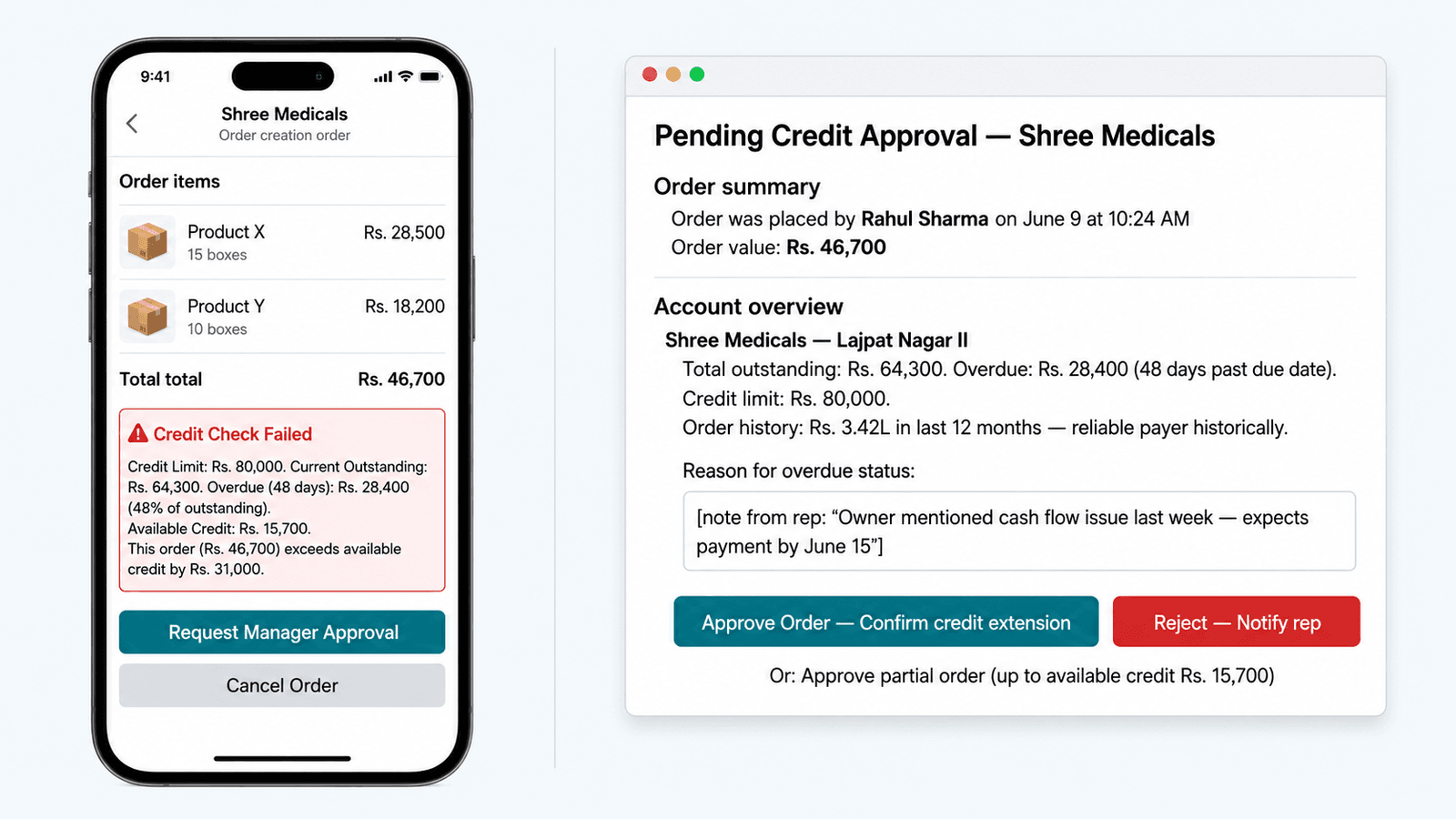
Step 3: Credit status check — automatic. If the account has a credit limit configured in Zopkit Finance and the new order would breach the limit or the account has overdue invoices beyond the configured tolerance, the rep sees a warning: "This account has Rs. 28,400 overdue (48 days). Order requires manager approval before processing."
Step 4: Save. The order is now a Zopkit sales order — visible to the sales manager and the billing desk in real time, from the moment the rep saves it in the field.
The paper order book is eliminated. The WhatsApp chain is eliminated. The billing desk does not need to receive a phone call to start processing the order — it appears in their Zopkit order queue automatically.
The Sales Manager's Order Pipeline View
The sales manager's order pipeline shows all open orders across all reps — by status (pending, approved, invoiced, dispatched), by rep, by account, by product, and by date. The total order value pending today is visible. The product mix is visible. The orders stuck in "pending manager approval" (because of credit issues) are flagged separately — the manager can approve or reject from the same screen.
Minimize image
Edit image
Delete image

V. Sample Tracking Across a Field Team
From Individual Rep Notebooks to a Company Sample Register
For the solo MR, sample tracking is a personal discipline. For the pharma distribution company with 12 reps, sample tracking is a compliance and cost management responsibility. The company distributes samples provided by its principal pharma companies. These samples must be accounted for — received from the company, allocated to each rep, and dispensed with documentation.
The current reality at most small pharma distributors: samples are dispatched from the principal company in bulk, divided informally among reps, and tracked (loosely) in individual rep notebooks. The company's total sample utilisation — required for the principal company's monthly activity report — is assembled from 12 reps' notebooks by the sales admin, a process that takes half a day and produces approximate results.
In Zopkit CRM's company-level sample management:
Company-level receipt:
When the principal company ships a sample batch, the sales manager or admin records the receipt in Zopkit: product, batch number, expiry, total quantity received. This is the master inventory record.
Rep-level allocation:
Each rep is allocated a quantity from the master inventory at the start of the sample cycle. The rep's allocation is their sample balance in Zopkit — they can only dispense from their allocated quantity.
Field dispensing:
Each rep logs sample dispensing in their visit logs (as described above). The dispensing is deducted from their allocation balance automatically.
Company-level sample register:
The sales manager sees, at any time: total samples received (by product), total allocated to reps, total dispensed by each rep, and total balance remaining. The principal company's monthly sample utilisation report is generated from Zopkit — the 4-hour assembly exercise becomes a 5-minute export.
Accountability:
The rep who has dispensed 80% of their sample allocation with 40% of the cycle remaining is on track. The rep who has dispensed only 20% with 60% of the cycle elapsed is either hoarding samples or under-visiting their accounts — both are management conversation topics that the Zopkit sample data makes visible and specific.
VI. The CRM-Finance Connection: Credit Limits and Invoice Status at the Point of Sale
The Integration That Prevents the Biggest Operational Risk
The most consequential feature of Zopkit's CRM-Finance integration for a pharma distribution company is the credit limit and invoice status check at the point of order creation. This is the feature that prevents the rep from confirming an order for an account that the billing desk would reject — before the rep has made the promise, not after.
How it works:
In Zopkit Finance, every customer account has a credit limit and a credit terms configuration (30 days, 45 days, 60 days, etc.). When the rep creates a sales order in Zopkit CRM for a customer account, the CRM checks the Finance module's receivables data for that account in real time:
- Current outstanding invoice balance: How much does this account owe right now?
- Overdue amount: How much of that outstanding balance is past the agreed credit terms?
- Available credit: Credit limit minus current outstanding = available credit headroom.
- New order value: Does the new order, if approved, fit within the available credit headroom?
If the check passes — the account is within credit limit, has no overdue invoices beyond the tolerance configured — the order is created without friction.
If the check flags an issue — overdue invoices, credit limit breached, new account without configured credit terms — the rep sees a specific warning in the field, and the order is placed in a "pending approval" queue rather than flowing directly to the billing desk.
The sales manager's approval decision is informed: they see the order value, the account's current outstanding, the overdue amount and age, and a one-tap approve or reject action. The rep who made the field commitment is notified immediately of the decision.
The Receivables Visibility for the Sales Manager
In addition to the order-level credit check, Zopkit Finance gives the sales manager a receivables view by territory — which accounts in each rep's territory have overdue invoices, how much, and how many days overdue. This is the information that should inform which accounts the rep prioritises for collection follow-up during their field visits — not just sales visits, but payment collection conversations.
The rep who is visiting an account with a 45-day overdue invoice should be having a collection conversation, not just a sales conversation. Zopkit makes this visible in the rep's own account profile: when they open the Shree Medicals profile before a visit, they see the outstanding invoice, its age, and a note from the billing desk. The collection conversation happens proactively — not after the billing desk escalates 3 months later.
Minimize image
Edit image
Delete image

VII. The Sales Manager's Dashboard: Rep Productivity Across the Team
The Weekly Performance Review That Now Takes 10 Minutes
The sales manager at a small pharma distribution company who currently runs the weekly performance review from WhatsApp summaries and verbal rep reports needs 2 to 3 hours to prepare — assembling each rep's self-reported activity into a coherent team picture. The review itself is based on imprecise data and the manager's subjective assessment of each rep's behaviour.
In Zopkit CRM, the weekly performance review is a dashboard view — no preparation required, objective data from logged activity:
Rep performance scorecard (weekly):
Minimize image
Edit image
Delete image

The data is from logged visits and orders — not self-reported. The manager who sees that Suresh and Ankit are at 36% and 32% A-class account coverage for the week has a specific, data-grounded conversation to have, not a vague "I feel you're not covering enough ground" discussion. And the product mix view — which products are being detailed across the team, and which are being neglected — is a territory strategy input, not a guess.
The Territory Revenue Attribution
The connection between Zopkit CRM's order data and Zopkit Finance's invoicing means that revenue is attributed to the originating rep and territory automatically. The sales manager's revenue dashboard shows:
- Revenue by rep (total invoiced from orders originated by each rep in the period)
- Revenue by territory (geographic revenue distribution)
- Revenue by product (which products are generating revenue across the team vs. which are stagnant)
- Revenue by account type (walk-in stockist, corporate, hospital, retail chemist)
This is the management reporting that currently requires the CA or billing admin to manually slice Tally data — and takes 2 to 3 days. In Zopkit, it is a live dashboard.
Minimize image
Edit image
Delete image

VIII. Doctor and Chemist Account Management at Company Level
The Account Database That Belongs to the Company, Not the Rep
The most structurally important difference between a field force using Zopkit CRM and a field force using their personal phones is ownership of the account data.
When a rep's relationship with Dr. Mehta lives in the rep's phone contacts, with notes they have accumulated over 2 years of visits, Dr. Mehta belongs to that rep — not to the company. When the rep leaves, Dr. Mehta's relationship history, prescription behaviour data, and the 3 follow-up commitments the rep made last month leave with them.
When Dr. Mehta's profile is in Zopkit CRM — with 2 years of visit logs, sample history, and relationship notes — Dr. Mehta belongs to the company. The rep who takes over the territory inherits the complete relationship record. The sales manager who needs to reassign the territory can do so in 10 minutes. The new rep walks into their first visit with Dr. Mehta knowing exactly what was discussed last time, what samples were given, and what the follow-up was.
Account Segmentation for Strategic Planning
At the company level, the doctor and chemist account database in Zopkit enables strategic segmentation:
Doctor accounts: Segmented by speciality, classification (A/B/C), prescribing behaviour, territory, and visit frequency compliance. The sales manager who wants to see all A-class cardiologists across all territories who have not been visited in 14 or more days sees this in one filter operation.
Chemist/stockist accounts: Segmented by account type (retail chemist, wholesale stockist, hospital pharmacy, corporate account), volume tier, credit status, and ordering frequency. The accounts that ordered 3 times last quarter but zero times this month are a sales recovery list — visible immediately from a filter, not from manual analysis of Tally records.
Institutional accounts: Hospital pharmacies, nursing homes, corporate wellness programmes, government dispensaries — these are longer-cycle, higher-value accounts with purchase order processes and consolidated billing requirements. Zopkit CRM's opportunity pipeline (separate from the daily order flow) tracks these accounts through longer sales cycles, with multiple touchpoints and document-level follow-up.
IX. Billing Integration: From Field Order to Tally-Ready Invoice
The Quote-to-Cash Flow for a Pharma Distributor in Zopkit
The integration between Zopkit CRM and Zopkit Finance means that the order created by a rep in the field flows directly into the billing workflow — without re-entry, without a WhatsApp relay, and without a billing desk phone call:
Step 1 — Field order (Zopkit CRM):
Rep creates a sales order in Zopkit CRM from the chemist account's profile. Order includes products, quantities, and delivery date. Credit check runs automatically.
Step 2 — Manager approval (if required) or automatic approval (if within credit limit):
Approved orders move to the billing queue in Zopkit Finance automatically.
Step 3 — Invoice creation (Zopkit Finance):
The billing desk at the company office sees the approved orders in the Zopkit Finance AR (Accounts Receivable) queue. Invoice creation from the order is one-click — all line items, customer details, and delivery information are pre-populated from the CRM order. GST treatment is applied automatically from the product catalogue configuration (the pharma product's HSN code and applicable GST rate — most pharma products at 5% or 12% GST, medical devices at 5% or 18% depending on classification).
Step 4 — Invoice dispatch:
Invoice PDF generated in Zopkit Finance and sent to the customer directly from the platform. The rep is notified that the invoice has been raised — they can see the invoice status from the account profile in their Zopkit CRM mobile view.
Step 5 — Collection tracking:
Payment against the invoice is recorded in Zopkit Finance. The account's outstanding balance updates. The credit limit availability updates. The next time the rep creates an order for the same account, the credit check reflects the current, accurate receivables position.
The billing desk's workload is reduced — not eliminated, but the order re-entry step is gone. The error rate falls because the billing desk is not transcribing handwritten order books or interpreting WhatsApp messages. The sales manager can see which orders have been invoiced and which are still pending billing from the same CRM dashboard.
X. The Business Case for Integrated Field CRM + Finance
Four Quantifiable Value Drivers for the 5 to 20 Rep Distributor
Value Driver 1 — Bad debt prevention through point-of-sale credit checks:
A pharma distribution company with 12 reps and Rs. 18 crore in annual revenue extending Rs. 4 to 6 crore in trade credit at any time typically writes off 1.5 to 3% of annual revenue as bad debt — Rs. 27 to 54 lakh per year. The majority of bad debt cases involve an account being extended incremental credit after the first overdue invoice, because the rep in the field did not know the account's credit status. Point-of-sale credit checks in Zopkit CRM do not eliminate bad debt — they prevent its accumulation at the most vulnerable point: the field order confirmation.
Value Driver 2 — Rep productivity improvement:
A field rep who spends 60 to 75 minutes per day on manual reporting (WhatsApp updates, notebook entries, end-of-day summaries) spends 1.5 to 2 hours per week less in the field than a rep using a 90-second visit log. At 12 reps, this is 18 to 24 rep-hours per week — the equivalent of a full working day of field time, across the team, recovered to productive activity.
Value Driver 3 — Order processing error reduction:
The pharma distributor whose billing desk processes 40 to 80 orders per day from rep WhatsApp messages and phone calls has an estimated 3 to 6% order transcription error rate — wrong product, wrong quantity, wrong account. At Rs. 18 crore revenue, 3% of orders with errors creates Rs. 54 lakh in billing discrepancies, returns, or credit notes per year. Direct-to-Finance order creation from the field eliminates transcription errors.
Value Driver 4 — Account data retention on rep attrition:
The average tenure of a pharma field rep in India is 18 to 30 months. A company with 12 reps experiences 4 to 8 rep transitions per year. Each departing rep who managed their accounts on a personal phone takes 2 to 3 months of relationship recovery time for the replacement rep. At Rs. 2 lakh per rep per month in territory revenue, 2 months of recovery at 30% productivity loss per affected territory = Rs. 120,000 per rep transition. With Zopkit's company-owned account database, the recovery time is reduced to 2 to 3 weeks.
Conclusion
The Distribution Company That Owns Its Field Data Compounds Its Advantages
The small pharma distribution company that moves from WhatsApp-based field management to Zopkit CRM does not just improve operational efficiency. It shifts the ownership of its most valuable asset — the doctor relationships and chemist account networks that its reps have built over years — from individual phones to a company database.
The company's competitive moat is not the products it distributes. Any competitor can distribute the same products from the same principal companies. The moat is the relationships — the 340 active accounts across 12 territories, the 18 A-class referring doctors who consistently choose this distributor's products because a rep visits them reliably, the 45 chemist accounts that stock consistently because order fulfilment is fast and billing is accurate.
Those relationships belong in a system that the company controls, where the data survives rep transitions, where the sales manager can see the team's coverage and productivity in real time, and where the billing desk knows the credit status of every account before an order is confirmed.
That is Zopkit CRM connected to Zopkit Finance. Start at zopkit.com.