You Have Five Stores. You Have Five Versions of the Same Problem.
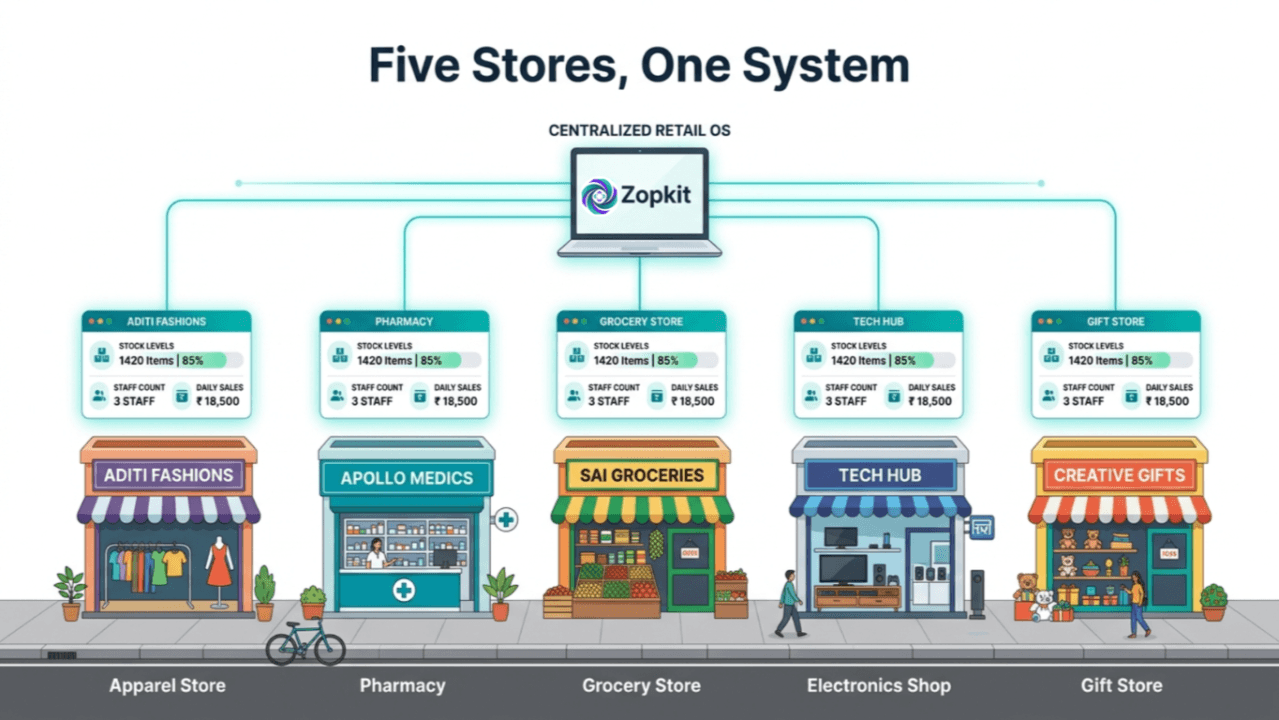
Store 2 is out of your best-selling kurta in Medium. Store 3 has 18 units sitting on the shelf unsold. You find out when a customer at Store 2 walks out. Nobody transferred the stock because nobody could see Store 3's count without calling the manager and waiting for a WhatsApp reply.
This is the defining operational problem of running 2 to 10 retail stores in India. The moment you open a second location, every system you used for one store breaks — not catastrophically, but slowly. The billing software works at each counter independently. The stock registers are separate. The payroll for each store's staff runs on different spreadsheets. The accounts for all five stores are emailed to the CA who consolidates them manually before every board call. Nothing is wrong with any individual tool. The problem is that five tools for five stores produce five versions of data that were never designed to talk to each other.
Zopkit Operations, Zopkit HRMS, and Zopkit Finance are the three-product stack built specifically to fix this. One platform, one login, one version of truth across every store.
Table of Contents
- I. Why a Second Store Breaks Everything You Built for One
- II. Zopkit Operations — Inventory and POS Across Every Store
- III. Zopkit HRMS — Store Staff Payroll Without the Spreadsheets
- IV. Zopkit Finance — Consolidated P&L Across Every Location
- V. Central Buying, Store-Level Billing — How the Three Products Connect
- VI. Who This Is Built For
I. Why a Second Store Breaks Everything You Built for One
One Store, One Problem. Two Stores, Five Problems. Five Stores, Chaos.
A single-store retail business runs on proximity — the owner sees everything. The counter, the stock room, the staff, the daily cash, the supplier invoice pile on the desk. When the owner adds a second store in a different neighbourhood, every workflow that relied on physical presence stops working. Stock visibility requires a phone call. Staff attendance requires a trust system nobody defined. The day-end cash count at Store 2 arrives as a voice note.
By the time a retail chain grows to 5 stores, the operational infrastructure built for 1 store has been stretched into something no longer manageable:
- Stock: Each store manager maintains their own register. Inter-store transfers happen via WhatsApp and paper — or they do not happen at all.
- Billing: Each store's POS is a standalone system. There is no shared product catalog with consistent pricing. One store sells the same product at ₹899, another at ₹950.
- Staff and Payroll: Each store's salary is tracked in a separate spreadsheet. Attendance records are collected by hand. The payroll run involves 4 to 6 spreadsheets and someone spending a Sunday afternoon on it.
- Accounts: Each store's billing export goes to the CA separately. The CA consolidates them. The consolidated P&L arrives 2 to 3 weeks after month-end — by which point the numbers are already stale for any operational decision.
These are not problems caused by bad management. They are problems caused by using single-store tools to run a multi-store business.

II. Zopkit Operations — Inventory and POS Across Every Store
One Catalog. Five Stores. Stock That Moves Automatically.
Zopkit Operations puts every store on a shared product catalog. Product names, SKU codes, HSN codes, and GST rates are defined once at the center and appear identically on every store's billing screen. A product added to the catalog is immediately available at all locations. A price change takes effect everywhere simultaneously. The inconsistency between stores — different names for the same product, different prices at different counters — is eliminated at the structural level.
Live Stock Count Per Store, Visible Centrally
Every sale at every counter reduces the stock count for that store in real time. The head office view shows current stock across all locations simultaneously: Store 1 has 4 units of SKU-X, Store 3 has 17 units. No phone calls. No WhatsApp requests. No waiting until the manager updates the register at day-end. The stock count visible to central buying is the actual stock count, current to the last transaction recorded at any counter.
Inter-Store Transfers Without the Paper Trail
When Store 2 runs low and Store 3 is overstocked, a transfer request is raised in Operations. The quantity is deducted from Store 3's count when it leaves and added to Store 2's count when it arrives. Both store managers see the in-transit status. The transfer is logged with user, timestamp, and quantities. The paper register that used to document these transfers — and frequently got lost or never got filled — is replaced by a permanent, auditable record in the system.
Counter-Speed POS at Every Store
Each store runs Zopkit's POS billing — scan or search a product, apply the correct GST rate automatically from the HSN code assigned to the product, accept cash, UPI, or card, and close the transaction. Every invoice raises in Finance automatically. Every sale updates the stock count in Operations automatically. The counter staff at each store needs to know how to scan and how to accept payment — the system handles everything else.
Reorder Alerts for Every Store Separately
Reorder thresholds are set per SKU per location. A fast-moving product at a high-footfall store might have a reorder point of 10 units, while the same product at a smaller store sits at 3. When either location crosses its threshold, the alert surfaces to central buying. Stock replenishment decisions are data-driven and location-specific, not gut-feel calls made when a manager notices the shelf is empty.

III. Zopkit HRMS — Store Staff Payroll Without the Spreadsheets
Eight Store Staff Across Five Locations. One Payroll Run.
Store staff management for a 5-store chain typically involves 20 to 40 employees across locations — salespeople, cashiers, store managers, cleaners, security. Each store has a different mix. Some are full-time, some are part-time, some are on different salary structures. Running payroll across all of them from five separate spreadsheets — with attendance collected informally and statutory deductions computed manually — is the single most time-consuming HR task in a multi-store retail operation.
All Store Staff in One Employee Directory
Every employee across every store is in one place in Zopkit HRMS. Store, location, designation, salary structure, date of joining — all stored centrally. When a new salesperson joins Store 3, they are added to the system once. Their attendance, leave, and payroll records are maintained from day one without any spreadsheet setup. When an employee transfers from Store 2 to Store 4, their record follows them.
Attendance Without the Register Book
Staff attendance is recorded in HRMS — directly on the system or via the mobile app. Manual attendance can be logged by the store manager for employees without device access. Corrections and regularisations go through an approval workflow. The attendance record is the source of truth for payroll — not a book that gets photographed and sent to the head office accountant.
India Payroll With PF, ESI, and TDS Built In
For retail chains employing staff below the PF and ESI threshold — typically the majority of store-level staff — Zopkit HRMS handles PF deduction, ESI computation, professional tax, and TDS automatically. CTC is broken into components: basic, HRA, and applicable allowances. Payslips are generated automatically at the end of each pay run. Form 16 and statutory returns are produced from the same payroll data. The accountant who used to spend a Sunday computing deductions for 30 employees from five spreadsheets now reviews and approves a single payroll run.
Leave Management Across All Stores
Leave requests from any store employee come into one system. Store managers approve leave for their team. The head-office HR view shows leave calendars across all locations — helpful for planning store coverage during festive season when leave requests peak simultaneously across every store.

IV. Zopkit Finance — Consolidated P&L Across Every Location
Five Stores, One Books-of-Record. The CA Gets a Report, Not a Pile of Exports.
Every sale at every store counter posts an accounting entry to Zopkit Finance automatically. Every payroll run posts the payroll journal entry. Every supplier payment is recorded. By the time the owner or CA wants to see the month-end numbers, the accounts are already built — not from five separate billing exports to be reconciled, but from a single ledger where every transaction from every store has been posting in real time.
Store-Level P&L and Chain-Level Consolidated View
Zopkit Finance's multi-entity structure maps directly to a store chain. Each store is an entity. Every entity has its own P&L — revenue, cost of goods sold, staff cost, rent, and other expenses. The consolidated view rolls all five stores into a group P&L. The owner sees what the whole chain made this month, and can drill into which store drove the most revenue, which carried the highest cost structure, and which needs attention.
GST Filing for Every Store, Managed Centrally
Each GST-registered store entity has its own GSTR-1 and GSTR-3B. In Zopkit Finance, GST reports are generated per entity from the invoices raised at that store's counter. The CA accesses all five store reports from one platform instead of receiving five separate billing exports via email. The filing timeline for a 5-store chain compresses significantly — what previously took 2 days of data collection and compilation is a report review and file.
Accounts Payable for Central Buying
For a chain that buys centrally and distributes to stores, supplier invoices are raised against the head-office entity. The three-way match — purchase order, goods receipt note, and supplier invoice — is handled in Finance before the bill is approved for payment. Vendor credits, debit notes for short-shipments, and recurring bills for rent across store locations are all managed in one place.

V. Central Buying, Store-Level Billing — How the Three Products Connect
One Purchase Order. Five Stores Receive. One Payroll Run. One P&L.
The reason Zopkit's three-product stack works for a multi-store chain is not that each product is strong individually — it is that they share the same data and the same identity layer. A transaction recorded in Operations is immediately visible in Finance. An employee added to HRMS is available in payroll in the same session. There is no monthly export, no integration middleware, no manual synchronisation.
Here is what a typical multi-store retail month looks like on Zopkit:
Workflow What Happens Automatically Central buyer raises a PO Supplier invoice matched to PO and GRN in Finance Stock received at warehouse Distributed to store entities in Operations Store counter raises a sale Stock count reduces, GST entry posts in Finance Inter-store transfer Stock deducted from sending store, added to receiving store Payroll run at month-end Payslips generated, journal entry posts to Finance Month-end accounts Consolidated P&L available — no manual compilation CA files GST Pulls reports from Finance per entity — data already organised
Every row in that table is a manual step in a disconnected setup. On Zopkit, each one is automatic.
VI. Who This Is Built For
Zopkit Operations + HRMS + Finance for multi-store retail fits any Indian retail chain where:
- 2 to 10 stores — physical retail locations, same brand or brand family, operated centrally
- Central buying — one head-office function handles supplier relationships and procurement, stores handle sales
- GST registered per entity or consolidated — regular GSTR-1 and GSTR-3B filer per store or group
- 20 to 60 store staff — salespeople, cashiers, store managers on India payroll with PF, ESI, TDS
- Shared product catalog — consistent SKUs and pricing across all store locations
- Owner or COO wants a group view — consolidated P&L across all stores, not five separate reports
- CA currently compiling manually — monthly data collection from five stores before any filing can happen
This is the right fit for apparel chains, footwear retailers, electronics dealers, pharmacy chains, home décor stores, grocery chains, and any other multi-location retail business in India that has outgrown single-store tools but does not need enterprise ERP complexity or cost.
Conclusion
The challenge of running a 2 to 10-store retail chain in India is not a buying problem or a staffing problem or an accounting problem in isolation. It is a systems problem — the same business data exists in five separate places and has to be reconciled manually before any decision can be made. Zopkit Operations, HRMS, and Finance eliminate that reconciliation entirely. Stock is visible centrally and updates with every counter sale. Staff payroll runs from one system across all locations. The P&L is consolidated automatically from every transaction posted at every store. The CA gets structured data, not a pile of exports. The owner gets a real-time view of the whole chain, not a 2-week-old spreadsheet.
Start free at zopkit.com. Add your stores, map your products to each location, onboard your staff, and raise your first multi-store P&L in one month — without changing how your counters work or retraining your store managers from scratch.