You Have 40 Leads, 12 Projects, and One Phone. Here Is How to Stop Losing Deals to Forgetfulness.
You do not lose deals because the property was wrong or the price was too high. You lose deals because you called three days after you should have. Because you forgot that Mr. Sharma from Whitefield asked about a 3BHK with a north-facing preference in the ₹85 to ₹95 lakh range and when you finally called back you pitched him a south-facing 2BHK at ₹1.1 crore. Because the lead from the Magicbricks inquiry last Tuesday is still sitting in your DMs without a follow-up. Because you spent the entire day at site visits on the Sarjapur project and by the time you got home the six leads who called during the day had already spoken to three other brokers.
Real estate brokerage in India is a business of timing and memory. The broker who calls first, remembers the client's requirement precisely, follows up at the right intervals, and can tell a client exactly which unit is available in which project at which price wins the deal. The one who calls second, pitches the wrong configuration, or calls six days after the inquiry loses it to someone who was organised.
This post is for the solo broker or independent real estate agent managing 20 to 50 active leads across multiple residential and commercial projects. You are working every day but the system behind your effort is a combination of a contact book, a WhatsApp group with the developer's channel partner team, a few sticky notes, and your memory. You know this is not a system. You have been meaning to set one up. This post is that setup.
Zopkit CRM and Zopkit Financial Accounting together give the solo broker a professional lead management and commission invoicing infrastructure that runs from the first inquiry to the final payment without any tool other than the one you already use for everything else: your phone.
Table of Contents
I. Why Solo Brokers Lose Deals They Should Win
II. What a CRM Actually Does for a Real Estate Broker
III. Zopkit CRM: Pipeline Management for 20 to 50 Active Leads
IV. Zopkit CRM: Follow-Up Automation and Communication History
V. Zopkit CRM: Deal Tracking From Inquiry to Booking
VI. Zopkit Finance: Commission Invoicing With GST Compliance
VII. The Daily Workflow: Inquiry to Booking to Commission
VIII. The Setup Checklist: Going Live in One Weekend
IX. The Evaluation Checklist
I. Why Solo Brokers Lose Deals They Should Win
The Three Failure Modes That Kill a Solo Broker's Conversion Rate
A solo real estate broker who is active and client-facing should be converting 8 to 15 percent of serious inquiries to bookings. Most solo brokers running on informal systems convert 4 to 6 percent. The gap is not capability. It is operational discipline, which is extremely hard to maintain manually when you are the salesperson, the site visitor, the paperwork person, and the follow-up team all in one.
Failure mode 1: The follow-up gap.
You receive a serious inquiry from a couple looking for a 2BHK in Baner, Pune, in the ₹70 to ₹85 lakh range. They visited a site with you. They said they needed a week to discuss with family. You noted this in your phone. Eight days later you got busy with another site visit and another set of clients and the Baner lead slipped your mind. On day twelve you remembered to call. They had already booked with another broker who had called them on day seven.
The deal was winnable. The follow-up was the job. The follow-up was not done because it was not in a system.
Failure mode 2: The requirement mismatch.
You have 40 active leads. Each has a different requirement profile: budget range, configuration preference, floor preference, parking need, possession timeline, and whether they need a home loan. You recorded some of this in WhatsApp conversations, some in a notes app, some only in memory. Three weeks after the initial conversation you call a lead with a new project launch. You cannot remember whether they wanted 2BHK or 3BHK so you pitch both. The client feels you have forgotten them entirely. The trust that a broker earns by listening carefully is gone.
Failure mode 3: The commission documentation gap.
You close a deal. The developer owes you ₹1.2 lakhs as 2% commission on the booking value. You send them a WhatsApp message with the amount. They say they will process it by month-end. Month-end passes. You follow up again. They say they need a proper invoice for GST. You do not have a GST invoicing tool. You ask your CA to make one. The invoice has errors. The developer sends it back. The payment takes six more weeks. You just funded someone else's business for two months.
These three failure modes are all solvable with a CRM and a basic invoicing tool. Not a complex one. Not an expensive one. A well-designed, mobile-first CRM built for exactly this use case.
II. What a CRM Actually Does for a Real Estate Broker
Not Software for Software's Sake. A System That Replaces Your Memory.
A CRM, Customer Relationship Management tool, for a solo real estate broker does three things that no combination of WhatsApp, notes apps, and memory can do reliably.
It holds every lead with their complete requirement profile. Name, phone, email, source of inquiry, property type, configuration, budget range, preferred location, possession timeline, home loan requirement, objections from previous conversations, and next follow-up date. Every piece of information you have ever learned about this lead is in one place, visible before every call.
It tells you who to call today. Every morning you open the CRM and it shows you the leads with follow-up due today. You do not have to remember who you spoke to three days ago and promised to call back this week. The system holds the promise and surfaces it on the right day.
It shows you the health of your pipeline. You have 40 active leads. How many are in the enquiry stage? How many have visited a site? How many have said they are ready to book but need home loan sanction? How many are cold? Without this pipeline view you are running blind. With it, you know where to focus your energy today.
Adding Zopkit Financial Accounting to this gives you a fourth capability: professional GST-compliant commission invoicing in minutes, with payment tracking so you know exactly which developer owes you what and for how long.
III. Zopkit CRM: Pipeline Management for 20 to 50 Active Leads
Every Lead, Every Stage, Visible From Your Phone
Zopkit CRM is a pipeline management tool built for B2B and B2C sales workflows. For a solo real estate broker, the core pipeline management features translate directly into the lead management reality of a property sales cycle.
Pipeline Stages That Mirror the Property Sales Journey:
In Zopkit CRM, your pipeline has stages that you define to match the real estate sales cycle. A practical stage structure for a residential broker:
- New Inquiry — Lead received, requirement not yet clarified
- Requirement Qualified — Budget, configuration, location, and timeline confirmed
- Site Visit Scheduled — Visit booked for at least one property
- Site Visit Done — One or more visits completed, property shortlisted
- Negotiation — Price, payment terms, or unit-specific discussion in progress
- Booking in Process — Client has agreed, paperwork being processed
- Booked and Commission Due — Booking complete, commission invoice to be raised
- Commission Received — Deal fully closed
Every lead sits at a stage. Moving a lead from one stage to the next takes one tap. The pipeline view shows you exactly how many leads are at each stage and where deals are stalling.
Lead Records With Full Requirement Details:
Each lead in Zopkit CRM is a contact record with custom fields you define. For real estate this means: required configuration (1BHK / 2BHK / 3BHK / commercial), budget range (minimum and maximum), preferred location and micromarket, possession requirement (ready-to-move or under-construction acceptable), home loan requirement, and any specific preferences like floor, facing, or project amenities.
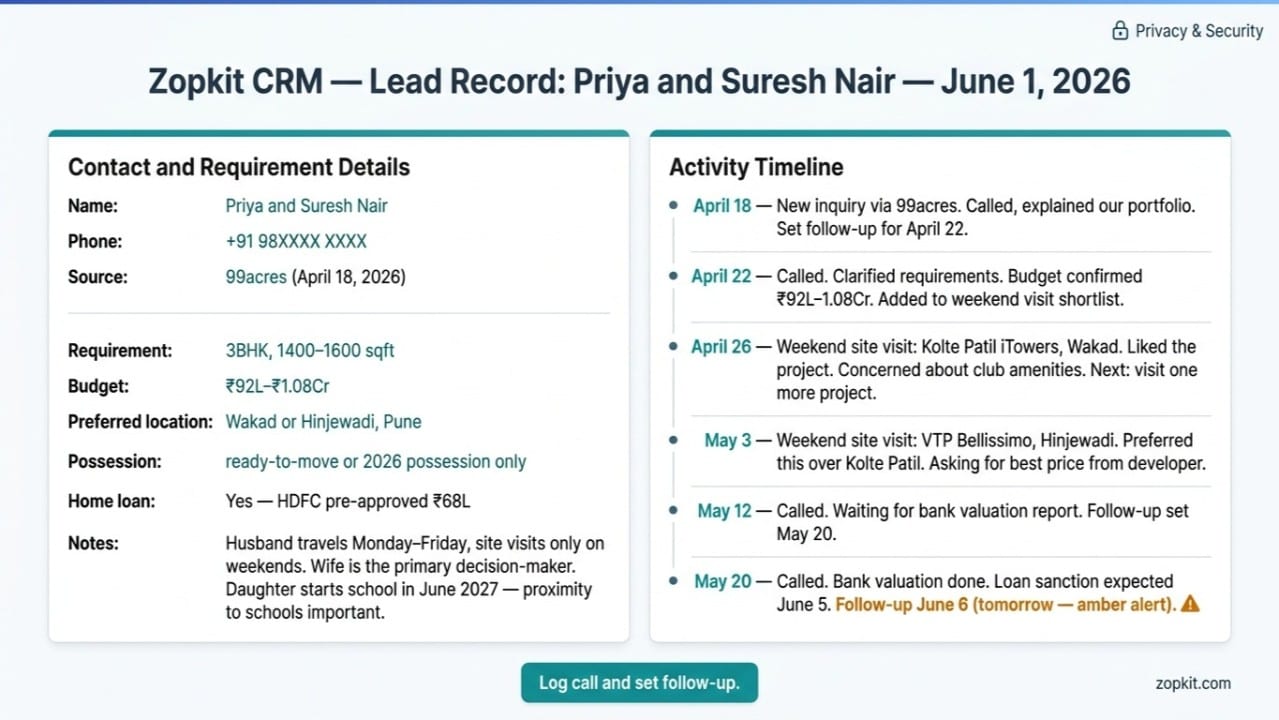
When a lead calls you back three weeks after the first conversation, you open their record before picking up and you already know everything they told you the first time. The conversation starts with "Mr. Sharma, I remember you were looking for a 3BHK in the ₹85-95 lakh range with a north-facing preference in Baner" rather than "so what exactly were you looking for?" The first version builds trust. The second destroys it.
Activity Log for Every Interaction:
Every call, every WhatsApp message, every site visit, and every email is logged against the lead's record with a timestamp and notes. When you call a lead you have not spoken to in two weeks, the activity log shows you exactly what was discussed, what objections were raised, and what was promised. You are always continuing the conversation, never starting it again.
Source Tracking for Lead Attribution:
Each lead is tagged with their source: MagicBricks, 99acres, Housing.com, developer campaign, referral from existing client, walk-in at site office, or social media. Source tracking tells you which channels are generating your highest-quality leads, not just the most leads. The referral leads who convert at 20% are more valuable than the portal leads who convert at 4%, and you need the data to know this.
See content credentials

IV. Zopkit CRM: Follow-Up Automation and Communication History
The System That Calls You to Action Before the Lead Goes Cold
The follow-up discipline that separates a high-converting broker from an average one is not a personality trait. It is a system. The brokers who follow up at the right time every time are not naturally more disciplined. They have a system that tells them when to follow up and will not let them forget.
Scheduled Follow-Ups as Task Reminders:
Every time you speak to a lead in Zopkit CRM, you close the activity log with a follow-up action: call in 3 days, call after site visit, follow up in 1 week. The follow-up is a task with a due date. On the due date, it appears in your Zopkit task list. You open the app and your first view of the day is: here are the leads you committed to follow up with today. Not a mental exercise. Not a note you may or may not see. A prioritised task list that was set the last time you spoke to each lead.
Overdue Follow-Up Alerts:
When a follow-up task is overdue, the lead in the pipeline shows an alert indicator. You can see at a glance which leads have been waiting longer than intended. This is the visual nudge that prevents a lead from disappearing into the pipeline's quiet zone and re-emerging six weeks later as a deal that closed with another broker.
Communication History in Chronological Order:
Every interaction logged against a lead appears in chronological order in their activity timeline. Call on April 12: clarified requirement, 3BHK preferred, budget ₹90-1.05 crore, Hinjewadi preferred. Site visit on April 19: visited Pride World City, liked the project, concerned about possession timeline. Call on April 26: checking home loan progress, bank valuation pending. Follow-up due May 5.
When you open this lead record before calling on May 5, the entire relationship history is on one screen. No scrolling through WhatsApp. No trying to remember what was said on which call. The record is the memory.
Deals as the Revenue-Bearing Unit:
Within each contact in Zopkit CRM, a Deal represents a specific property transaction in progress. The deal has the property name, the developer, the unit configuration, the expected booking value, the expected commission percentage, and the expected commission amount. When you have three deals potentially closing this month, the Deals view shows you the total expected commission value for the month.
AI-Driven Sales Insights:
Zopkit CRM includes AI-powered features that flag deals at risk of going cold based on last activity date and stage age, and surface opportunities where a follow-up action might advance the deal. For a solo broker managing 40 leads with no support team, the AI layer functions as a virtual sales manager pointing out where attention is needed.
See content credentials

V. Zopkit CRM: Deal Tracking From Inquiry to Booking
Every Deal, Every Developer, Every Commission Amount, All Visible
The distinction between a contact and a deal in Zopkit CRM matters for a real estate broker because you will often be working multiple potential deals with the same contact. A couple might be comparing three different projects across two different developers. Each comparison is a potential deal. The deal record in Zopkit CRM captures the specifics of each potential transaction separately while keeping them all associated with the same contact record.
Deal Records With Property and Commission Details:
Each deal in Zopkit CRM has: the property name and developer, the specific unit or configuration under consideration, the expected booking value, the agreed commission percentage from the developer, the expected commission amount, the deal stage, and the expected closing date. For a broker working multiple developers simultaneously, the deals pipeline shows the total potential commission value in the active pipeline and the deals expected to close this month.
Developer as an Account in CRM:
Each developer you work with is an Account in Zopkit CRM. The account record holds the developer's contact details, the projects you are empanelled for, your commission agreement for each project, the contact names at the developer's channel partner team, and all the communication history with that developer's team. When you need to confirm unit availability for a lead, the developer contact is one click from the CRM account record. When your commission invoice needs to go to the right person at the developer, the accounts record has the name and email.
Pipeline Value and Monthly Commission Forecast:
The deals pipeline in Zopkit CRM shows total pipeline value by stage. For a solo broker this translates directly into a monthly commission forecast: deals in booking-in-process stage this month, expected commission per deal, and total expected commission for the month. This is not a complex financial model. It is the basic pipeline arithmetic that tells you whether this month's income is on track or whether you need to accelerate another deal.
Kanban Board and List View for Daily Management:
The deals pipeline is available as a Kanban board for visual pipeline management and as a list view sorted by stage, expected close date, or deal value. The morning review of your active deals takes five minutes from the Kanban view. Drag a deal from Negotiation to Booking in Process when the client confirms. The pipeline updates in real time.
Mobile Access for Field Management:
Zopkit CRM is fully accessible from the mobile app. When you are at a site visit with a client, you can log the visit notes from your phone the moment it ends rather than trying to remember the details when you get home. When a developer calls you with a new unit availability, you can check which of your leads has a matching requirement from your phone before the call ends. The CRM that lives only on a desktop is not a CRM for a field-based solo broker.
VI. Zopkit Finance: Commission Invoicing With GST Compliance
Every Commission Earned, Invoiced Professionally, Tracked Until Paid
Zopkit Financial Accounting for a solo broker handles the commercial side of the business: raising professional GST-compliant commission invoices, tracking which developer has paid and which is overdue, and maintaining the financial records your CA needs at year-end.
GST-Compliant Commission Invoices in Minutes:
When a deal is marked booked in Zopkit CRM, the commission invoice is raised in Zopkit Finance with the project linked. The invoice carries: your GSTIN, the developer's GSTIN, the SAC code for real estate brokerage services (99716), the commission amount as the taxable value, and GST at 18% split as CGST 9% and SGST 9% for intra-state or IGST 18% for inter-state transactions. The invoice number follows the correct sequential format. The PDF is ready to email directly to the developer's accounts team from the platform.
What used to take a call to the CA, a wait for the invoice, and back-and-forth on GSTIN and format takes three minutes.
Estimates as Pre-Invoice Commission Confirmations:
Before the booking is confirmed, Zopkit Finance allows you to create an estimate document confirming the commission entitlement: the developer, the project, the unit, the booking value, and the commission amount. Sending this estimate to the developer's channel partner manager before the booking creates a documented agreement on the commission amount that prevents the "we thought the rate was 1.5% not 2%" conversation that happens when the invoice arrives three weeks after the booking.
AR Tracking and Overdue Alerts:
Every commission invoice raised sits in Accounts Receivable with its due date, payment status, and aging category. Zopkit Finance shows you at any moment: which developers have open invoices, how many days each invoice has been outstanding, and which are overdue. The AR aging report is the weekly commission follow-up tool. You can send payment reminders to overdue developers directly from the platform.
Expense Tracking for Business Costs:
Site visit fuel and transport, marketing materials, portal subscription fees, and professional membership costs are expenses that a solo broker can track in Zopkit Finance as vendor bills or expenses. Tracking these against your commission income gives you the actual profit picture for the month, not just the gross commission. At year-end, your CA receives structured expense records rather than a box of receipts.
Bank Reconciliation:
Bank transaction import and rule-based categorisation means that when a commission payment arrives in your bank account, Zopkit Finance matches it to the open invoice and marks it paid automatically. Your AR is always current without manual updating.
GST Filing Preparation:
GSTR-1 outward supply data from your commission invoices compiles from live transactions and is available for export at any point in the month. Your CA receives this data in structured format rather than a bundle of PDF invoices.
See content credentials

VII. The Daily Workflow: Inquiry to Booking to Commission
What a Professional Broker's Operating Routine Looks Like With Zopkit
The value of a CRM is not in the features. It is in how the features change the daily routine. Here is what a working day looks like for a solo broker running on Zopkit CRM and Finance.
7:30 AM: Morning pipeline review.
Open Zopkit CRM on the phone. Check today's follow-up tasks: three leads with follow-up due today. Read the activity history for each before calling. Know exactly what was discussed, what was promised, and what the current status is before the first call.
8:00 AM to 10:00 AM: Follow-up calls.
Call each lead from the follow-up task list. After each call, log the conversation in the activity timeline in 30 seconds: what was discussed, outcome, next action. Set the next follow-up task before hanging up. The lead's record is always current.
During the day: New inquiries.
A new inquiry comes in from Housing.com. Add them as a contact in Zopkit CRM from the phone. Set their requirement fields: 2BHK, Baner, ₹70-80 lakh. Source: Housing.com. Set a follow-up task for the same day or the next morning. The lead is in the system before you forget who called.
Afternoon: Site visit.
Take a lead for a site visit. During the drive back or immediately after the visit ends, open the CRM and log the visit notes: which project, what the client liked, what their concerns were. Set the follow-up task for the right date based on their timeline. Done in two minutes. The record is complete.
Evening: New booking confirmation.
A deal closes. The developer confirms the booking. In Zopkit CRM, move the deal to Booked stage. In Zopkit Finance, raise the commission invoice in three minutes: developer's GSTIN is already in the account record, SAC code is pre-configured, GST computes automatically. Send the PDF invoice to the developer's accounts team from the platform. The commission clock starts immediately.
End of week: Pipeline review.
Open the Kanban view. How many leads are in each stage? How many follow-ups are overdue? What is the total expected commission in the pipeline? Are there deals that have been in Negotiation for more than two weeks without movement? Move or qualify them. The weekly review takes 15 minutes and gives you a complete picture of the business
See content credentials

VIII. The Setup Checklist: Going Live in One Weekend
What to Do on Saturday and Sunday to Be Running Professionally From Monday
The biggest reason solo brokers do not set up a CRM is not cost. It is the belief that setup takes weeks. For a solo broker with 20 to 50 leads, the Zopkit CRM and Finance setup takes one focused weekend.
Saturday Morning: CRM Setup (2 to 3 hours)
- Create your Zopkit account at zopkit.com
- Set up your pipeline stages to match your real estate sales cycle. The stages suggested in Section III of this post are a starting point you can customise.
- Add the developers you work with as Accounts in Zopkit CRM. For each developer, add their GSTIN, your channel partner contact, and your commission rate per project.
- Set up custom fields on your contact record for: property type required, budget range, preferred location, possession preference, home loan requirement.
Saturday Afternoon: Lead Entry (2 to 4 hours depending on active leads)
- Go through your phone contacts and WhatsApp chats. Every lead you are currently working becomes a contact in Zopkit CRM.
- For each lead, fill in the requirement fields and add the key activity notes from memory or from your WhatsApp chat history.
- For each lead, set a follow-up task for the appropriate date based on where the conversation was last.
Sunday Morning: Finance Setup (1 to 2 hours)
- Add your GSTIN and business details in Zopkit Finance.
- Configure the SAC code for real estate brokerage services (99716) as your primary service code.
- Add the developers as clients in Zopkit Finance with their GSTINs. The developer accounts you created in CRM link to Finance.
- Enter any open commission invoices that have not yet been paid as opening AR entries.
Sunday Afternoon: Review and Test
- Run through the daily workflow from Section VII above using your actual leads.
- Raise a test commission invoice for a recently closed deal to verify the GST and GSTIN fields are correct.
- Set your first week's worth of follow-up tasks for Monday through Friday.
By Monday morning, your pipeline is visible, your leads are in a system, and your follow-up schedule is set. The business you were running from memory now has an operating system.
IX. The Evaluation Checklist
What to Confirm Before Choosing Any CRM as a Solo Broker
If you are evaluating multiple CRM options, use this list. Every point should be verifiable from a free trial or a live demonstration.
Pipeline Management:
- Can I create custom pipeline stages that match the real estate sales cycle, not a generic B2B sales process?
- Can I add custom fields to contact records for property-specific requirements like budget range, configuration preference, and possession timeline?
- Does the pipeline view show overdue follow-up alerts at the deal and contact level?
Lead and Activity Management:
- Can I log calls, site visits, and messages against a contact from the mobile app in under one minute?
- Is the activity history displayed in chronological order per contact so I can see the full conversation history before a follow-up call?
- When I set a follow-up task after logging an activity, does it appear in a daily task list on the due date?
Follow-Up Automation:
- Does the system show me a prioritised list of leads with follow-up due today when I open the app each morning?
- Are overdue follow-ups visually flagged in the pipeline view so I can see which leads have been neglected?
Commission Invoicing:
- Can I raise a GST-compliant commission invoice with the developer's GSTIN, SAC code 99716, and automatic 18% GST computation in under five minutes?
- Does the AR tracking show me which commission invoices are outstanding and for how many days?
- Can I send a payment reminder to an overdue developer directly from the Finance module?
Mobile Usability:
- Is the CRM and Finance module fully functional from a mobile app, not just a mobile-responsive web view?
- Can I add a new lead, fill their requirement details, and set a follow-up task from my phone in under two minutes?
Conclusion
The Broker With the System Wins. Every Time.
Real estate brokerage in India is not a business where the hardest working person always wins. It is a business where the most organised person wins, because organisation determines follow-up speed, follow-up precision, and the ability to match the right property to the right client at the right moment.
Zopkit CRM gives the solo broker the pipeline management, requirement tracking, activity history, and follow-up task system to operate like a professional sales organisation, from a single phone, at a cost that is appropriate for a solo practice. Every lead is in a system. Every follow-up is scheduled. Every developer conversation is documented. Every deal is tracked from inquiry to booking.
Zopkit Financial Accounting gives the solo broker the commission invoicing infrastructure to turn a closed deal into a professional GST-compliant invoice in three minutes, track the payment until it arrives, and send a reminder when it does not. The commission that used to take two months to collect because of documentation back-and-forth gets invoiced correctly on the day the booking confirms.
The one-weekend setup plan in Section VIII gets you live before the week begins. The daily workflow in Section VII is the operating routine. The evaluation checklist in Section IX is what to ask if you look at alternatives.
The leads you have right now are in your phone and your memory. By Monday they can be in a system that will not forget them.