You Are Running a Store. Your Billing App Does Not Know How Much Stock You Have Left.
Every small retailer in India knows this situation. A customer asks for a product. You check the shelf it is empty. You open the billing software. It shows the product as available because the last four sales were raised on the app but nobody subtracted them from the stock count in the notebook.
This is not a management failure. It is a systems failure. The billing software raises the invoice. The stock register is a separate notebook. The accounts are compiled once a month when the CA visits and tries to reconcile three sources that were never designed to talk to each other. For a solo or single-store retailer doing ₹2 to ₹8 lakh a month, this fragmentation is the single biggest operational drain not the business itself, but the glue work that holds three disconnected tools together.
Zopkit Finance and Zopkit Operations fix this from the ground up. GST-correct billing at the counter. Inventory that updates with every sale. Accounts that build themselves from every transaction. One platform, one login, nothing to synchronise manually.
Table of Contents
I. The Real Cost of a Disconnected Billing Setup
II. Zopkit Finance — GST Billing That Works at the Counter
III. Zopkit Operations — Inventory That Updates Itself
IV. How Finance and Operations Work Together
V. The Tally Question Every Small Retailer Asks
VI. GST Return Filing Made Simple
VII. Who This Is Built For
I. The Real Cost of a Disconnected Billing Setup
The Invoice Takes 30 Seconds. The Chaos After It Takes Hours Every Month.
Generating a GST invoice on a billing app is the easy part. What happens after the invoice is where the operational cost accumulates. After every sale, the stock count needs to be manually reduced in the notebook. After every day, the sales total needs to be noted somewhere for accounts. After every month, the billing software export, the stock register entries, and the bank statement need to be reconciled before the CA can file the return. When these three things live in three different places, the work of keeping them in sync falls entirely on the store owner — every single day.
The compounding cost is invisible until month-end:
- Stockouts because the notebook was not updated after the afternoon rush
- GST return errors because the billing export had a duplicate entry or a missed credit note
- CA overbilling — 60% of the CA visit is data compilation, not actual accounting
- Wrong purchase decisions because the stock count in the notebook is always 3 to 4 days behind reality
A solo retailer spending 6 to 8 hours every month just synchronising three disconnected systems is a retailer not spending that time on the floor, on buying, or on customers.
II. Zopkit Finance — GST Billing That Works at the Counter
Scan. Bill. Done. The GST and the Accounts Sort Themselves.
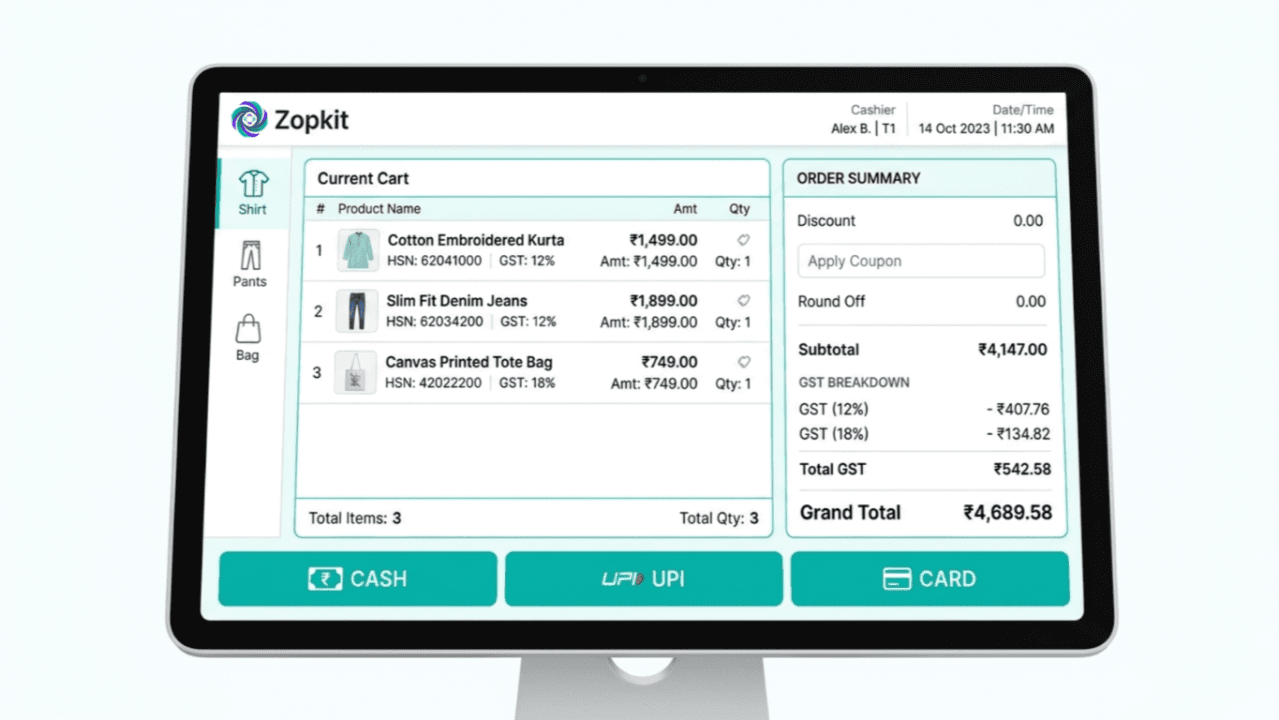
Zopkit Finance's POS billing is built for counter speed, not for accountants. Counter staff scan or search a product, the price and HSN code load from the product record, the correct GST rate applies automatically, and the invoice is ready to print or share on WhatsApp in under 60 seconds. For a busy counter handling 40 to 80 transactions a day, this is the baseline.
GST Rate at the Product Level, Not the Invoice Level
The correct GST slab — 5%, 12%, or 18% — is set once when the product is added to the catalog. Every invoice for that product carries the correct rate without the counter staff needing to know it. The most common GST billing error in small retail — wrong rate applied because the person at the counter made an assumption — is eliminated structurally. GSTR-1 rate mismatches that currently require CA corrections every quarter stop being a recurring problem.
HSN Codes Without the Lookup
HSN codes are assigned to products at setup and appear on every invoice automatically. For a mixed retail catalog where apparel is 5%, footwear is 12%, and accessories are 18% — each with their own HSN — this eliminates an entire category of compliance error that currently gets caught only when the CA reviews the return data.
Credit Notes for Returns in Two Taps
A customer returns a product bought yesterday. Zopkit Finance generates a GST-compliant credit note against the original invoice. The tax reversal is automatic. The inventory restocks in Operations. The accounts entry posts. A return that currently requires a manual stock entry, a handwritten note, and a CA call is a two-tap operation.
Day-End Shift Summary Without Any Extra Work
At close of day, the POS session produces a complete shift summary: total sales by category, GST collected by rate slab, cash received, UPI and card received, and expected vs. actual drawer amount. The daily data is structured, clean, and feeds directly into the monthly GST report — without any additional effort from the store owner.

III. Zopkit Operations — Inventory That Updates Itself
Every Sale Is a Stock Entry. The Register Runs Itself.
Zopkit Operations is the inventory layer that sits directly behind the billing function. When Finance raises an invoice for 3 units of a product, Operations reduces the stock count for those 3 units in real time — automatically, with no manual entry required. When a goods receipt is recorded for incoming stock, the count increases. The stock register is not a notebook that someone updates at day-end. It is the live output of every transaction in the system.
Live Stock Count for Every SKU
A retailer managing 300 SKUs across sizes, colours, and variants cannot track stock from memory. Zopkit Operations shows a real-time count for every SKU: current quantity on hand, units sold today, units received this week. When you search "Blue Linen Kurta Size M," the system shows 4 units — not 4 as of yesterday's manual count, but 4 as of the last transaction recorded.
Low-Stock Alerts Before the Shelf Empties
Set a reorder point for each product — 5 units for fast movers, 2 for slow movers. When stock crosses below the threshold, an alert surfaces. You know to reorder before the stockout happens, before the customer asks and walks out, before the sale is lost. For a retailer managing 300+ SKUs manually, this single feature prevents 10 to 20 stockout events every month.
Barcode Scanning at the Counter and Receiving Dock
Zopkit Operations generates barcodes for every SKU. Counter staff scan instead of searching by name. Incoming stock is scanned against the purchase order to confirm quantities received. Manual entry errors — wrong product on an invoice, wrong count at receiving — are eliminated when the workflow is scan-based rather than typed.
Closing Stock Valuation Without a Physical Count
The CA's first question at month-end: what is the closing stock value? In a manual setup, this requires a full physical count and price multiplication across hundreds of SKUs — a half-day exercise at minimum. In Zopkit Operations, the stock valuation report is available at any point: current quantity × cost price, totalled across the entire catalog. The month-end closing stock figure for the accounts is a report, not an exercise.

IV. How Finance and Operations Work Together
One Sale at the Counter. Six Things Update Automatically.
The core difference between Zopkit and a standalone billing app is that Finance and Operations share the same data layer. A transaction recorded in one module is immediately visible in the other — no export, no manual transfer, no synchronisation required.
Here is what a single counter sale looks like end-to-end:
Step What Happens Counter staff scans product Name, price, HSN code, GST rate load instantly Invoice raised in Finance GST entry posted to tax register Payment recorded Daily sales total and accounts entry updated Stock count in Operations Reduces by units sold — in real time Low-stock check runs Alert surfaces if count crosses reorder point Day-end session closed Shift summary with sales, GST, cash vs. UPI ready
In a disconnected setup, steps 3 to 6 are all manual. In Zopkit, they are automatic consequences of step 2.
V. The Tally Question Every Small Retailer Asks
Tally Is for the CA. Zopkit Is for the Store. Both Can Coexist.
Most small retailers have Tally because the CA requires it for year-end compliance. The CA logs in once a month, posts entries, files returns, and leaves. The daily operations — billing, stock management, supplier payments — happen outside Tally because Tally was never designed for counter operations. The result is two parallel systems with no connection between them.
Zopkit is not a Tally replacement. It is a replacement for everything the retailer does daily that Tally was never the right tool for:
Daily Operation Before Zopkit With Zopkit GST invoice at counter Billing software Zopkit Finance POS Update stock after a sale Manual notebook entry Auto-updated in Operations Process a customer return Manual note + CA call Credit note in 2 taps Check current stock level Count the shelf Live count in dashboard Reorder low-stock items Notice when shelf is empty Alert at reorder threshold Month-end closing stock Physical count exercise Valuation report from Operations Compile GSTR-1 for CA Export + organise + reconcile Aligned report ready to file
Tally stays for year-end audit and ITR. Zopkit handles the other 360 days. The CA visit that currently takes 3 hours takes 45 minutes because the data is already organised and structured.
VI. GST Return Filing Made Simple
GSTR-1 Data in 10 Minutes. CA Reviews. Files. Done.
The monthly GST return for a small retailer currently involves: exporting billing data, organising by invoice type — B2B with GSTINs, B2C above ₹2.5 lakh, B2C summary for smaller transactions — computing output tax by slab, and handing the file to the CA. If the billing and stock records do not match, there is a reconciliation exercise before filing can even begin.
In Zopkit Finance, the GSTR-1 aligned report is generated from live invoice data at month-end. B2B invoices are listed with GSTINs and HSN codes. B2C invoices are summarised by slab. Credit notes appear separately. Everything matches the invoices raised in the period because every invoice was created with the correct product-level rate.
The CA receives one clean report. Reviews in 10 minutes. Files. The 2 to 3 hour monthly data compilation session disappears entirely

VII. Who This Is Built For
Zopkit Finance + Operations for retail fits any single-location Indian retail business where:
- One store, one counter — owner or counter staff handles billing directly
- GST registered — regular GSTR-1 and GSTR-3B filer, monthly or quarterly
- 50 to 1,000 SKUs — physical products, often with size and colour variants
- CA handles filings — not day-to-day billing or stock management
- Outgrowing the notebook — manual stock register is causing stockouts and month-end reconciliation headaches
- Wants simplicity first — counter staff should be able to learn it in one day, not one week
This is the right fit for apparel stores, electronics retailers, grocery shops, pharmacies, hardware stores, gift shops, stationery stores, and any other single-location retail business in India that needs professional GST billing and inventory management without enterprise-level complexity or cost.
The Business You Wanted to Run Runs Better With the Right Tools
The problem is not that small retailers in India lack billing software. It is that their billing software does not talk to their stock register, and neither talks to their accounts. Every month, hours are lost reconciling three systems that were never designed to work together hours that could be spent on buying decisions, on customer relationships, or simply on being present in the store.
Zopkit Finance and Zopkit Operations close that gap permanently. Every invoice updates the stock. Every return posts the credit note and restocks the shelf. Every month ends with a clean GSTR-1 report and a closing stock figure the CA can use directly. The daily operations of a single-store retail business run from one platform, one login, and one consistent set of data.
Start free at zopkit.com. Add your products, set GST rates and HSN codes, and raise your first GST-correct invoice in under 30 minutes. No CA needed for setup. No training programme needed for counter staff. Just a better way to run the store you have already built.