Top Business Operating Software for Mid-Size Consulting Firms (India 2026)
A 100 to 200 person consulting firm is not a startup running lean on a few tools. It has real organisational complexity. Multiple delivery teams. A structured HR function. A finance team that is supposed to close the month cleanly but spends most of its time chasing approved timesheets that live in a project tool that does not talk to the billing system.
At this size, the tools problem is not about finding the right project management app or the right HRMS. It is about the gaps between them. Every time an approved timesheet has to be manually re-entered into an invoice, every time an employee record in payroll is out of sync with the HR system, every time the CFO has to pull data from three places to produce a revenue report, the firm is paying an operational tax on its own fragmentation.
This article compares how mid-size consulting firms in India are currently evaluating operating software, what the typical fragmented stack actually costs, and why Zopkit's integrated billing, HRMS, and project delivery ecosystem eliminates the double-entry problem that other tool combinations cannot.
Table of Contents
- I. The Tool Landscape for 100 to 200 Person Consulting Firms
- II. The Double-Entry Problem: Where Revenue Leaks Between Tools
- III. What to Actually Evaluate When Comparing Operating Software
- IV. How the Leading Tool Combinations Stack Up
- V. How Zopkit Works as One Connected Operating System
- VI. The Credit-Based Model vs. Per-Seat Licensing at Scale
- VII. Where to Start if You Are Currently on a Fragmented Stack
I. The Tool Landscape for 100 to 200 Person Consulting Firms
At this firm size, the tool conversation typically involves comparing five to eight vendors across four functional categories. Almost every firm in this segment is currently running one of three configurations.
Configuration A: The enterprise stack
Salesforce or HubSpot for CRM. Jira or Asana for project delivery. Darwinbox, Keka, or Zoho People for HRMS. Tally or Zoho Books for accounting. Four separate vendors. Four separate contracts. Four separate data models that need to be manually reconciled at every process boundary.
Configuration B: The Zoho suite
Zoho CRM, Zoho Projects, Zoho People, and Zoho Books. All from one vendor, which sounds like integration. In practice, the integration between Zoho modules is shallow. Approved timesheet data in Zoho Projects does not automatically generate invoice line items in Zoho Books. Employee records in Zoho People do not feed directly into payroll without configuration overhead that grows with team complexity.
Configuration C: The point-solution stack
A combination of best-in-class single-purpose tools. Harvest or Toggl for timesheets. HubSpot for CRM. Keka for HR. Tally for accounts. Each tool is genuinely good at its specific function. The problem is the space between them, which is filled entirely with manual data transfer, export-import workflows, and a growing reconciliation burden on the finance and ops teams.


II. The Double-Entry Problem: Where Revenue Leaks Between Tools
Double-entry is the operational term for what happens when the same data point needs to exist in two systems and a human being is responsible for moving it from one to the other. At 100 to 200 people, this is not a minor inconvenience. It is a systematic source of billing errors, payroll discrepancies, and revenue leakage.
Where double-entry occurs most often in consulting firm operations:
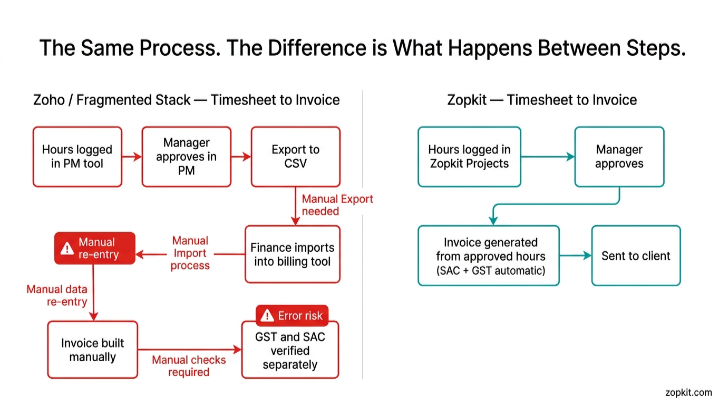
Between project delivery and billing. A consultant completes work. They log hours in the project management tool. Those hours are approved by the project manager. At billing time, the finance team opens the invoicing tool and manually enters the approved hours, the billing rate, the GST details, and the client information. Every step in that manual transfer is an opportunity for error. Wrong rates, missed hours, incorrect SAC codes, wrong client GSTIN on the invoice. In a firm billing 50 to 80 active engagements a month, the aggregate error rate is not zero.
Between HRMS and payroll. An employee gets a salary revision approved in the HRMS. The payroll team has to update the same information in the payroll calculation tool. If that update is missed or delayed, the month's payroll runs on stale data. PF contributions are calculated on the wrong gross. TDS is computed on an old salary. The correction requires a manual reversal in the next cycle, which creates an accounting entry that should not exist.
Between HRMS and project allocation. A consultant is assigned to a new engagement. The project manager records this in the project tool. The HRMS has no idea. When the leave request comes in during a critical delivery week, the approver has no visibility into the project commitment. The leave is approved. The engagement suffers.
The aggregate cost of double-entry at 100 people:

That is 30 to 50 person-hours per month in pure overhead, before counting the hours spent correcting errors generated by those handoffs.
III. What to Actually Evaluate When Comparing Operating Software
When a 100 to 200 person consulting firm is evaluating operating software, the feature comparison is the easy part. Every vendor has a feature checklist. The harder questions are about the architecture beneath the features.
The five questions that actually separate operating platforms at this firm size:
1. Is the data model shared across modules?
When a client record is created, does it automatically flow to project delivery, billing, and CRM without re-entry? Or does each module have its own data store that requires synchronisation? The difference between a shared data model and an integrated-but-separate model is the difference between zero double-entry and managed double-entry.
2. Does timesheet approval flow directly to invoicing?
This is the single highest-value integration for a consulting firm. If the answer is "no, there is an export step," the billing delay and error risk are structural, not solvable by process improvement.
3. Is Indian statutory payroll a first-class feature?
Not an add-on, not a third-party integration, not "you can configure it to handle PF." PF, ESI, PT by state, TDS with correct slab calculation, Form 16 generation, and Form 12BA, all running natively inside the HRMS.
4. Does the pricing model match how a consulting firm actually operates?
A per-seat model charges identically for a month where 150 people are billing actively and a month where half the firm is between engagements. At 100 to 200 people, this asymmetry is material.
5. Is there a single source of truth for leadership?
Can the managing partner or CEO open one dashboard and see pipeline health, delivery status, team utilisation, outstanding receivables, and cash flow, all live, without running reports from four different systems?
IV. How the Leading Tool Combinations Stack Up

The Zoho suite is the most common alternative to Zopkit in this segment, and it is worth addressing directly. Zoho's modules are individually capable. The shared-vendor positioning is genuine. But "same vendor" is not the same as "same data layer." The integration between Zoho Projects and Zoho Books does not eliminate invoice double-entry in the way that a native shared data model does. Timesheet approval in Zoho Projects does not auto-generate invoice line items in Zoho Books without significant custom configuration. For a firm billing 60 to 80 active engagements monthly, that configuration gap is where the revenue leakage lives.

V. How Zopkit Works as One Connected Operating System
Zopkit is not four modules that happen to be sold by the same company. It is a single platform where every module shares one identity layer, one client data model, and one transaction record. The difference matters practically at every process boundary a consulting firm crosses.
Project delivery and billing: no gap between them
When a project manager approves a consultant's timesheet in Zopkit Projects, those approved hours become immediately available in Zopkit Financial Accounting as billable line items. The client name, the project reference, the billing rate agreed at engagement setup, the SAC code for the service type, and the GST rate are all pre-populated from the client record created when the deal was won in the CRM. The finance team does not re-enter anything. They review, confirm, and send. For a firm billing 70 active engagements monthly, the monthly billing cycle goes from a two-day exercise involving three people to a same-day process involving one.
HRMS and payroll: one source of truth
Employee records in Zopkit HRMS are the same records used by the payroll engine. A salary revision approved in HRMS is reflected in the next payroll run automatically. PF contributions are calculated on the correct updated gross without a manual update step. TDS slab calculation is dynamic, not static, so mid-year salary revisions do not require a payroll correction in the following cycle. PT is calculated by state, with the correct rate applied based on the employee's work location as recorded in their HRMS profile.
CRM and project delivery: deal won to engagement live
When a deal is marked won in Zopkit CRM, the engagement details, the client account, and the agreed commercial terms flow directly into a new project record in Zopkit Projects. The delivery team does not receive a briefing email or a separately created project brief. The client context, scope, and commercial terms are already there. The project begins with the right information from day one.
Leadership visibility: one dashboard, every function
The managing partner or operations lead can open Zopkit and see, in one view: the current pipeline by stage and value, the health status of every active engagement, team utilisation across all consultants, outstanding invoices by ageing bracket, and projected cash flow for the month. None of this requires a report run, a data export, or an update meeting. It is live, from the same data that every function is working from.
What each team in a 100 to 200 person consulting firm gains:


VI. The Credit-Based Model vs. Per-Seat Licensing at Scale
For a 100 to 200 person consulting firm, the economics of per-seat SaaS licensing are worth examining carefully. Not just the headline cost, but the structural mismatch between how per-seat pricing works and how a consulting firm actually operates.
The per-seat problem at scale:
A 150-person firm using a typical enterprise stack pays for 150 seats on each module, every month, regardless of usage. In a month where 40 consultants are between engagements or on bench, the firm still pays for 150 CRM seats, 150 project seats, and 150 HRMS seats. The cost does not flex with the business.
In a consulting firm, headcount and active utilisation can diverge significantly across the year. Hiring cycles, project ramp-ups, and delivery peaks create a pattern where the actual system usage in December may be 60% of what it is in March. A flat per-seat model charges the same for both months.
How Zopkit's credit-based model works differently:
Credits are consumed by actual usage across all modules. A senior partner who is active in the CRM every day and reviews the finance dashboard weekly consumes credits at a rate that reflects that activity. A junior analyst who logs timesheets daily but rarely touches the CRM or billing module consumes credits differently. A bench consultant between engagements consumes minimal credits until their next project starts.
The credit pool is shared across all modules. Adding the HRMS module to a firm already using CRM and Projects does not add a new per-seat charge line. It draws from the same credit pool, with the usage profile reflecting how HRMS is actually being used.
For a firm managing variable engagement volumes and non-uniform module usage across a team of 100 to 200, the credit model consistently delivers a better cost outcome than any fixed per-seat licensing structure.
VII. Where to Start if You Are Currently on a Fragmented Stack
A 100 to 200 person consulting firm that is currently running a fragmented stack does not need to migrate everything simultaneously. The productive approach is to identify which handoff in the current stack is generating the most overhead or the most errors, and start with the two Zopkit modules that eliminate that handoff.

Because Zopkit modules share one data layer, adding the second module after the first is not a new implementation project. The client records, employee records, and transaction history created in the first module are already available to the second. The connection is activation, not integration.
The double-entry problem is not solved by better processes or more disciplined data entry from the team. It is solved by removing the gap between the tools that data has to cross. That is the structural advantage of a platform where billing, HRMS, and project delivery were built to share one data model from the beginning, not integrated after the fact.
Book a free demo at zopkit.com to see how the timesheet-to-invoice flow, connected HR and payroll, and cross-module leadership dashboard work for a firm at your size.