Tools to Run a SaaS Startup Alone in India - CRM, Finance and HR in One
Most articles about tools for SaaS founders are written for teams. A CRM for your sales team. An HRMS for your HR manager. An accounting tool your finance head will configure.
If you are building a SaaS product alone in India, you do not have a sales team, an HR manager, or a finance head. You are all of them. And the last thing you need is three separate tools, three separate logins, and three separate monthly invoices just to manage ten prospects, raise your first invoice, and stay compliant with GST from month one.
This article walks through exactly what a solo SaaS founder in India needs at each stage from pre-revenue to first ten paying customers, and how Zopkit CRM and Financial Accounting cover every function without adding complexity, headcount, or cost you cannot justify yet.
I. What You Are Actually Managing as a Solo SaaS Founder
Before picking any tool, it helps to be honest about what the job actually is at this stage.
You are building the product. But alongside that, you are also:
- Running sales by yourself. Every demo call, every follow-up, every proposal, every "still thinking about it" conversation that needs a nudge three weeks later
- Managing customer success for the few users you have already onboarded. Their questions come in at 11 PM. Their renewal is next month. Their feedback shapes your roadmap.
- Handling billing for every paying customer. Recurring subscriptions, one-time setup fees, GST on SaaS invoices under SAC 9983, TDS from corporate clients who deduct at source
- Keeping your own books clean because your CA, your potential investors, and the GST portal all want accurate records and they do not care that you are also the product manager
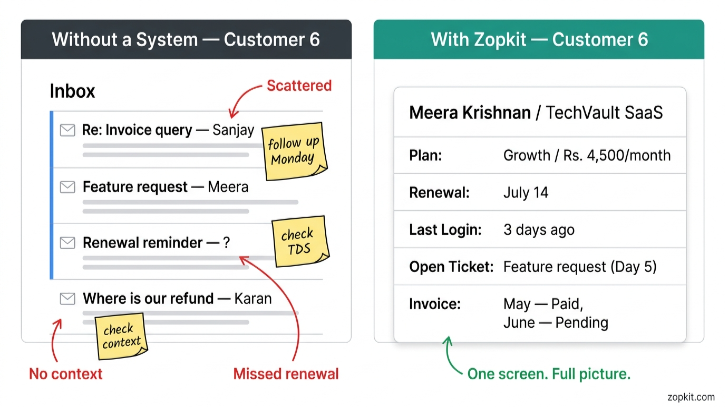
None of this is complicated individually. The problem is that without a system, it lives in your head, your inbox, and a growing pile of tabs that you plan to organise "this weekend." And then one warm lead goes cold because you forgot to follow up. And then a customer churns because nobody noticed they stopped logging in. And then a GST filing is three days late because you could not find the invoice you raised in March.
The tool you need at this stage is not powerful. It is connected. Every piece of information about a customer, a deal, an invoice, and a compliance deadline in one place, accessible from one login, with zero manual handoffs between functions.
II. Stage by Stage: What You Need and When
Pre-Revenue: Before Your First Paying Customer
At this stage, your primary operational need is lead tracking. You are having conversations. You are doing product demos. You are collecting waitlist signups from your landing page. You are following up with early adopters who said "looks interesting, come back when X is ready."
Without a system, all of this lives in your memory and your inbox. That works for the first 10 conversations. It fails at 30.
What Zopkit CRM gives you at pre-revenue:
- A lead pipeline with stages you define. "Demo Requested," "Demo Done," "Considering," "Waitlisted," "Ready to Onboard." Every conversation has a home. Nothing falls through.
- Contact records where every email, every note from a call, every piece of feedback is attached to the specific person who gave it. When you go back to that conversation three weeks later, you have full context without digging through your inbox.
- Tasks and follow-up reminders tied to each contact. When someone says "reach out after our board meeting in two weeks," you set a task. Zopkit reminds you. You do not rely on memory.
- Web forms that embed on your landing page and push signups directly into the CRM as new leads. No manual import from a Google Form into a spreadsheet.
- Email sync with Gmail so every email you send or receive from a prospect is automatically logged to their record. The CRM stays current without any extra effort.
At this stage you are not paying for features you will not use. The credit-based model means low activity at pre-revenue costs very little. You are building the habit and the system before you need it at scale.

First Customer: Customer 1 to Customer 3
Your first paying customer changes everything operationally. You now need to raise an invoice. You need to make sure it has the right GST treatment for a SaaS product. You need to track whether it has been paid. And you need to make sure the books are accurate from day one because switching accounting tools after twelve months of messy records is genuinely painful.
What Zopkit Financial Accounting gives you at this stage:
- GST-compliant invoicing for SaaS out of the box. SAC code 9983 for software services, 18% GST, correct invoice format. You do not need to look up whether SaaS is a service or a product for tax purposes or build a custom invoice template in Canva. The invoice is correct by default.
- Subscription and recurring invoice setup. Set the customer, the plan, the billing cycle, and the amount once. The invoice raises automatically every month. Your first three customers are billing themselves from month two.
- Payment tracking and AR visibility. Know exactly which invoices are paid, which are outstanding, and how many days they have been overdue without maintaining a spreadsheet.
- TDS handling for corporate customers. When your first B2B customer deducts TDS on the SaaS fee, that gets recorded against the invoice correctly. You are not trying to reconcile this at year-end from memory.
- Bank transaction import and reconciliation. Connect your current account. Transactions import automatically and match against invoices. Your books are always reconciled.
The CRM and Finance module are connected on the same platform. The customer record you created in the CRM when they were a lead is the same record you invoice from in Finance. No re-entry. No "let me find their GSTIN again."
Customers 4 to 10: When Operations Start Multiplying
Between your fourth and tenth customer, three things happen simultaneously that catch most solo founders off-guard.
First, customer success becomes a real job. You have onboarded customers who are at different stages of adoption. Some are power users. Some logged in once and never came back. Some have questions that your documentation does not answer. Keeping track of who needs what, who is at risk of churning, and whose renewal is coming up requires a system, not just good intentions.
Second, your pipeline is more complex. You have inbound leads from people who found your product organically. You have referrals from existing customers. You have conversations with enterprise prospects who want a pilot before committing. All of these are at different stages and need different follow-up approaches. Your inbox cannot hold all of this anymore.
Third, financial compliance becomes more involved. You may have started collecting advance payments. You may have customers on annual plans. You may have issued credit notes when a customer changed plans mid-cycle. The invoice history is growing and your CA wants clean books for quarterly advance tax.
What the CRM covers at this stage:
- 360-degree customer account records that show every deal, every invoice, every support ticket, and every communication for a customer in one place. When a customer calls with a billing question, you open their record and everything is there.
- Support ticketing integrated into the customer record. Customer questions, bug reports, and feature requests are logged as tickets against their account. You can see their full history alongside their deal value and renewal date when deciding how to prioritise.
- Pipeline segmentation. Separate views for inbound leads, referrals, and enterprise pilots so you are not managing everything in one cluttered board.
- AI assistant that answers "which customers have not logged in this week," "which renewals are coming up in the next 30 days," or "which enterprise deal has been in the pipeline the longest" in plain English from your actual data.
What Finance covers at this stage:
- Advance payment recording and credit management. When a customer pays for an annual plan upfront, that advance is recorded correctly. When they change plans, the credit note adjusts the books without creating a mess.
- Accounts Receivable aging. A live view of every outstanding payment sorted by how long it has been due. At ten customers you do not need this every day. But when an invoice goes 45 days overdue, you want to know without doing mental arithmetic across five browser tabs.
- P&L reporting generated from real transaction data. At this stage your P&L is simple. But having it accurate and accessible is what lets you make confident decisions about when to hire your first employee or whether you can afford that infrastructure upgrade.
- Compliance calendar with GST filing deadlines, advance tax due dates, and TDS return reminders. You do not need to maintain a separate calendar for this. The platform surfaces it from your own transaction data.

III. The Tools Most Solo Founders Use Instead (And Why They Break)
It is worth being direct about the alternatives, because every solo founder has tried at least two of these before landing on something that actually works.

The pattern in every failed combination is the same. Each tool is reasonable at its specific job. The problem is the gap between them. The customer who exists in the CRM has to be created again in the billing tool. The payment status in the billing tool has to be manually noted in the CRM. The GST on the invoice has to be calculated separately and verified against the invoice total before it goes out. The books are assembled from multiple sources at month-end.
A solo founder does not have the bandwidth to manage these gaps. The tools that look free or cheap up front become expensive in time within the first 60 days.
IV. What Changes When CRM and Finance Share One Data Layer
This is the core of why Zopkit specifically works for a solo SaaS founder rather than any individual tool recommendation.
When the CRM and Financial Accounting run on the same platform, the following things happen without any action from you:
Customer created once, used everywhere. The prospect you added to the CRM pipeline is the same record you invoice from in Finance. Their GSTIN, their billing address, their email, and their plan details are already there when you generate the invoice. You do not re-enter anything.
Deal won triggers the billing setup. When you mark a deal as won in the CRM, you set up the subscription and recurring invoice in Finance from the same record. One flow, not two separate setups in two separate tools.
Invoice status is visible from the customer record. Open the CRM record for any customer and you can see their invoice history, payment status, and outstanding amount without opening a separate tab. When they call with a billing question, you already know the answer before they finish the sentence.
Payment received updates the customer status. When a payment is recorded in Finance, the customer record in the CRM reflects the updated account standing. No manual status update. No cross-referencing two systems to figure out whether a customer's renewal payment came through.
AI assistant works across both. You can ask "which customers have an outstanding invoice and have not logged in this week" and get an answer that draws on both the CRM engagement data and the Finance billing records simultaneously. That kind of cross-function query is impossible when the tools are separate.
V. The Credit Model at Solo Founder Scale
The credit-based pricing model matters especially at this stage because your activity level is not consistent month to month.
Pre-revenue, you are primarily using the CRM. A handful of lead records, some tasks, some email logging. Very low activity. Under a per-seat model, you would still pay the full monthly seat fee for a CRM tool regardless.
At your first three customers, you are generating invoices and tracking payments. Activity is higher in Finance, lower in the CRM as you focus on onboarding.
At customers four to ten, both modules are active but the intensity varies week to week depending on where you are in your sales and billing cycle.
The credit model charges for what actually happens. A quiet week costs less than a week where you are onboarding two new customers, chasing three overdue invoices, and demoing to four prospects simultaneously. You top up credits when you need them. You do not pay for seat licences during months where the product is barely touched.
For a solo founder in India who is watching every expense during the pre-revenue and early-revenue stage, this is not a minor consideration. It is the difference between a tool that feels like overhead and a tool that scales with the business it is supposed to be running.

VI. When to Add More
Zopkit CRM and Financial Accounting are enough from zero to your first ten customers. The natural expansion moments are predictable.

Because every Zopkit module shares one identity layer and one data system, adding a module is not a new implementation. Your customer records, invoice history, and contact data are already there. The new module activates against data that already exists.
The solo founder who starts Zopkit at pre-revenue is on the same platform at 50 employees. No migration. No "you have grown into our enterprise tier" conversation. No re-entering three years of customer data into a new tool because the old one does not scale.
Start with what you need today. Add what the business requires as it grows. Every piece of it shares one source of truth from the first day you log in.
Start for free at zopkit.com — no per-seat fees, no enterprise contracts, no complexity that does not match where you are.