How SaaS Companies Use Zopkit to Run Sales, CS, HR and Finance on One Platform
At 100 to 200 people, a SaaS company is no longer improvising. It has a sales team, a CS function, an HR manager, a finance team, and a leadership layer that needs to see all of them at once.
It also has, in most cases, six to eight tools running in parallel. None of them share data natively. Somebody's job is making sure the information moves correctly between them. When that person makes an error, or is on leave, or leaves the company, the data falls out of sync and nobody notices until a customer calls or a board meeting asks for a number that takes two days to produce.
This article is a step-by-step walkthrough of how a 100 to 200 person SaaS company in India runs the full operational loop on Zopkit, from the moment a lead enters the pipeline to the moment payroll runs for the team that closed and served that customer. Every step, every data handoff, and every manual task that disappears when the platform is connected.
I. The Operational Stack at a 100-Person SaaS Company
Before the walkthrough, here is what the typical fragmented stack looks like at this size, and what it costs.
Typical Fragmented Stack

Total: Rs. 2,35,000 to Rs. 5,60,000 per month. Six contracts. No shared data layer.
Every boundary between these tools is a manual handoff. Every manual handoff is a potential error. Every error is either discovered in a customer call, a month-end reconciliation, or not at all.
What Zopkit Replaces
- Zopkit CRM replaces the sales CRM and CS tool
- Zopkit Financial Accounting replaces the billing and accounting tool
- Zopkit HRMS replaces the HRMS and payroll tool
- Zopkit Projects replaces the project management tool
- The leadership dashboard replaces the manual BI layer
One platform. One credit-based contract. All data shared natively across every function.
II. The Full Data Flow: Lead to Payroll
This is the complete operational loop for a 100 to 200 person SaaS company on Zopkit. Every step shows what happens, which module handles it, and what data moves automatically without human intervention.
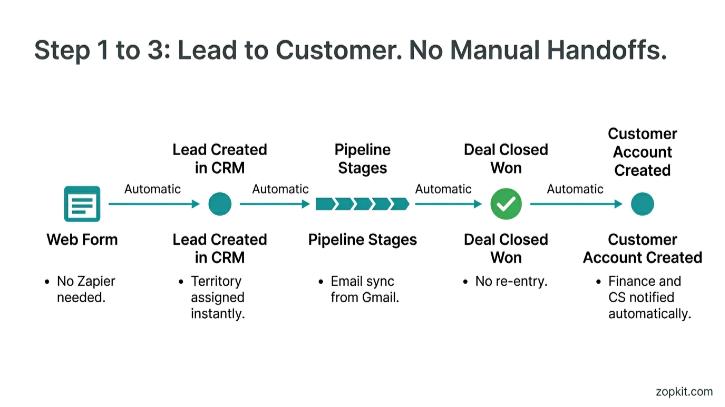
Step 1: Lead Enters the Pipeline
What happens:
- A prospect fills out a demo request form on the company website
- The web form is embedded directly from Zopkit CRM, no Zapier, no third-party form tool
- The lead record is created automatically in the CRM pipeline with name, company, email, phone, and source
- The lead is assigned to the correct sales rep based on territory rules configured in the CRM
Module: Zopkit CRM
Data created: Lead record, contact record, territory assignment, source attribution
Manual steps eliminated: Form-to-CRM data entry, lead assignment email, manual pipeline update
Step 2: Sales Qualification and Pipeline Management
What happens:
- The sales rep works the lead through configured pipeline stages: Qualified, Demo Done, Proposal Sent, Negotiation, Closed Won
- Every email between the rep and the prospect syncs automatically from Gmail or Outlook to the lead record
- No manual logging required
- The rep generates a quotation directly inside the CRM with the product tier, pricing, and contract terms
- The quotation becomes a PDF sent to the prospect from inside the platform
Module: Zopkit CRM
Data created: Pipeline stage history, email thread, quotation with deal terms and pricing
Manual steps eliminated: Manual email logging, copy-pasting deal terms into a separate quoting tool, exporting to send
Step 3: Deal Closed, Customer Record Created
What happens:
- The rep marks the deal as Closed Won in the CRM
- A customer account record is created automatically, inheriting all deal information: tier, contract value, payment terms, billing cycle, renewal date
- The CS manager is notified and assigned to the account
- The customer record is now live across the entire platform, visible to Sales, CS, Finance, and Projects with the appropriate role-based access
Module: Zopkit CRM
Data created: Customer account record with full deal context, renewal date, CS assignment
Manual steps eliminated: Creating a new customer in the billing tool, emailing CS to introduce the account, building an onboarding sheet from scratch
What the CS manager sees on day one:
- Deal value and tier
- Contract start and renewal date
- Agreed billing terms (monthly/annual, bank transfer/UPI)
- Every email sent during the sales cycle
- No handover doc required

Step 4: Onboarding Project Created
What happens:
- The CS manager or delivery lead creates an onboarding project in Zopkit Projects, linked to the customer account record in the CRM
- The project template for new customer onboarding is applied: kickoff call, environment setup, data migration, training session, go-live, handover to ongoing CS
- Tasks are assigned to team members across the delivery and engineering teams
- Time logged by delivery team members on this project is classified as billable or non-billable at the task level
Module: Zopkit Projects + Zopkit CRM (linked)
Data created: Project record linked to customer, tasks with assignees and due dates, time entries
Manual steps eliminated: Creating a Jira project, copying customer details manually, sending onboarding task sheets via email
Step 5: First Invoice Raised
What happens:
- The first subscription invoice is raised in Zopkit Financial Accounting, directly tied to the customer account that was created when the deal closed
- The billing terms from the CRM deal record are already available: tier, value, payment terms, GST applicability
- No re-entry of customer details
- GST is calculated automatically based on SAC code configuration (9983 for SaaS, 18% GST)
- TDS handling is configured for enterprise customers who deduct at source
- The invoice is sent directly from the platform with a payment link
Module: Zopkit Financial Accounting
Data created: Invoice record linked to customer, GST calculation, TDS entry if applicable
Manual steps eliminated: Re-entering customer details in a separate billing tool, calculating GST manually, sending invoices from a separate email
For recurring subscription customers:
- Recurring invoices are configured once with the billing cycle (monthly or annual)
- Invoices generate and send automatically on the configured date
- No manual action required each cycle
Step 6: Payment Received, Books Updated
What happens:
- Customer pays via bank transfer or UPI
- The bank transaction imports automatically into Zopkit Financial Accounting via bank account connection
- Rule-based auto-categorisation matches the payment to the outstanding invoice
- The invoice is marked paid, the AR aging report updates, and the customer's payment status in the CRM account record updates simultaneously
- If the customer is overdue, the CS manager sees this on the account record without calling finance
Module: Zopkit Financial Accounting
Data created: Payment record, bank reconciliation entry, updated AR aging
Manual steps eliminated: Manually reconciling bank statements, updating invoice status in a separate system, emailing finance to confirm payment before a renewal call
Step 7: Renewal Pipeline Triggered
What happens:
- 60 days before the renewal date (configured in the CRM), the account is automatically added to the renewal pipeline
- The CS manager receives a task to initiate the renewal conversation
- When opening the account record, the CS manager sees: current MRR, invoice payment history, open support tickets, last contact date, and the renewal deal value
- If the account has overdue invoices or open tickets older than 5 days, an at-risk flag is visible on the record
Module: Zopkit CRM + Zopkit Financial Accounting (connected)
Data created: Renewal deal in pipeline, at-risk flag if signals present
Manual steps eliminated: Manually tracking renewal dates in a spreadsheet, calling finance to check payment history, checking Freshdesk separately for open tickets
Step 8: Professional Services Billed from Project Hours
What happens:
- For customers on an implementation or professional services engagement, the delivery team logs hours in Zopkit Projects
- Hours are approved by the project manager
- Approved billable hours flow automatically into Zopkit Financial Accounting as invoice line items
- The finance team reviews and approves the invoice before it is sent
- No manual timesheet export, no re-entry into the billing tool
Module: Zopkit Projects + Zopkit Financial Accounting
Data created: Billable time entries linked to customer, invoice generated from approved hours
Manual steps eliminated: Exporting timesheets from Jira, re-entering hours in Zoho Books, manually calculating billable amounts

Step 9: New Hire Added to HRMS
What happens:
- The sales team closes a quarter and headcount increases with two new AEs
- The HR team adds the new employees in Zopkit HRMS: personal details, job title, department, reporting manager, salary structure, PF enrollment, ESI eligibility, and Professional Tax by work state
- The employees are assigned roles in Zopkit with access to the CRM and Projects modules appropriate for their function
- No separate account creation in the CRM, no separate Keka onboarding
Module: Zopkit HRMS
Data created: Employee records with statutory configuration, system access role assignments
Manual steps eliminated: Creating accounts in every tool separately, configuring PF/ESI/PT manually in a separate payroll tool, sending welcome emails with multiple login credentials
Step 10: Monthly Payroll Run
What happens:
- The HR manager initiates payroll in Zopkit HRMS at month end
- Leave taken during the month, approved overtime, and approved expense claims are already in the system from the attendance and expense modules
- PF, ESI, Professional Tax, and TDS are calculated automatically based on each employee's configured structure and investment declarations
- Payslips are generated and distributed to employees from the platform
- Form 16 and Form 12BA are available at year end without a separate process
- The payroll journal entry posts automatically to Zopkit Financial Accounting, updating the books with salary costs by department
Module: Zopkit HRMS + Zopkit Financial Accounting (connected)
Data created: Payslips, statutory deduction records, payroll journal entries in the GL
Manual steps eliminated: Exporting payroll numbers to Tally, cross-checking leave data from a separate attendance tool, calling a CA to handle PF/ESI filing inputs
Step 11: Sales Commission Calculated
What happens:
- The sales leader reviews the quarter's closed deals in Zopkit CRM
- Deal values, close dates, and assigned reps are all on record
- Commission calculations are configured as a formula tied to deal value and tier
- Approved commissions feed into the next payroll run as a variable component in HRMS
- No separate commission spreadsheet, no manual reconciliation between the CRM and payroll
Module: Zopkit CRM + Zopkit HRMS
Data created: Commission amounts per rep linked to deals, variable component in payroll
Manual steps eliminated: Exporting deal data from HubSpot, calculating commissions in Excel, manually inputting variable pay into Keka

III. What Leadership Sees Across All of This
At 100 to 200 people, the CEO and leadership team need a single operating view. Here is what the Zopkit leadership dashboard surfaces without any manual assembly.

No Monday morning report assembly. No pulling four exports into a spreadsheet. No waiting for finance or HR to send numbers. Every data point above draws from the same platform.
IV. The Manual Handoffs That Disappear
Here is a specific inventory of the recurring manual tasks that SaaS operations teams carry every month, and what happens to them on Zopkit.

V. India-Specific Compliance That Runs Automatically
At 100 to 200 people, compliance is not optional and it is not simple. Here is what runs automatically inside Zopkit for Indian SaaS companies.
Finance Compliance
- GST calculated on every invoice using configured SAC codes
- TDS deducted for enterprise customers with auto-generated TDS certificates
- GSTR-1 and GSTR-3B aligned reports generated directly from transaction data
- Compliance calendar with GSTR filing deadline reminders
- Multi-entity support for companies with subsidiaries or international entities
Payroll and HR Compliance
- Provident Fund calculated and tracked for every eligible employee
- ESI calculated for employees below the wage ceiling
- Professional Tax configured by state for remote and distributed teams
- TDS on salary calculated using the selected tax regime (old or new) per employee
- Form 16 and Form 12BA generated at year end without a separate process
- ESOP administration including cap table, vesting schedules, and regulatory compliance calendar
VI. Zopkit vs. the Typical 100-Person SaaS Stack

VII. Getting Started at the 100-Person Stage
If your team is currently at 100 to 200 people on a fragmented stack, the migration question is always: where do we start?
Recommended sequence for a SaaS company:
- Start with CRM and Finance together. These two modules share the most data at the customer account level. Getting them running together eliminates the highest-friction manual handoff first: new customer re-entry between sales and billing.
- Connect HRMS second. Run the first payroll inside Zopkit and validate the statutory calculations. Once payroll is clean, the commission and headcount data becomes trustworthy.
- Add Projects third. Once delivery is in the platform, billable hour billing becomes automatic and the leadership dashboard gains utilisation data.
- Activate the leadership dashboard. At this point, every major data source is live. The Monday morning report assembly exercise is over.
What the first two weeks look like:

Conclusion
At 100 to 200 people, the operational overhead of a fragmented tool stack is not a minor inconvenience. It is a compounding drag on every function. Sales cannot see billing. CS cannot see support without switching tools. Finance waits for deal terms in an email thread. HR is disconnected from the revenue data that should drive compensation decisions. The leadership team spends Sunday nights assembling a dashboard that will be out of date by Monday morning.
Zopkit removes these handoffs structurally, not through integrations or automation patches, but because every module runs on the same data from the start. The customer record created when a deal closes is the same record CS opens before a renewal call, the same record Finance reads when an invoice needs to be raised, and the same record the leadership dashboard pulls when it reports net revenue retention.
One platform. One data layer. The same source of truth for every function.
See how Zopkit works for your SaaS team with a free walkthrough.
Book a demo at zopkit.com and your team can be live on CRM and Finance within the week.
If your ops team is currently spending more than 10 hours a week moving data between tools, that is the real cost of your current stack. Zopkit eliminates that overhead at the architecture level, not the workaround level. Start free at zopkit.com