How IT Service Companies Can Move Off Spreadsheets and Run Everything in One Tool
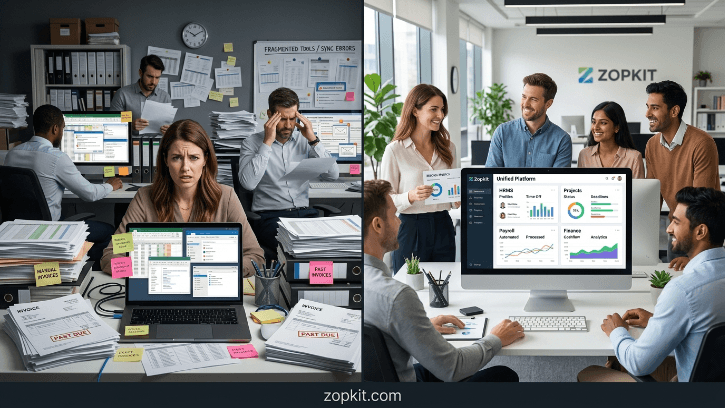
You did not build an IT service company to spend Friday afternoons chasing timesheets over WhatsApp, manually building invoices from exported Excel data, or discovering a payroll error on the last working day of the month. Yet here you are. Not because your team is careless. Because the tools you are using were never designed to work together.
Table of Contents
- The Real Cost Is Not in the Spreadsheet. It Is in the Handoff.
- What Running on One Platform Actually Means
- Zopkit HRMS: Replace the People Spreadsheets First
- Zopkit Project Management: Connect Work to Billing
- Zopkit Financial Accounting: Close the Loop from Hours to Invoice
- What the Migration Looks Like in 30 Days
- Who This Is Built For
Section I: The Real Cost Is Not in the Spreadsheet. It Is in the Handoff.
Most mid-size IT service companies do not have a shortage of software. They have a shortage of connection between their software.
Timesheets live in Excel, collected by email every Friday. Leave balances sit in a Google Sheet that nobody fully trusts. Employee records are split across Drive folders, an old HRMS, and a few onboarding emails nobody archived properly. Projects are tracked in Jira or Trello. Finance has never opened either.
When invoice time arrives, someone has to pull hours from the project tool, confirm the deal value with sales, reconcile the leave adjustments in the timesheet, and build the invoice manually. Every step in that process is a handoff. Every handoff is a potential error. Those errors cost money. And the invoice goes out two weeks late.
This is what that stack looks like in practice:
- Timesheets: Collected manually, often incomplete, submitted over email
- Leave tracking: Separate sheet, never synced with project staffing
- Employee records: Scattered across Drive, email, and a tool nobody logs into
- Project status: Visible to the PM, invisible to everyone else
- Billing: Built manually from exported data with no direct link to what was actually delivered
- Payroll inputs: Compiled by hand from attendance sheets every month

The margin loss is not in delivery. It is in the gaps between tools.
Section II: What Running on One Platform Actually Means
Consolidating on one platform does not mean buying one more SaaS tool. It means replacing the handoffs entirely by giving every function access to the same data.
Zopkit brings HRMS, Project Management, and Financial Accounting into a single ecosystem where every part of the platform shares one identity layer and one source of truth. An employee added to the HRMS is immediately available in Projects. Hours logged against a task in Projects flow directly into the billing module. A leave approved in HRMS automatically reflects in that employee's project availability. Nothing needs to be exported, copied, or re-entered.
What changes immediately:
- An employee logs hours inside the same tool where their task lives
- Those hours are tagged to the client, the project, and the employee's billing rate automatically
- When invoice time comes, the data is already structured and ready
- Leave approvals block project availability without a separate calendar update
- Payroll inputs are pulled from actual attendance and approved leave data, not a manually maintained sheet

One login. No re-entry. No handoff chaos.
Section III: Zopkit HRMS: Replace the People Spreadsheets First
The HRMS is where most IT firms carry the most hidden overhead. HR data that should live in one place is spread across onboarding emails, Drive folders, a shared leave sheet, and a payroll file someone updates manually every month.
What Zopkit HRMS covers:
- Employee profiles with documents, roles, departments, and reporting structure
- Leave management with configurable policies, accrual schedules, half-day options, and manager approval workflows
- Attendance with timesheet submission, overtime approvals, and regularization policies
- Payroll inputs auto-populated from attendance and approved leave data, with every statutory deduction handled natively: PF, ESI, Professional Tax, TDS, and Form 16
- Performance management with goal setting, continuous feedback, and 360-degree reviews
- Onboarding checklists so every new hire goes through the same structured process without things falling through the cracks
For Indian IT service companies specifically, the payroll module alone replaces the dependency on a separate payroll tool or the monthly CA call to reconcile attendance with salary inputs.

Section IV: Zopkit Project Management: Connect Work to Billing
IT service companies need project management that connects to billing. Trello boards and Jira backlogs track tasks. They do not produce invoices. Zopkit Projects does.
What it covers:
- Projects with budget tracking, progress monitoring, and health scoring
- Tasks and subtasks with assignees, due dates, priorities, and sprint assignment
- Agile workflows with sprint planning, velocity tracking, and backlog management
- Kanban boards for daily standup visibility
- Time tracking with billable and non-billable classification, timesheet submission, and manager approval
- Team analytics showing capacity and utilisation per member
- AI-generated delivery insights: budget overrun alerts, overdue project flags, and low utilisation warnings built from real project and time data
- Migration from Jira, Asana, and Monday.com for teams moving existing project history into the platform
Why the time log is the critical link:
Every hour logged in Zopkit Projects is automatically tagged to the employee who logged it, the task it belongs to, the project and therefore the client, and the billing rate set for that employee or role. When invoice time comes, there is nothing to compile. The data is already structured.
This is what breaks down in every team running project management and billing as separate tools. The hours exist in one place. The deal value lives in another. Someone bridges the gap manually every billing cycle. That manual step is where revenue leaks.

Section V: Zopkit Financial Accounting: Close the Loop from Hours to Invoice
This is the module that removes the most manual work from a mid-size IT firm's monthly cycle.
What it covers:
- Accounts Receivable: customer invoicing with a full approval and payment lifecycle, estimates, sales orders, recurring invoices, and AR aging reports
- Accounts Payable: vendor bills, purchase orders, and expense report approvals
- Banking: bank account management, transaction imports, rule-based auto-categorisation, and bank reconciliation
- General Ledger: chart of accounts, journal entries, trial balance, and period close
- Financial reporting: P&L, balance sheet, and cash flow statement generated from live transaction data with no manual export required
- India tax compliance: GST configuration, HSN code management, TDS configuration, and GSTR-aligned reports built into every transaction by default
- Invoice scanning that reads a paper bill and auto-fills relevant fields to reduce manual data entry
The billing cycle before and after:
Before Zopkit, this is what invoicing looks like in a typical 40-person IT firm: the PM exports hours from Jira, emails them to finance, finance reconciles against the deal terms in the CRM, builds the invoice in Excel, exports a PDF, sends it manually, follows up by email, and updates payment status in yet another sheet. That process takes three to four hours per client per billing cycle.
After Zopkit: hours are approved in Projects. Finance generates the invoice directly from those logged hours. The invoice goes to the client. Payment status updates automatically. The same process now takes under thirty minutes.
Section VI: What the Migration Looks Like in 30 Days
There is no big bang here. The transition runs parallel to existing tools for the first two weeks. Nothing gets cut over until the data is clean and the team is comfortable.
Week 1: People Foundation
- Import all employee records into Zopkit HRMS
- Set up departments, roles, and reporting structure
- Configure leave policies and approval workflows
- Set billing rates per employee or role
Week 2: Projects and Clients
- Add all active clients and projects
- Assign team members to live projects
- Set budgets, timelines, and milestones
- Begin logging timesheets in Zopkit in parallel with the existing method. No cutover yet.
Week 3: Finance Setup
- Connect clients to invoicing
- Configure invoice templates and payment terms
- Import outstanding invoices and payment history
- Generate the first test invoice from logged project hours
Week 4: Full Cutover
- Stop using spreadsheets for timesheets and leave tracking
- Archive existing Excel files for reference. Do not delete them.
- Run the first full payroll input cycle from Zopkit attendance data
- Send the first live invoice generated directly from Zopkit Projects
By Day 30, a 40-person IT service firm with eight to twelve active clients has eliminated the manual timesheet collection, the invoice compilation process, the separate leave tracking sheet, and the monthly payroll reconciliation call. The spreadsheets still exist. The team just stops opening them.


Section VII: Who This Is Built For
Zopkit's HRMS, Project Management, and Financial Accounting are the right fit if your IT service company matches this profile:
Team size: 15 to 200 employees
Revenue model: Time-and-material, retainer, milestone-based, or a mix of all three. Mixed contract types on a single client are supported.
Current stack: Excel or Google Sheets for HR and billing, Jira or Trello for projects, a separate accounting tool or CA-managed books, and a few other tools that do not connect to any of them.
Where the pain is: Manual billing cycles, payroll errors every month, no real project cost visibility, and an HR process that still runs on a shared Google Sheet.
What you want: Every function running on one platform, with one login, where data flows automatically and invoices come from the same place work is tracked.
Because everything in the Zopkit Ecosystem shares one identity layer and one data system, adding a module is not a new implementation project. It is activating a new part of a system your team already knows.
Conclusion
Mid-size IT service companies have always operated on tight margins in a demanding market. The ability to deliver quality work, retain good people, and grow a client base in that environment is not in question.
What has been missing is software that matches how these businesses actually operate. Tools that connect payroll to attendance, projects to invoices, and HR to billing, without requiring a human being to move data between them manually every month.
That is what Zopkit is. Not one more tool to manage. One platform where every part of your IT service business runs on the same data.
Start with HRMS, Projects, or Finance. By Day 30 you will understand why the spreadsheets stay closed.
Visit zopkit.com to book a free demo.