How Early-Stage SaaS Startups Can Manage Sales, HR and Finance Without Switching Tools Every 6 Months
There is a pattern that every early-stage SaaS founder recognises, usually after living through it once.
Month three: the free CRM is too limited. Switch to HubSpot Starter.
Month seven: headcount is five. Set up Keka for HR. Separate login, separate data.
Month eleven: billing is getting complex. Move from Razorpay + Excel to Zoho Invoice. Third separate system.
Month fourteen: the CRM, the HRMS, and the billing tool share no data. Someone's job is now reconciling them manually.
Month eighteen: the team is at twelve people. Every tool has hit a wall at the same time. The conversation is about migrating everything to a new stack. Again.
This is tool roulette. It is not caused by bad decision-making. It is caused by picking tools that were built for one stage and hitting their ceiling when the company moves to the next. The average early-stage SaaS startup in India changes at least two core operational tools within the first eighteen months. Each change costs time in migration, data cleanup, team retraining, and the quiet tax of starting from scratch in a new system while trying to also run the business.
The alternative is not finding the "perfect" tool at each stage. It is choosing a platform that was architected to grow with the company, where every module added is an extension of what already exists, not a new disconnected system.
This is the problem Zopkit solves for early-stage SaaS teams. This article explains what tool roulette actually costs, why it keeps happening, and how the modular but connected architecture of Zopkit lets a team start with two modules and scale to a full operating platform without migrating data or switching tools.
I. Why Tool Roulette Keeps Happening
Tool roulette is not a budget problem or a research problem. Most founders pick reasonable tools. The problem is that good tools for one stage are wrong for the next stage, and there is no natural point at which to switch.
The three stages where tools break:
Stage 1: Pre-revenue to first 5 customers (1 to 10 people)
At this stage the priority is speed. Free or near-free tools. Lightweight pipeline management. Basic invoicing. The team sets up the simplest version of everything and ships the product. This works fine until it does not.
The free CRM has no automation. The invoicing tool does not handle GST for SaaS. The HRMS is a shared spreadsheet because "we're only five people." These are reasonable compromises at this stage. But each one is a future migration project.
Stage 2: First 5 to 20 customers (10 to 30 people)
The team starts to feel the limits of the tools they picked early. The CRM needs proper deal tracking and email sequences. Payroll needs to be done properly for PF and ESI compliance. Invoicing needs recurring billing and the ability to handle annual plans. The team adds new tools to solve each problem. Each new tool is slightly disconnected from the last one.
By this point there are four to six tools running in parallel. No shared data. Every process boundary requires someone to manually move information from one system to another. The operations person's calendar fills up with reconciliation tasks.
Stage 3: 20 to 50 customers (30 to 80 people)
Growth is real. The tool stack is now actively slowing the company down. The sales team cannot see invoice status in the CRM. The finance team cannot see deal terms without calling the sales team. HR data is not connected to anything. The monthly payroll run takes three days because two systems need to be manually reconciled. The board wants a revenue dashboard and it takes two days to build from four exports.
This is when the migration conversation starts. And it is painful. Not because migrating is technically hard. Because the team is also trying to close customers, onboard new hires, and ship the next product update.

II. The Real Cost of Every Tool Switch
When a founder or ops person decides to migrate from one tool to another, the visible cost is the time spent on the migration itself. The full cost is larger.

A single tool migration for a 20-person SaaS team costs approximately 60 to 150 person-hours in total, across migration, training, and workflow rebuilding. That is the equivalent of one person working full-time for two to four weeks, during a period when the company needed everyone building the product and serving customers.
Two migrations in eighteen months is not uncommon. That is 120 to 300 person-hours burned on tool switching rather than growth.
The compounding factor is that every new tool arrives with a new data silo. The CRM does not know about the HRMS. The billing tool does not know about the deal terms in the CRM. The project tracking tool does not feed into finance. Each migration solves one problem and creates three new data gaps that will generate friction until the next migration.
III. Why "Integrating" Your Tools Does Not Solve This
The obvious response to the data gap problem is to use integration tools. Zapier workflows. HubSpot to Keka connectors. Zoho Flow automation. Many teams try this approach before concluding that it makes the problem worse.
Why integrations fail in practice for early-stage SaaS teams:
They break when vendors update. Every Zapier workflow between two tools depends on the specific API endpoints and data schemas of both tools. When either vendor pushes an update, the integration breaks. Someone needs to notice it has broken. Someone needs to fix it. At a 20-person SaaS company, that someone is probably the person who built it, who has since moved on to three other things.
They are partial by design. An integration between a CRM and an invoicing tool can sync specific fields in one direction. It cannot create a genuine shared data model. The customer in the CRM and the customer in the billing tool are still two separate records that need to stay in sync. The integration tries to maintain that sync. But when one record is updated without triggering the integration, they diverge. And nobody knows until a customer calls with a billing question.
They add a third vendor to manage. A Zapier integration between HubSpot and Zoho Invoice means you are now dependent on three vendors. When something goes wrong with the invoice sync, you are debugging HubSpot, Zapier, and Zoho simultaneously.
They do not solve the reporting problem. Even with integrations, leadership cannot see pipeline health, invoice status, payroll costs, and team utilisation in one place. Each dashboard is built from one tool's data. Cross-function reporting still requires manual assembly.
The integration approach works as a short-term stopgap. As a long-term strategy for a company that is growing, it adds complexity faster than it removes it.
IV. The Modular but Connected Approach
Zopkit is built on a different architectural premise. Every module, CRM, Financial Accounting, HRMS, Project Management, shares one data layer, one identity system, and one customer record. They are modular in the sense that you can start with two and add more. They are connected in the sense that they were never separate to begin with.
What this means in practice for an early-stage SaaS startup:
When you add a contact to Zopkit CRM, that contact is the same record used in Financial Accounting when you raise an invoice, the same record the customer success team opens when they log a support ticket, and the same record that appears on the leadership dashboard when someone asks about outstanding receivables from that account.
There is one identity layer. One person added to the system is available across every module their role permits. When you hire your fifth employee, you add them once. They exist across HR, projects, and any other module the team is using.
The data does not need to be synced between tools because it is not in separate tools. It is in separate modules that read from the same underlying data. The distinction is not semantic. It is the reason why there is nothing to migrate when you add a new module. The new module already has access to everything that exists.

V. Stage-by-Stage: What an Early-Stage SaaS Team Actually Uses
1 to 10 People: CRM and Finance
At this stage, the operational needs are narrow. You need a pipeline to manage leads and prospects. You need to raise GST-compliant invoices for SaaS services. You need recurring billing for your subscription customers. You need bank reconciliation to keep your books accurate from the beginning.
Zopkit CRM at this stage handles:
- Lead and deal pipeline with custom stages
- Contact records with email sync from Gmail or Outlook
- Follow-up tasks and reminders tied to each deal
- Web forms that push website signups directly into the pipeline
- Support ticketing connected to the customer record from the first day a customer signs on
Zopkit Financial Accounting at this stage handles:
- GST-compliant invoicing for SaaS (SAC 9983, 18% GST auto-applied)
- Recurring invoices for subscription customers, set up once and sent automatically
- TDS handling for corporate clients who deduct at source
- Bank account connection and transaction reconciliation
- AR aging so you always know which invoices are paid, outstanding, and overdue
- P&L reporting from real transaction data, not a manually assembled spreadsheet
The credit model at this stage is particularly favourable. A 5-person team with limited daily activity consumes a fraction of the credits that a 50-person team does. You pay for what actually happens, not a flat per-seat fee that is the same whether you had a busy month or a quiet one.
10 to 30 People: Add HRMS
The trigger for adding HRMS is typically the first time payroll needs to be done properly. PF registration. ESI calculation. Professional Tax by the employee's work state. TDS calculation on salary. The first time a full-time employee leaves and you need to produce a relieving letter and Form 16.
At this point, Zopkit HRMS is added to the same platform. The employee records in HRMS are the same identities used across the rest of the system. The payroll module handles PF, ESI, PT by state, TDS slabs, Form 16, Form 12BA, and the statutory compliance calendar. Leave policies, attendance, and performance reviews are all part of the same employee record that the rest of the team is already working from.
Nothing is re-entered. No new vendor. No new login. The HRMS activates on top of the data that already exists.
30 to 80 People: Add Project Management
When delivery becomes complex enough to need tracking, Zopkit Projects is added. For a SaaS company at this stage, this typically covers engineering sprints, customer onboarding projects, and internal initiatives.
The critical connection for a SaaS company is that project time tracking connects to Finance. When a team runs a paid implementation or professional services engagement alongside the core product, approved hours in Zopkit Projects become invoice line items in Zopkit Financial Accounting automatically. No export, no re-entry.
The CRM's customer record now shows the customer's deal history, invoice history, support tickets, and any active project deliverables in one view. The customer success manager and the account executive are both looking at the same complete picture.

VI. What Leadership Gets at Every Stage
The leadership dashboard problem at early-stage SaaS companies is consistent and frustrating. The CEO or founder wants to know: how is the pipeline looking, how much revenue came in this month, what is the team headcount and burn rate, and are there any customers at churn risk. Answering this across a fragmented stack requires pulling from four different tools and assembling the answer manually.
In Zopkit, this answer comes from one dashboard because all the data that produces it was never in separate systems.
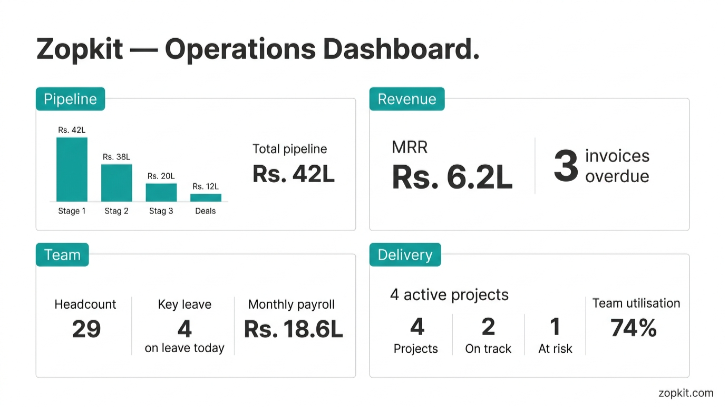
At 1 to 10 people using CRM and Finance, the founder sees the pipeline by stage and value, revenue recognised this month, outstanding invoices by ageing, and current MRR, all live, all from the same platform.
At 10 to 30 people after adding HRMS, the founder also sees payroll cost by month, headcount, and leave status across the team, allowing the burn calculation to update in real time.
At 30 to 80 people after adding Project Management, the founder sees all of the above plus delivery health across active customer projects, team utilisation, and billable versus non-billable hours.
None of these require a BI tool, a report request, or a Monday morning data assembly exercise. The dashboard draws from live data across every module because all modules share the same underlying data.

VII. The Credit Model for a Growing SaaS Team
Early-stage SaaS teams are inconsistent by nature. Some months are heavy in sales activity. Some months are heads-down product sprints with minimal CRM activity. Some months are payroll-intensive because bonuses run. Some months are quiet.
Per-seat pricing does not account for this. A team of 30 on a per-seat stack pays the same fee in a month where half the team is on a product sprint with minimal tool usage as they do in a month where the sales team is running 40 demos and the finance team is closing out quarter-end.
The Zopkit credit model charges based on actual activity across all modules. Credits are shared across the platform. A quiet month in the CRM costs less than a busy one. A month where Projects is heavily used draws credits from the same pool that the CRM and Finance use. There is no separate contract for each module and no per-seat fee per module.
For a SaaS team whose usage is genuinely variable, the credit model consistently delivers a better cost outcome than any fixed per-seat stack. And the credit model has no natural ceiling at which you are forced to "upgrade" to an enterprise tier. The same platform that serves a 5-person team serves a 200-person team, with the credit consumption scaling proportionally to actual usage.
The tool roulette problem is not fundamentally about finding the right tools for each stage. It is about the fact that most tools are designed to serve one stage well and one stage only. A platform designed to grow with the company, where every new function is an extension of what already exists rather than a new disconnected system, eliminates the roulette by removing the conditions that made switching necessary.
Start free at zopkit.com and see how far the platform takes you before you ever need to look at another tool.