Five Sites, Twenty People, One System That Keeps It All From Falling Apart.
You started with one site and a team you knew personally. You knew which subcontractor was reliable, which labour crew worked at what pace, and roughly what you had spent because you were the one approving every payment.
Now you have five sites running simultaneously. Sixteen to twenty people across your own team and your subcontractors. A project manager on Site 3 who calls you twice a day because there is no other way to escalate a decision. An accounts person who works from two Excel files and a WhatsApp group to track which site received which material payment. A client on Site 1 who is waiting for a progress invoice you have not raised because the retention calculation for their contract is not straightforward and you have not had time to work through it.
The bottleneck is no longer your technical capability. The bottleneck is the absence of a system that can hold the operational complexity of a 5 to 20 person construction company running multiple sites concurrently.
This post covers exactly what that system needs to do. Zopkit Project Management, Zopkit HRMS, and Zopkit Financial Accounting on one connected platform give the small EPC and construction contractor the site-level task visibility, labour management, and billing infrastructure to run multiple sites without the information living only in your head and your phone.
Table of Contents
I. The Multi-Site Contractor's Operating Problem
II. What "Software for Construction" Usually Gets Wrong
III. Zopkit Project Management: Multi-Site Task and Milestone Tracking
IV. Zopkit HRMS: Site Labour Management, Attendance, and Payroll
V. Zopkit Financial Accounting: Progress Invoicing, Retention, and GST
VI. How the Three Modules Work as One System
VII. The Implementation Path: Getting Live on Multiple Sites Fast
VIII. The Evaluation Checklist for Small EPC and Construction Companies
I. The Multi-Site Contractor's Operating Problem
The Complexity That Makes Informal Systems Break Down
Every small EPC and construction company reaches a point where the founder's memory and a collection of WhatsApp groups are no longer sufficient to manage the business. That point usually arrives somewhere between the third and fifth simultaneous site. Here is what the breakdown looks like in practice.
The coordination gap. You have five sites. Each site has its own schedule, its own labour team, its own subcontractor relationships, its own material procurement needs, and its own milestone billing schedule. Coordinating across five sites from a phone and a spreadsheet means critical information falls through. The shuttering inspection on Site 4 was completed last Tuesday. The invoice for that milestone was supposed to go out within 48 hours per the contract terms. Today is Monday and it has not been raised because no one connected the completion event to the billing event.
The labour management gap. You have your own skilled staff spread across sites. You have a labour contractor supplying daily-wage workers on three of the five sites. Attendance is marked manually by the site supervisor and sent to the office via WhatsApp every evening. The accounts person transfers it to a spreadsheet. Payroll for the month requires consolidating five sets of manually marked attendance records, verifying overtime claims, and computing PF and ESI for your own staff. This process takes three full working days every month-end, consumes two people, and still produces errors.
The billing gap. Construction contracts in India almost universally include retention clauses. The client holds back 5% to 10% of each invoice as retention until a defined defects liability period expires after project completion. Tracking how much retention has been withheld across multiple projects, when each retention release is contractually due, and ensuring the final invoice includes the correct retention release demand is a calculation that most small contractors manage in a corner of an Excel file that was last updated three months ago.
The cash flow gap. You have ₹18 lakhs in billable milestones across four active projects. You know this loosely. You do not know it with precision because two of the milestone completions have not been formally documented, one invoice is sitting in draft because the GST calculation was questioned by your accounts person, and one client has received the invoice but has not acknowledged it. The cash position you are making financial decisions from is a rough estimate, not a real number.
II. What "Software for Construction" Usually Gets Wrong
Why Most Tools in This Category Fail the 5 to 20 Person Contractor
The software market for construction companies is split between two ends that both miss the 5 to 20 person contractor.
At one end are basic project management tools: task lists, kanban boards, deadline reminders. These help individuals stay organised but have no concept of a construction project's financial structure. There is no milestone-to-invoice connection. There is no budget vs. actual cost tracking. There is no retention calculation. There is no GST compliance. You still need Tally for accounts, a separate payroll tool for your staff, and Excel for the site labour attendance.
At the other end are construction-specific ERP platforms built for 50-plus crore turnover contractors. These have everything you will ever need and many things you will never need, at a license cost and implementation complexity that is designed for a company with a dedicated IT function and a ₹15 to 20 lakh annual software budget.
The 5 to 20 person contractor running ₹3 to ₹15 crore in annual work needs something between these two poles. A platform that handles multi-site project tracking, site labour management, and GST-compliant progress billing with retention management in one connected system, without requiring a 6-month implementation project or a dedicated system administrator.
That is exactly the gap Zopkit Project Management, HRMS, and Financial Accounting fills.
III. Zopkit Project Management: Multi-Site Task and Milestone Tracking
Every Site, Every Milestone, Every Task, Visible From One Dashboard
Zopkit Project Management is built for delivery organisations that need to plan work, track budgets, and report on progress without managing multiple tools. For a multi-site construction company, this translates directly into the operational reality of concurrent site management.
Multi-Site Project Dashboard:
Every active site is a project in Zopkit. The project dashboard gives you a portfolio view: health status, budget position, current milestone, and task completion progress for every site simultaneously. The morning review that currently requires opening five Excel files and reading through five WhatsApp chats takes five minutes on one screen.
Each project has a budget set at creation, a status lifecycle from planning through active to completed, and a health score that reflects schedule adherence and budget position. A site that is behind on milestones or trending toward budget overrun shows an amber or red health indicator in the portfolio view before it becomes a crisis that requires an emergency call.
Milestone Structure for Construction Contracts:
Milestones in Zopkit Projects are structured events with a target date, a description of the completion condition, and the ability to mark them complete when the work is done. For a construction project with a defined billing schedule, the milestone structure mirrors the contract: earthwork completion, foundation, plinth, each floor slab, brick and plaster, finishing, handover. Each milestone completion is the trigger for a billing event in Zopkit Finance.
Task and Subtask Management at the Site Level:
Below each milestone are tasks and subtasks with assignees, due dates, priorities, and status. A milestone like "Ground Floor Slab Completion" has underlying tasks: formwork inspection, rebar inspection by structural engineer, concrete pump booking confirmation, pour schedule, curing period sign-off. Each task has an owner. The milestone is not marked complete until the task structure under it supports that completion.
Your project manager on Site 3 sees their task list. Your structural engineer sees the inspection tasks assigned to them across all sites. You see the full milestone and budget picture. Nobody needs to call you for a status update because the status is visible in the system.
Kanban Board for Daily Site Review:
Zopkit Projects includes Kanban boards with drag-and-drop status management. Your daily site review meeting runs from the kanban view: tasks in the backlog, tasks in progress, tasks pending inspection sign-off, tasks completed this week. A ten-minute daily review of each site covers what used to require a 45-minute phone call.
Sprint Planning for Weekly Site Targets:
For contractors who manage sites on a weekly work-program basis, Zopkit supports sprint planning with sprint start and complete cycles, velocity tracking across sprints, and backlog management. A weekly site target becomes a sprint. Completed vs. planned work across the sprint is visible without a separate reporting exercise.
Time Tracking for Billable and Non-Billable Work:
Time tracking with billable and non-billable classification, timesheet submission, and manager approval runs within Zopkit Projects. For staff members whose time is allocated to specific projects, the time log contributes to the actual cost tracked against each project's budget.
AI-Driven Delivery Alerts:
Zopkit Projects generates AI-driven alerts for budget overrun risk, overdue milestones, and under-utilised resources. When Site 2 is tracking to exceed its approved budget at the current spend rate, you receive an alert before the overrun has occurred. When a milestone is seven days overdue, it flags at the portfolio level. You do not have to remember to check each site individually.
Team Analytics:
Team analytics showing capacity, utilisation, and per-member performance are available for coaching and planning. For a small contractor building their project management capability, knowing which team members are overloaded and which have capacity is the first step to better site allocation decisions.

IV. Zopkit HRMS: Site Labour Management, Attendance, and Payroll
Your Own Staff and Your Site Labour, Both Managed Without the Month-End Scramble
For a 5 to 20 person construction company, the HRMS requirement has two distinct layers that most HR software is designed to handle separately. Your permanent staff: project managers, site engineers, accounts, and administrative personnel on monthly salary with PF, ESI, and TDS obligations. And your site labour: daily-wage workers, skilled tradespeople, and contract staff whose attendance varies by site and by day and whose payroll computation is an exercise in daily attendance aggregation.
Zopkit HRMS handles both within the same platform.
Employee Records and Org Structure:
Your permanent staff are managed with full employee records, department structure, position catalog, and document management. Employment history, salary structures, and statutory enrollment are all maintained per employee. Transfers between sites, promotions, and role changes follow configurable approval workflows.
Shift-Based Attendance for Site Staff:
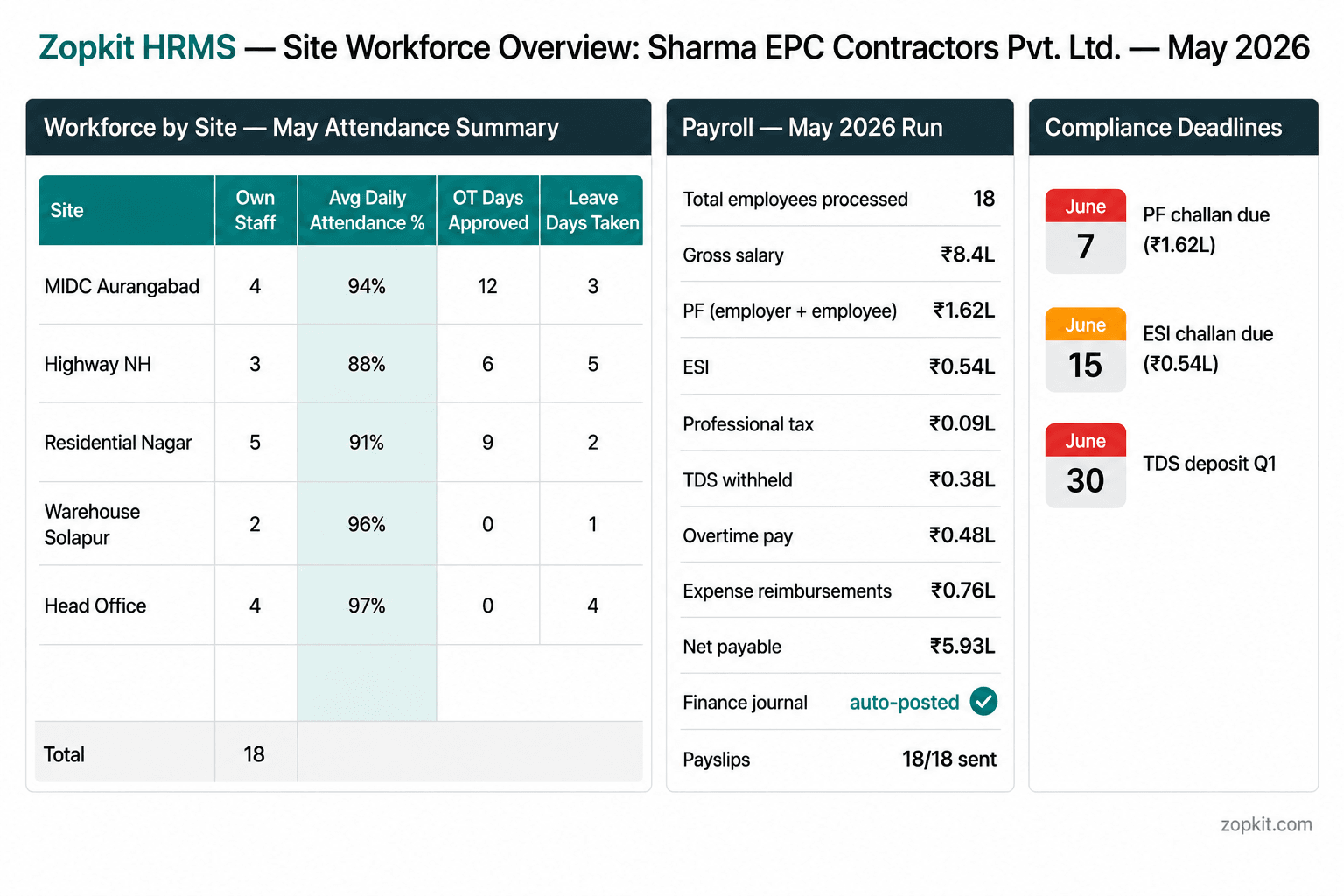
Attendance tracking with shift assignment, timesheet submission, overtime approvals, and regularization workflows handles the reality of a construction workforce where different team members are on different site schedules. The site supervisor for MIDC Aurangabad submits the attendance record for that site's team. The submission flows into the central HRMS, not into a WhatsApp message that someone transcribes into a spreadsheet.
Leave Management With Field Applicability:
Configurable leave policies with accrual schedules, half-day options, emergency leave, and manager approval workflows cover your permanent staff. On a construction site where an employee absence directly affects the day's productivity, the leave approval and documentation trail matters. Leave requests are raised in the system, approved by the relevant manager, and reflected in the attendance record automatically.
Payroll With Full Indian Statutory Compliance:
Zopkit HRMS computes payroll with every Indian statutory requirement natively: PF at the correct rates for eligible employees, ESI for those within the applicable wage ceiling, professional tax per state, TDS based on salary slab and investment declarations, Form 16 generation at year-end, and Form 12BA for perquisite reporting where applicable.
For a construction company, the shift-level attendance data for your production staff feeds the payroll run directly. Overtime hours approved during the month are included in the payroll computation automatically. The accounts person does not assemble the payroll manually from five sets of WhatsApp attendance screenshots. The system computes it from the data that has been entered throughout the month.
When payroll is approved, the salary disbursement journal posts to Zopkit Financial Accounting automatically. No manual re-entry in Tally. No export and import cycle.
Performance Management:
Goal setting, continuous feedback, 360-degree reviews, calibration sessions, and development plans are available within the HRMS performance module. For a growing construction company investing in its project management team, structured performance management is the difference between retaining good people and losing them to a larger contractor.
Expense Claims:
Site engineers and project managers who incur site expenses submit claims through the HRMS expense module with category, amount, and receipt. The approval follows a configurable workflow. Approved claims are reimbursed through payroll or a separate payment run, and the expense posts to the relevant project cost centre in Finance automatically.

V. Zopkit Financial Accounting: Progress Invoicing, Retention, and GST
The Full Financial Infrastructure for a Multi-Site Construction Company
Zopkit Financial Accounting is a complete books-of-record platform. For a small EPC and construction company, the features that matter most go beyond basic invoicing. Progress billing with stage-linked amounts, retention tracking across multiple projects, GST compliance on every transaction, and a live cash position are the financial management functions that determine whether a growing construction company survives its growth phase.
Progress Invoicing Linked to Project Milestones:
Every milestone marked complete in Zopkit Projects creates a billing trigger in Zopkit Finance. The invoice for that milestone is raised with the project linked, the billing amount from the contract schedule, the correct SAC code for the service type, the client's GSTIN pre-filled from their account record, and GST computed automatically. The connection between site completion and client billing is not a manual reminder. It is a system workflow.
Retention Tracking Across Projects:
Construction contracts with retention clauses require tracking of how much has been withheld on each invoice, the cumulative retention balance per project, and when each retention release is contractually due. In Zopkit Finance, the estimate and sales order structure supports recording the gross billing amount and the retention amount separately, so the AR record reflects both the amount due now and the amount held pending release.
When the defects liability period ends and the client is obligated to release retention, the retention invoice is raised from the project record with the cumulative retention amount, the release conditions documented, and GST applied correctly on the release payment. Retention management is a Finance discipline, not an Excel calculation run at the end of each project.
Estimates as Contract Reference Documents:
Before work begins on any project, Zopkit Finance allows creation of a client estimate with the full milestone billing schedule: each stage, its trigger description, the gross amount, the retention percentage, and the net invoice amount at each stage. The estimate PDF is sent to the client for approval. The approved estimate is the reference against which all actual invoices are raised. This replaces the informal WhatsApp billing discussion with a formal documented agreement.
Project Cost Tracking With Three-Way Visibility:
Vendor bills entered in Finance and tagged to a project contribute to the actual cost tracked against that project's budget. Material purchase from a vendor for Site 2, subcontractor bill for Site 4, and equipment rental for Site 1 are all entered in AP tagged to their respective projects. The budget vs. actual comparison for each project is live. The project health indicator in Zopkit Projects is informed by this cost data.
AR Aging and Payment Tracking:
Every invoice raised sits in Accounts Receivable with its due date, payment status, and aging category. For a company with multiple invoices across multiple projects and multiple clients, the AR aging report gives you the complete receivables picture in one view. Follow-up reminders can be sent to clients for overdue invoices directly from the platform.
Banking and Cash Flow:
Bank transaction import, rule-based auto-categorisation, bank reconciliation, and 14-day cash flow forecasting are available in Zopkit Finance. The treasury question that the MD of a construction company faces every week, whether there is enough cash to cover the upcoming subcontractor payment and material procurement cycle, is answered by the cash flow screen, not by a phone call to the CA.
GST Compliance Built Into Every Transaction:
Every sales invoice carries the correct GST based on SAC code and transaction type. CGST and SGST for intra-state service delivery, IGST for inter-state. GSTR-1 outward supply data and GSTR-3B liability summary compile from live transactions and are available for export at month-end. ITC on vendor bills where applicable is captured at entry. The GST compliance calendar in Zopkit Finance shows upcoming filing deadlines.
Multi-Project P&L and Cost Centre Reporting:
With project-level cost tagging in both Finance and Projects, the P&L for each site is visible without a custom report request. The MD who wants to know which of the five active sites is profitable and which is margin-dilutive runs a cost centre report by project. The answer is available in minutes, not after a month-end analysis exercise.

VI. How the Three Modules Work as One System
One Identity, One Data Layer, Zero Manual Data Movement
The reason Zopkit Projects, HRMS, and Financial Accounting work for a multi-site construction company is not that each module is capable in isolation. It is that the three share one identity layer and one data layer, so information created in one module is immediately available in the others.
Projects to Finance: Milestone completion triggers billing.
When Site 2's foundation milestone is marked complete in Zopkit Projects, the billing event is ready to process in Zopkit Finance. The project is already linked. The client record with their GSTIN is already there. The invoice amount from the contract schedule is already referenced. Three clicks to raise the invoice, one click to send the PDF.
HRMS to Finance: Payroll posts automatically.
When the May payroll run is approved in Zopkit HRMS, the salary disbursement journal entries post to Zopkit Finance at that moment. The salaries payable, PF liability, ESI liability, and TDS payable are recorded in the books without a manual journal entry. The Finance month-end close does not wait for someone to re-enter the payroll figures.
Finance to Projects: Vendor bills update project cost.
When a material purchase bill for Site 3 is entered in Zopkit Finance AP and tagged to the Residential Nagar project, that cost is reflected in the project's budget vs. actual in Zopkit Projects at the same moment. The project manager for Site 3 can see the updated cost position from the Projects dashboard without a separate Finance report.
The result at month-end:
The month-end process that currently takes your accounts person three days, assembling attendance records, computing payroll, reconciling project costs, and preparing GST data, becomes a review and approval exercise. The data is current. The payroll is computed from attendance that was entered throughout the month. The GST data compiles from live invoices. The project P&L is visible per site from the cost centre report. The month-end close takes a morning, not a week.
VII. The Implementation Path: Getting Live on Multiple Sites Fast
A Practical Sequence That Does Not Require a Six-Month Setup Project
A small EPC contractor cannot afford to pause operations for a system implementation. The sites are running. The billing needs to happen. The payroll is due on the 1st regardless of whether the software is configured. The implementation sequence for Zopkit is designed for this reality.
Week 1 to 2: Finance and Client Setup
Enter the chart of accounts, your company's GSTIN and SAC codes, and the client master with GSTINs. Enter open invoices as opening AR entries. From week 2, all new invoices are raised in Zopkit Finance. Your CA transitions from receiving physical invoices to receiving a GSTR export from the platform.
Week 2 to 3: Project Setup
Create a project in Zopkit Projects for each active site. Set the contracted value as project budget, enter the milestone structure mirroring the billing schedule, and enter current milestone status reflecting what has already been billed and what is upcoming. Assign tasks to team members for the current work program on each site. From week 3, site updates and milestone tracking happen in Zopkit Projects.
Week 3 to 5: HRMS Setup
Enter the employee master for your permanent staff: salary structures, leave policies, PF and ESI enrollment, professional tax configuration. Set up shift assignments for site staff. Run the first payroll in parallel with your existing process to verify the output. Once confirmed, the existing payroll process is retired.
Week 5 onward: Full Integrated Operation
Milestone completions in Projects trigger billing in Finance. Payroll computes from attendance logged in HRMS and posts to Finance on approval. Vendor bills in Finance update project costs in Projects. Your monthly reporting is a set of exports from a live, current system rather than a manual assembly exercise.
VIII. The Evaluation Checklist for Small EPC and Construction Companies
What to Ask Before Choosing Any Project Management Platform
Use this checklist in any vendor evaluation. Require a live demonstration for every item, not a slide.
Project Management:
- Can I see the health status, current milestone, budget position, and task completion progress of five simultaneous sites on one dashboard without navigating between five separate screens?
- When a milestone is marked complete in Projects, how does that trigger billing in Finance? How many manual steps does it require?
- Can I track tasks at the sub-milestone level with assignees and due dates so my site supervisors have their work visible without calling me?
- Does the system alert me when a project is trending toward budget overrun before it has happened? Show me this alert trigger.
- Can I run weekly work programs as sprints and track completed vs. planned tasks at the end of each sprint?
HRMS:
- Can I manage shift-based attendance for site staff across multiple site locations within one HRMS?
- When I approve the monthly payroll, how does the accounting entry appear in Finance? Show me this live.
- Does the system compute PF, ESI, professional tax, and TDS natively, or does it require a third-party payroll tool?
- Can expense claims submitted by site engineers be tagged to specific projects so they contribute to project cost tracking in Finance?
Finance:
- Can I track retention withheld on each invoice per project and manage the retention release invoice when the defects liability period ends?
- Show me an invoice raised for a construction milestone with the correct SAC code, client GSTIN, and CGST/SGST applied automatically. How is the GST rate determined?
- Can I see a per-project P&L based on revenue billed and costs tagged to each project from Finance AP entries?
- Is GSTR-1 and GSTR-3B export data compiled from live transactions, ready for my CA at month-end without manual assembly?
Platform:
- What is the complete cost for a company with 20 employees and five active projects across all three modules?
- Is there a mobile interface for site supervisors to update task status and submit attendance from the site?
Conclusion
The System Your Sites Have Been Running Without
A 5 to 20 person EPC and construction company is already running a sophisticated operation. Multi-site coordination, subcontractor management, procurement, labour management, progress billing, retention tracking, and GST compliance are not simple business functions. You are managing all of them.
The question is whether you are managing them with tools that match the complexity. A combination of WhatsApp, Excel, and a Tally instance updated once a month does not match the complexity of five simultaneous sites with 20 people and ₹5 to ₹15 crore in annual billings. The information lives in too many places, moves too slowly, and requires too much human assembly to be reliable at the moment a decision needs to be made.
Zopkit Project Management gives you the milestone and task visibility across every site on one dashboard, with AI alerts for budget overrun and milestone delays. Zopkit HRMS gives you the shift-based attendance, payroll with full Indian statutory compliance, and expense claim management for your site staff, with automatic journal posting to Finance on payroll approval. Zopkit Financial Accounting gives you progress billing linked to milestone completion, retention tracking per project, GST compliance on every invoice, and a live cash position and AR aging view at any moment.
Three modules. One platform. One data layer. The month-end process that currently takes three days takes a morning. The milestone invoice that currently gets raised three weeks late gets raised within 48 hours of the site completion. The project that is trending toward overrun gets flagged before the overrun happens.
The implementation path starts in week one with Finance and client setup. By week five, all three modules are live. Your sites do not stop while the system is set up. They run as they always have, now with a system behind them that holds everything together.
Start at zopkit.com