Best Project Management Software for Digital Marketing Agencies in India
If you run a small digital marketing agency in India, your biggest operational problem is not finding clients. It is what happens after you sign them.
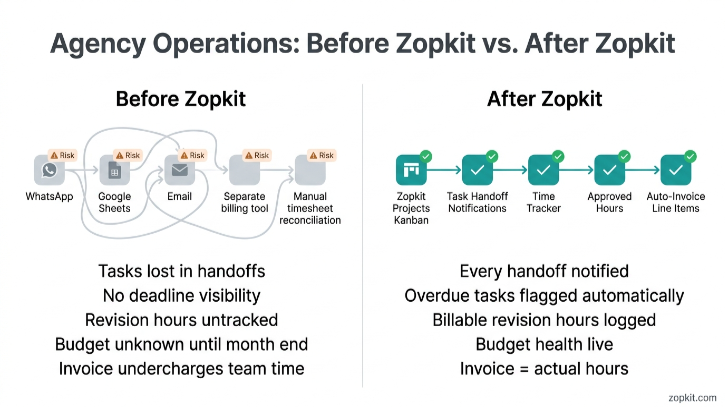
A new client comes in. You brief the team on WhatsApp. The designer asks the copywriter for the asset brief three days later. The copywriter sends a Google Doc. The client approves a direction on email. The social media executive uploads the wrong version. The client asks for a revision. Nobody can find the original approved brief. The deadline passes. The client follows up. The account manager chases the team. The team chases each other. Somewhere in all of this, 14 hours of work get done but only 8 hours show up on the invoice because nobody logged time properly.
This happens every month, for every client, at almost every small agency in India. It is not a team problem. It is a systems problem.
This article covers exactly how Zopkit Projects fixes this — Kanban boards, sprint planning, time tracking, and the part most project management tools miss entirely: connecting logged hours directly to client invoices so you stop leaving money on the table.
I. What a Digital Marketing Agency Actually Needs from a PM Tool
Most project management tools were built for software engineering teams or generic task management. The workflow for a digital marketing agency is different in specific ways that matter.
What Makes Agency PM Different
- Work is client-specific. Every task belongs to a client and a campaign. You need to see work filtered by client, not just by team member or date
- Deadlines are non-negotiable. A social media post for a product launch has a fixed publish date. Missing it has a real cost. The PM tool needs to surface deadline risk before it becomes a missed deadline
- Work is creative and iterative. A single deliverable (a set of ad creatives, a blog post, a landing page) goes through brief, draft, review, revision, and approval. The workflow is not linear
- Time tracking must be built in. Hours logged on client work drive invoices. If time tracking is separate from task management, neither gets done consistently
- Client billing must close the loop. The time your team logs on a project should flow into the invoice without manual reconciliation. This is where almost every agency leaks revenue
Zopkit Projects covers all of these. It also connects directly to Zopkit Financial Accounting, which means time entries approved by a project manager become invoice line items without anyone re-entering data in a billing tool.
II. The Five Operational Problems Zopkit Projects Solves
Problem 1: Nobody Knows What Is Due When
At most small agencies, the master project timeline lives in the account manager's head or in a WhatsApp group that scrolls faster than anyone can read it.
What Zopkit does:
- Every deliverable is a task with an assigned owner, a due date, a priority level, and a status
- The team sees their personal task list every morning: what is due today, what is overdue, what is coming up this week
- The account manager sees the full project board: all tasks across all team members, colour-coded by status and deadline proximity
- Overdue tasks surface automatically with a flag. You do not need to chase people to find out that something is behind
Problem 2: Work Falls Through the Gaps at Handoff
The most common failure point in agency workflow is the moment work moves from one person to another. Copywriter to designer. Designer to account manager for client review. Client approval back to the social media team for scheduling.
Every handoff that happens on WhatsApp or email is a handoff that may not happen.
What Zopkit does:
- Each task has a defined assignee. When a task moves to the next stage on the Kanban board, the next owner is notified automatically
- Subtasks within a task let you define the full workflow: "Write Brief" assigned to the AM, "Create Draft" assigned to the designer, "Client Review" assigned to the AM, "Revisions" assigned to the designer, "Final Upload" assigned to the social media executive
- No task disappears between people. The board shows who has it, what stage it is at, and when it is due
Problem 3: Revisions Blow the Budget With No Record
A client asks for "one small change." Then another. Then a restructure. By the end, the account has consumed three times the agreed hours. Nobody can prove it because no one tracked time.
The result: you either eat the cost or get into an uncomfortable conversation where you cannot back up your position with data.
What Zopkit does:
- Time tracking is built directly into tasks. Every team member logs time against the specific task they are working on
- Hours are classified as billable or non-billable at the task level
- When a client requests a revision outside the original scope, that revision task is flagged as billable. The logged hours are in the system with a timestamp
- At month end, the account manager can pull the project's full time log and show the client exactly what was done, how long it took, and what was within and outside the agreed scope
You stop having scope conversations from a position of "we feel like we did more work." You have the data.
Problem 4: You Never Know If the Project Is Profitable
You quoted Rs. 40,000 per month for a client's digital marketing retainer. You have no idea whether your team's actual hours on that account cost you Rs. 30,000 or Rs. 60,000 in time value. The invoice goes out every month. The work gets done. But whether the account is profitable or not is a mystery.
What Zopkit does:
- Every project has a budget defined in hours or value
- As the team logs time, the project's budget consumption updates in real time
- The project health score shows: budget used vs. remaining, hours burned vs. planned, tasks completed vs. total
- At any point, the agency principal can see: "This client is at 80% of their budget with 40% of the month remaining." That is when you initiate a scope conversation, not after you have already overspent
Problem 5: Billable Hours Do Not Make It to the Invoice
This is where the most revenue leaks. The team logs hours. The account manager exports a timesheet at month end. Half the team did not log properly. The account manager reconstructs the hours from memory and WhatsApp messages. The invoice goes out with a round number that undercharges the client.
The average agency undercharges by 15 to 25% of actual hours worked because of timesheet gaps. On a Rs. 5 lakh monthly billing, that is Rs. 75,000 to Rs. 1.25 lakh per month of work that goes uncompensated.
What Zopkit does:
- Time entries are submitted by team members and approved by the project manager inside the platform
- Approved billable hours flow directly into Zopkit Financial Accounting as invoice line items
- No export. No re-entry. No reconstruction from memory
- The invoice reflects every approved hour. Nothing falls off

III. The Zopkit Projects Workflow for a Digital Marketing Agency
Here is the exact setup for a five to twenty-five person digital marketing agency managing ten to twenty active client accounts.
Step 1: Create a Project for Each Client Account
Each client account is a project in Zopkit Projects. The project holds:
- Budget: either total monthly value (Rs. 40,000) or total monthly hours (80 hours at Rs. 500/hour)
- Status: Active, On Hold, or Closed
- Team members: designer, copywriter, SEO executive, account manager
- Health score: calculated automatically from budget consumption and task completion rate
You see all ten client projects on one screen. You can filter by health status to instantly find which accounts are at risk of going over budget or missing a deadline.
Step 2: Set Up Kanban Boards for Each Workflow Type
Zopkit's Kanban boards are configurable. For a digital marketing agency, the typical setup covers three workflow types:
Social Media Content Workflow:
Brief Required → Brief Approved → Design in Progress → Copy in Progress → Review Ready → Client Sent → Revision → Approved → Scheduled
SEO Workflow:
Keyword Research → Content Brief → Writing → Internal Review → Client Review → Published → Reporting
Paid Ads Workflow:
Campaign Brief → Creative Required → Copy Required → Setup in Progress → Internal QA → Client Approval → Live → Reporting
Each deliverable for each client is a card on the relevant board. The card shows: client name, due date, assignee, and current stage. Dragging the card to the next stage sends a notification to the next assignee.
No WhatsApp. No "did you get the brief?" messages. The system handles it.
Step 3: Use Sprints for Campaign-Based Work
For clients with defined campaign windows (a product launch, a festive season campaign, a new category entry), Zopkit's sprint planning is the right workflow.
- Create a sprint with a start date and end date (typically two weeks for campaign execution)
- Add all campaign tasks to the sprint with story points or hour estimates
- Run the sprint: the team sees only their sprint tasks, not the full backlog
- Sprint velocity shows how many points or hours the team completed vs. planned
For an agency running Diwali campaigns for five clients simultaneously, sprint planning is the difference between a structured execution calendar and a chaotic October.
Step 4: Time Tracking on Every Task
Every team member logs time directly on the task they are working on. The time entry captures:
- Which task (and therefore which client and project)
- Billable or non-billable
- Date and duration
- Notes (optional, useful for revision descriptions)
The agency principal or project manager sees the running time log per project. They approve timesheets at the end of the week. Approved hours are locked and flow into billing.
Time tracking discipline tip:
The most common reason teams do not log time is that it requires opening a separate app or tool. Because time tracking in Zopkit is on the task itself, the friction is near zero. You are already on the task. You click start timer or log time. The entry is created.
Step 5: Convert Approved Hours to Invoices
This is the step that closes the revenue leak.
At the end of the billing cycle, the finance or account management team goes to Zopkit Financial Accounting and creates the client invoice. The approved billable hours from Zopkit Projects are already there as line items. They review, add any fixed retainer line, and send.
For a typical retainer client, the invoice looks like:
- Monthly Social Media Retainer (fixed) — Rs. 25,000
- Additional Reels Production (3 reels, 4.5 hrs at Rs. 2,000/hr) — Rs. 9,000
- Campaign Setup and Ads Management — Rs. 12,000
- GST 18% — Rs. 8,280
- Total — Rs. 54,280
Every line is backed by a time entry. If the client questions the additional reels charge, the project manager can pull the time log: three tasks, logged hours, timestamps, team member names. The conversation takes 30 seconds.

IV. Sprint Planning for Campaign Execution
For agency teams that run campaign-based work alongside ongoing retainer work, sprint planning in Zopkit gives structure that Kanban alone cannot provide.
How to Run a Campaign Sprint
Before the sprint:
- List every task required for the campaign: creative brief, asset production, copy, ads setup, landing page, reporting template
- Estimate hours for each task
- Assign tasks to team members based on capacity
- Check total estimated hours against team capacity for the sprint period
During the sprint:
- Team members see their assigned sprint tasks at the top of their task view
- Daily standup uses the sprint board: what is done, what is in progress, what is blocked
- Blocked tasks are flagged on the board; the project manager resolves blockers before they cascade
After the sprint:
- Sprint velocity is calculated: planned hours vs. completed hours
- Over multiple sprints, velocity data shows whether the team is consistently over-committing or has capacity for additional work
- This is the data that informs the next client proposal: "We know we can execute a campaign of this scope in two weeks because we have velocity data from the last six campaigns."
Capacity Planning Across Clients
With ten to twenty active client accounts, the agency principal needs to know before committing to a new brief whether the team actually has capacity.
Zopkit Projects shows:
- Each team member's assigned hours for the current week
- Each team member's open tasks and due dates
- Project-level resource allocation across the portfolio
Before saying yes to a last-minute campaign brief, you check the resource view. You can see that the designer is at 38 hours for the week and the copywriter has 12 hours available. You staff the brief accordingly or push back on the timeline with data.
V. Time Tracking to Invoice: The Complete Flow
This is the section that most agency project management tools stop short of. They track time. They do not connect it to billing.
The Agency Revenue Leak in Numbers

At a 10-person agency, the unlogged and unbilled hours represent Rs. 9 lakh to Rs. 12 lakh per year. That is the cost of a full team member.
The Zopkit Time-to-Invoice Flow
`textTeam member logs time on task
↓
Project manager reviews and approves timesheet (weekly)
↓
Approved billable hours accumulate in project
↓
At billing cycle: finance creates invoice
↓
Approved hours auto-populate as line items in invoice
↓
Fixed retainer lines added manually
↓
GST calculated automatically (18%, SAC 998361)
↓
Invoice sent to client from platform
↓
Payment received; matched to invoice via bank reconciliation
↓
Project marked as billed for the period`
No export. No copy-paste. No reconstruction from memory. Every logged and approved hour makes it to the invoice.
VI. Zopkit Projects vs. Other PM Tools for Indian Digital Agencies

The critical column in this table is "Time to invoice (automatic)." Every other tool stops at time tracking. Zopkit closes the loop to billing. That difference is the Rs. 9 to Rs. 12 lakh per year for a 10-person agency.

VII. Setting Up Zopkit Projects for Your Agency
Here is the setup sequence for a digital marketing agency moving from WhatsApp and Google Sheets to Zopkit Projects.
Week 1: Foundation
- Create a project for each active client account with budget and team assignment
- Set up your standard Kanban board stages for each content type (social, SEO, paid)
- Add all active deliverables as tasks with due dates and assignees
- Brief the team on the one rule: if you work on it, you log it
Week 2: Workflow
- Run the first sprint if you have a campaign in execution
- Review the first week of time entries and approve timesheets
- Check the project health scores: identify which accounts are behind or over budget
- Set up recurring task templates for monthly deliverables (monthly reports, content calendar, performance decks)
Week 3: Billing
- At month end, pull approved hours from Zopkit Projects into Zopkit Finance
- Raise the first invoice with automatic line items from logged hours
- Compare the invoice value to your previous month's invoice on the same client
- In most agencies, the first accurate invoice is higher than the last manually assembled one
Week 4 onwards: Optimisation
- Use the velocity data from the first sprint to calibrate future estimates
- Use the project health dashboard to identify clients consuming more budget than their retainer covers (scope expansion conversations)
- Use the team utilisation report to identify team members who are underutilised and available for new client work
VIII. Connecting Projects to HRMS for Leave and Capacity
This is the advantage of a connected platform versus a standalone PM tool.
When a team member takes a leave day, it is approved in Zopkit HRMS. That approval automatically reduces their available capacity in Zopkit Projects for that week. The project manager sees that the designer is on leave from Thursday to Friday before assigning a deadline for Tuesday thinking the full week is available.
At a small agency, a single miscommunication around team availability is often the difference between a delivered campaign and a missed deadline. The HRMS-Projects connection removes that miscommunication structurally.
Getting Started
If your agency is currently managing work through a combination of WhatsApp, Google Sheets, and monthly timesheet requests that half the team ignores, Zopkit Projects is the most complete replacement available that also handles your India GST billing and does not require a separate tool to close the loop.
The setup takes one week. The revenue recovery from captured billable hours usually pays for the platform cost in the first month.
Start free at zopkit.com. Set up your first client project today and run your next sprint on a board instead of a chat group.
The best project management tool for a digital marketing agency is the one that connects what your team delivers to what you invoice the client. Every other tool stops at task management. Zopkit closes the loop. Start free at zopkit.com