Best Free CRM for Freelance Digital Marketers in India
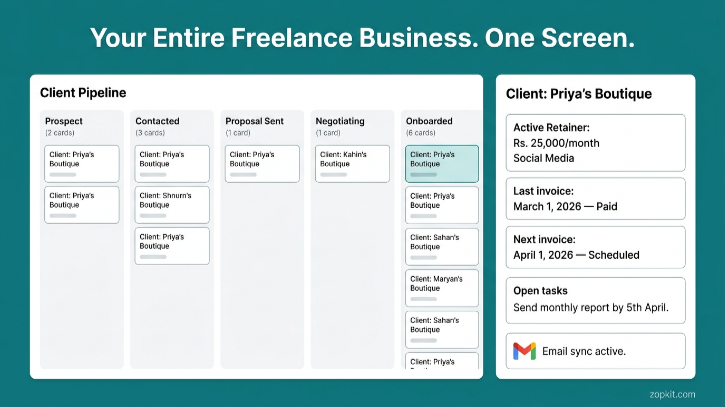
If you are a solo digital marketer managing five to ten clients, your current system is probably a WhatsApp group, a spreadsheet, and a lot of mental overhead.
You know which client needs a monthly report by the 5th. You remember that one client owes you for March but never replied to your payment reminder. You track proposals in your sent mail and invoices in a Google Sheet that is three versions out of date. Somewhere in your notes app is a list of leads from the networking event you attended two months ago.
None of this is a system. It is a collection of habits held together by memory, and it starts breaking the moment you add a new client or take a week off.
This article is for the freelance digital marketer in India who manages five to ten clients, runs retainer-based work, needs to raise GST-compliant invoices, and has never had time to properly evaluate whether a CRM is worth it. It is also a direct walkthrough of why Zopkit CRM specifically solves this problem better than any other free option in the Indian market.
I. What You Actually Need as a Freelance Digital Marketer
Before looking at any tool, it is worth being precise about the problem. The average freelance digital marketer in India with five to ten clients needs four things:
1. A place to track every client and prospect in one view
Not a spreadsheet. A proper record for each client with their contact details, what you are working on, the last conversation you had, and what they owe you — all in one place.
2. A simple pipeline for new leads
Referrals come in. Potential clients contact you on LinkedIn. You meet someone at a workshop. You need a system that moves them from "contacted" to "proposal sent" to "onboarded" without losing anyone in the process.
3. Retainer tracking that tells you who is active, who is overdue, and when renewals are coming
Most digital marketing work is retainer-based. Rs. 15,000 per month for SEO. Rs. 25,000 per month for social media management. You need to know which retainers are active, which invoices have been paid, and which client has been quietly ignoring your follow-ups for six weeks.
4. GST-compliant invoices that do not require a separate billing tool
If you are GST-registered (mandatory above Rs. 20 lakh annual turnover for service providers), every invoice needs a GSTIN, the correct SAC code, and 18% GST calculated correctly. Most free CRMs do not handle this. You end up raising invoices in Zoho Invoice or a Word template and manually updating your CRM. That is two tools doing one job.
Zopkit CRM handles all four. And the invoicing is inside the same platform as the CRM, not a separate product.
II. Why Most Free CRMs Fail Freelancers in India
The free tier of most CRM tools was designed for a US-based small business context. It looks right on the surface but breaks in specific ways for Indian freelancers.

The hidden cost of a "free" CRM with a separate billing tool:
- Zoho CRM Free + Zoho Invoice Free: two separate logins, manual data sync, limited invoices per month on free tier
- HubSpot CRM Free + Wave or Vyapar: HubSpot's free tier has no invoicing at all; Wave does not support GST correctly; Vyapar has no CRM
- Freshsales Free + any billing tool: Freshsales' free tier is capped at three users and has no billing integration
Zopkit gives you the CRM and the billing in one platform, with India GST built in natively.
III. Setting Up Zopkit CRM as a Freelance Digital Marketer
Here is the exact setup that works for a solo digital marketer managing five to ten retainer clients.
Step 1: Create Your Pipeline
Zopkit CRM uses a configurable kanban pipeline. As a freelancer, set up these five stages:
- Prospect — someone you have identified as a potential client, not yet contacted
- Contacted — you have reached out; waiting for a response
- Proposal Sent — you have shared your scope and pricing
- Negotiating — they are interested, going back and forth on terms
- Onboarded — active client
Each potential client is a card in this pipeline. The card holds their name, company, contact details, the service they inquired about, and your notes from every conversation.
When a referral comes in on WhatsApp, you spend 90 seconds creating a card in Prospect. You stop losing leads to your chat history.
Step 2: Set Up Client Records
For each active client, create an account record in Zopkit CRM. The account record is the central home for everything related to that client:
- Contact details for the primary contact and decision-maker
- Retainer value and service type in the account notes or custom fields
- All email communication synced automatically from your Gmail or Outlook (no manual logging)
- Invoices raised for that client, visible directly on the account record
- Open tasks like "send April report by 5th" or "follow up on payment"
You open one record and see everything. You stop opening four different tabs to get the full picture on one client.
Step 3: Configure Your Service Catalog
In Zopkit, you can set up your services as line items with pre-configured pricing:
- Social Media Management — Rs. 25,000/month (SAC: 998361, 18% GST)
- SEO Retainer — Rs. 15,000/month (SAC: 998361, 18% GST)
- Google Ads Management — Rs. 12,000/month (SAC: 998361, 18% GST)
- Website Audit — Rs. 8,000 one-time (SAC: 998314, 18% GST)
- Content Writing (10 blogs/month) — Rs. 10,000/month (SAC: 998153, 18% GST)
Once configured, raising an invoice is selecting the service line and clicking send. No more manually typing amounts or looking up SAC codes every month.
Step 4: Set Up Recurring Invoices for Retainer Clients
This is the most time-saving feature for a retainer-based freelancer.
For each active retainer client, configure a recurring invoice in Zopkit Financial Accounting (connected to the CRM):
- Client name, billing address, GSTIN (if they are a business)
- Service lines with SAC codes
- Invoice date: 1st of every month (or your preferred date)
- Payment terms: Net 15 or Net 7
- Delivery: auto-send to client email on the configured date
On the 1st of every month, invoices go out automatically to all retainer clients. You do not need to remember to raise them. You do not need to open a billing tool. You check your dashboard to see which ones have been paid and which need a follow-up.

IV. Managing 5 to 10 Clients Without Losing Track
With five to ten clients, the most common failure modes are:
Failure mode 1: You forget to invoice on time
One client gets invoiced on the 3rd, another on the 12th, another when you remember. Your cash flow is unpredictable because your invoicing is unpredictable.
Fix on Zopkit: Recurring invoices go out on the configured date automatically. Every client gets invoiced on the same date every month.
Failure mode 2: You do not know who owes you money without opening a spreadsheet
You have to manually check every client to know the payment status. By the time you chase an overdue invoice, it has been 6 weeks.
Fix on Zopkit: The AR Aging report shows every outstanding invoice by client, with the number of days overdue. You see at a glance: Rahul Digital Pvt Ltd — Rs. 25,000 — 23 days overdue. You send a reminder from inside the platform in one click.
Failure mode 3: A lead goes cold because you forgot to follow up
You sent a proposal two weeks ago. The prospect went quiet. You meant to follow up but three client deadlines happened and you forgot.
Fix on Zopkit: Set a follow-up task on the lead card when you send the proposal. Due in 5 days. You get a notification. You send the follow-up. This is the difference between a 20% and a 40% proposal conversion rate for most freelancers.
Failure mode 4: You cannot find what you agreed with a client
A client disputes the scope of work or asks for something you did not include. You need to find the original WhatsApp message or email from four months ago.
Fix on Zopkit: The client account record shows every email exchanged, every note you added after a call, and the original deal terms. You open the record and you have the full history in two seconds.
Failure mode 5: You spend the last week of every month doing admin
Raising invoices, updating your spreadsheet, chasing payments, and reconciling who paid what. This is time that should be on client work.
Fix on Zopkit: Invoices auto-send. Payments are tracked. The dashboard tells you the status without any manual update. The last week of the month looks the same as every other week.
V. GST-Compliant Invoicing: How It Works Inside Zopkit
For any freelance digital marketer in India who is GST-registered, or planning to cross the Rs. 20 lakh threshold, this section is the most practically important.
What a Compliant GST Invoice Requires
- Your GSTIN (15-character tax identification number)
- Client GSTIN (if they are a registered business)
- Invoice number in a continuous sequential series
- Invoice date
- Description of service with the correct SAC code
- Taxable value
- CGST + SGST (9% + 9% for intra-state, i.e., both you and client are in the same state) or IGST (18% for inter-state)
- Total amount including GST
- Your digital signature or authorised signatory line
Most freelancers currently produce these invoices in Word or a Zoho Invoice template. The SAC code is often wrong or missing. The CGST/SGST vs. IGST split is often incorrect (intra-state vs. inter-state is not automatically determined). Sequential invoice numbering is often manually tracked and sometimes has gaps.
How Zopkit Handles This
- Your GSTIN is configured once in the platform settings
- Client GSTIN is stored on the client account record
- SAC codes are configured per service line item (stored once, applied automatically)
- CGST/SGST vs. IGST is determined automatically based on the state of supply (your registered state vs. client's state from their GSTIN)
- Invoice numbers are sequential and system-generated; no gaps
- Invoice PDF is generated with all compliant fields populated
- Your invoices are GSTR-1 aligned, meaning the data is ready for filing without manual reconciliation
You stop being the person who Googles "SAC code for digital marketing services in India" every month.

VI. The Full Client Lifecycle on Zopkit CRM
Here is the complete flow from a lead inquiry to a paid invoice, as it works for a solo digital marketer on Zopkit.

Total monthly admin time for 10 clients: approximately 30 to 45 minutes. Down from the 6 to 8 hours most freelancers spend across spreadsheets, billing tools, and inbox searches.
VII. Zopkit CRM vs. Other Free Options for Freelancers in India

The core difference is structural. HubSpot, Zoho CRM, and Freshsales are CRMs that connect to billing tools via integrations. Zopkit is a platform where the CRM and billing are the same system. For an Indian freelancer, that difference means one less tool, one login, and invoices that are GST-compliant without configuring a second product.
VIII. What Happens When You Grow
One of the quiet advantages of starting on Zopkit as a freelancer is that the platform scales with you without a migration.
At 5 clients: You use the CRM pipeline and recurring invoices.
At 15 clients: You activate the leads module more actively, use the proposal template system, and start using the dashboard to track collection efficiency.
At 30 clients (with 1 to 2 team members): You add team members to Zopkit HRMS (one record creates their access across all modules), assign leads to them in the CRM, and start tracking team utilisation in Projects.
At 50 clients (a small agency): You add Zopkit Projects for client delivery tracking, connect billable hours to invoices automatically, and use the Financial Accounting module for full P&L by client.
At no point do you migrate to a new platform. You activate the next part of the same ecosystem. The client records, invoices, and history you built as a freelancer are still there when you become an agency.

IX. Getting Started in One Day
You do not need a weekend to set this up. Here is the one-day setup plan for a freelance digital marketer.
Morning (1 hour):
- Create your Zopkit account
- Configure your GSTIN and business details in Finance settings
- Set up your five pipeline stages in the CRM
- Add your five service lines with SAC codes and pricing
Afternoon (1 to 2 hours):
- Create account records for each of your active clients (10 minutes per client)
- Import or manually add email history for the last 30 days on each account
- Set up recurring invoices for all active retainer clients
Evening (30 minutes):
- Add your current leads to the pipeline with their correct stage
- Set follow-up tasks on any lead that has a pending action
- Check the dashboard to confirm everything is in order
By end of day, you have:
- A live pipeline showing every lead and their status
- A client record for every active client with their full history
- Recurring invoices configured to go out automatically from next month
- A dashboard that tells you who owes you money and when your next renewals are
You have stopped running your freelance business in your head.
Where to Start
If you are a freelance digital marketer in India managing five to ten clients and your current system is some combination of WhatsApp, Google Sheets, and sent-mail history, Zopkit is the most complete free starting point available. The CRM, the GST invoicing, and the retainer tracking are all in one platform, without a parallel billing tool, without a GST connector, and without a spreadsheet to maintain on the side.
Start free at zopkit.com. Set up your pipeline and your first recurring invoice in the same afternoon. Your March invoices will go out automatically. You will have a full hour back every month, minimum.
The best CRM for a freelance digital marketer in India is the one that also handles your GST invoicing, so you never have to open two tabs to get one job done. Start free at zopkit.com