Best Free Accounting and CRM Software for Small Manufacturers in India
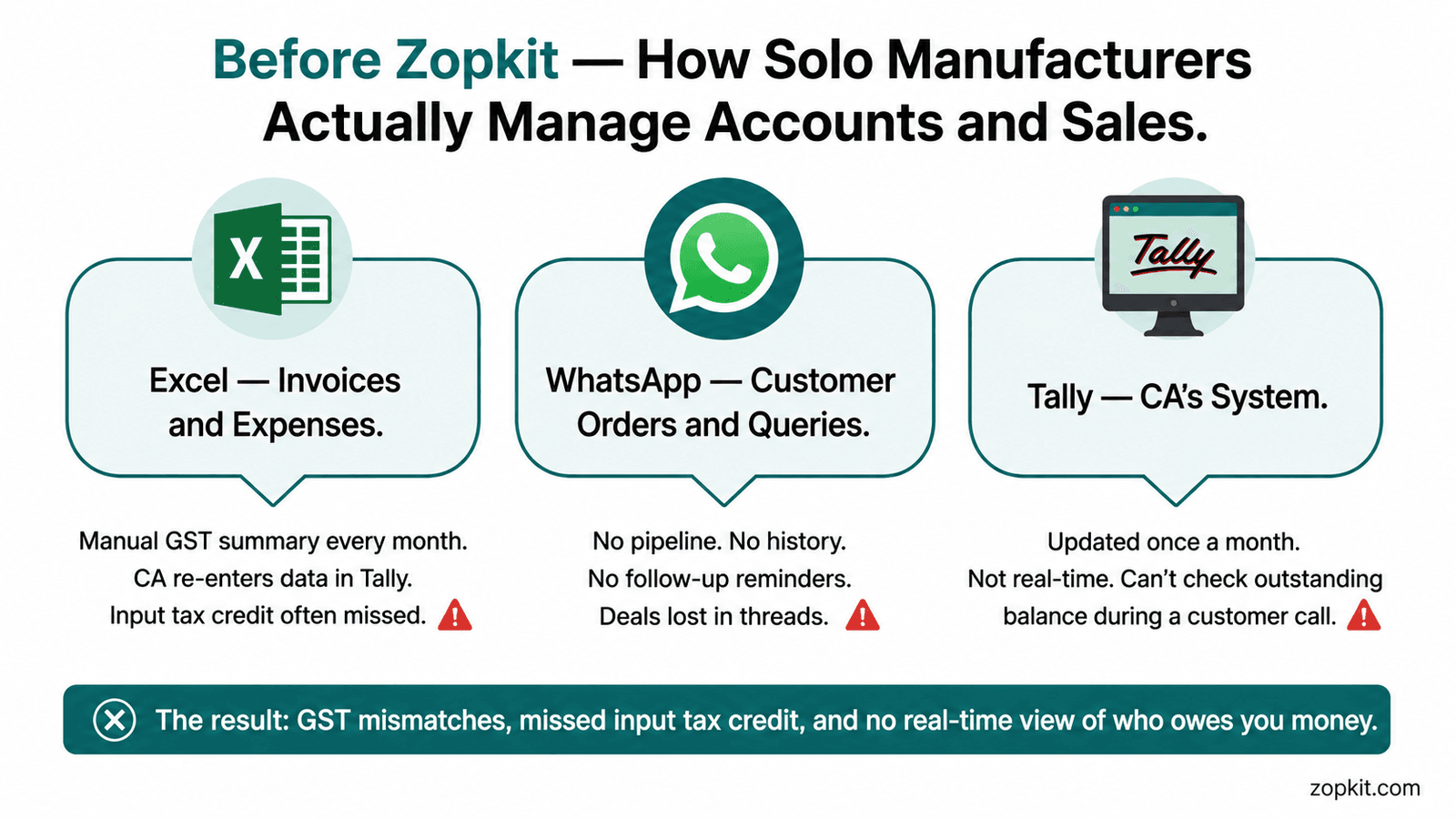
You started your manufacturing business with a product, a few customers, and a notebook. The notebook became Excel. Excel became multiple files. Now you have one sheet for orders, another for expenses, a Tally file your CA visits once a month, and a WhatsApp group where your customers send purchase enquiries.
You are not running a broken business. You are running a business on tools that were never designed for someone at your stage.
This is what Zopkit Finance and Zopkit CRM do, why they are the right replacement for Tally and spreadsheet-based sales tracking at the entry level, and how a solo manufacturer or small proprietor can get GST-compliant invoicing, vendor bill management, bank reconciliation, and a basic CRM running for free — today.
Table of Contents
I. The Real Problem: What Managing Accounts and Sales Actually Looks Like for a Solo Manufacturer
II. Why Tally Is the Wrong Tool for Entry-Level Manufacturing Businesses
III. What Zopkit Finance Does and What It Replaces
IV. GST Compliance: Built In, Not Configured
V. Vendor Bills and Accounts Payable — Without a CA on Speed Dial
VI. Bank Reconciliation Without Manual Matching
VII. Zopkit CRM: Basic Sales and Customer Tracking for Small Manufacturers
VIII. What "Free" Actually Means on the Zopkit Platform
IX. Who This Is Built For and Where to Start
I. The Real Problem: What Managing Accounts and Sales Actually Looks Like for a Solo Manufacturer
Most solo manufacturers and small proprietors in India are running three systems simultaneously: memory, Excel, and WhatsApp.
Memory handles the informal deals — the customer who always pays in 45 days, the supplier whose rates went up in March, the standing order that comes in every quarter without a formal PO. Excel handles the formal records — the invoice tracker, the expense sheet, the GST summary that gets assembled every month before the CA call. WhatsApp handles everything in between — customer enquiries, supplier confirmations, payment chasers, and the running conversation with your accountant.
This setup works until it does not. It breaks the first time you miss a GST filing deadline because your invoice data was split across two Excel files. It breaks when a customer disputes an invoice and you cannot find the original. It breaks when your CA tells you the input tax credit on three purchases was missed because you did not have the vendor bills entered correctly. It breaks when you are trying to figure out which of your fifteen customers actually owes you money right now and you have to cross-reference a spreadsheet, a WhatsApp chat, and a bank statement to get the answer.
The specific pain points for a solo manufacturer managing accounts manually:
- GST invoices generated in Excel do not automatically feed into GSTR-1 or GSTR-3B — you or your CA assembles the summary manually every month
- Input tax credit on vendor purchases is tracked informally, often under-claimed, because vendor bills are not systematically entered
- Bank reconciliation means matching bank statement entries against Excel invoice records by hand — a multi-hour task that gets postponed until month-end
- Customer outstanding balances are not visible in real time — you find out a customer is 60 days overdue only when you check the statement during month-end
- Sales enquiries and follow-ups are tracked in WhatsApp threads that cannot be searched, filtered, or reported on
None of these are accountancy failures. They are system failures. And the fix is not a complicated ERP. It is the right free software at the right stage.

II. Why Tally Is the Wrong Tool for Entry-Level Manufacturing Businesses
Tally is not a bad product. It is the wrong product for where you are.
Tally was designed for businesses that have a dedicated accountant or bookkeeper — someone whose full-time job is to enter every transaction into the system in the correct format, maintain the books in real time, and generate reports at period-end. For a business of that type, Tally is extremely capable. For a solo manufacturer or small proprietor who is also the salesperson, the production manager, and the customer service team, Tally has three fundamental problems:
Problem 1: It requires accounting knowledge to operate. Creating a GST-compliant invoice in Tally requires understanding ledger heads, tax configurations, and voucher types. A business owner who was not trained as an accountant will either make errors or delegate entirely to a CA — paying for a task that modern software can automate.
Problem 2: It is not built for real-time visibility. Most small businesses use Tally the way they would use a ledger book — entries are made in batches, often weekly or monthly. The result is that your accounts are always some days or weeks behind reality. You cannot look at Tally on a Wednesday afternoon and get an accurate answer to "which customers owe me money right now?"
Problem 3: It does not handle your sales pipeline. Tally records transactions that have already happened. It does not help you manage the deals that are in progress — the enquiry you received last week, the quotation you sent and are waiting on, the follow-up you meant to make. That side of the business lives in WhatsApp, and nothing connects it to your accounts.
The alternative is not a more complicated ERP. It is a modern, free accounting and CRM platform designed to be operated by the business owner directly — without daily CA involvement, without accounting expertise, and without a separate tool for sales.
That is what Zopkit Finance and Zopkit CRM are.
III. What Zopkit Finance Does and What It Replaces
Zopkit Finance is a full-stack accounting platform designed for Indian businesses. For a solo manufacturer or small proprietor, it replaces the combination of Excel invoicing, manual GST summary, and monthly Tally updates with a single system that handles every financial transaction in real time.
The core capabilities that matter at the entry level:
Customer invoicing with a complete payment lifecycle. You create an invoice in Zopkit Finance. It generates a GST-compliant PDF with the correct tax breakdown, your business details, and the customer's GSTIN if applicable. You send it directly from the platform. When the customer pays, you record the payment and the outstanding balance updates immediately. No Excel. No manual tracking. No separate GST calculation.
Estimates and quotations. Before the invoice, Zopkit Finance lets you raise a quotation or estimate, send it to the customer, and convert it to a sales order and then an invoice with a single click. The full document trail — from initial quote to final invoice to payment receipt — is captured in one record.
Accounts Receivable aging. At any point, you can open the AR aging report and see exactly which customers owe you money, how much, and for how long. The customer who is 60 days overdue is flagged automatically. You do not need a CA visit to find out your collection position.
Recurring invoices. If you supply the same product to the same customer on a regular cycle — monthly production runs, standing orders — you set up a recurring invoice once and the platform generates it automatically on the scheduled date.
Credit notes. When a customer returns goods or there is a pricing correction, you raise a credit note. The GST reversal is calculated automatically and reflected in your tax summary.
Financial reporting. Profit and Loss, Balance Sheet, Cash Flow Statement, and Trial Balance are generated directly from live transaction data — no manual assembly, no export, no CA intervention required for basic reporting.

IV. GST Compliance: Built In, Not Configured
For a small manufacturer in India, GST is not an optional feature. It is a monthly compliance requirement that carries penalties for delays and errors. Yet for most small businesses, GST compliance is handled through a combination of manual data entry, CA assistance, and last-minute reconciliation — a process that costs time, money, and creates risk of errors.
Zopkit Finance handles GST compliance as a first-class feature built into every transaction by default.
How the GST system works in Zopkit Finance:
HSN Code Management. Every product in your Zopkit Finance catalog carries its HSN code. You enter the HSN code once when setting up the product. From that point, the correct GST rate is applied automatically to every invoice line item for that product. There is no manual GST rate field where a data entry error can cause a compliance problem.
Tax Determination Engine. When you raise an invoice, the tax determination engine applies the correct CGST and SGST for intra-state transactions or IGST for inter-state transactions, based on your GST registration state and the customer's billing state. You do not need to know the CGST/SGST/IGST split. The system handles it.
GSTR-Aligned Reports. At the end of every month, your GST summary in Zopkit Finance is formatted to match GSTR-1 (outward supplies) and GSTR-3B (summary of tax liability and input tax credit) requirements. You or your CA can export this data directly for portal filing — no manual reassembly from invoices.
Input Tax Credit Tracking. Every vendor bill you enter in Zopkit Finance with a valid GST invoice number and supplier GSTIN is automatically included in your input tax credit ledger. The ITC amount you can claim is calculated from actual entered bills — not estimated. This is the single most common area where small businesses leave money on the table, and it is automated in Zopkit Finance.
Compliance Calendar. The platform maintains a compliance calendar showing your GSTR-1 and GSTR-3B filing deadlines. You do not need a separate reminder system. The upcoming deadline is visible on your Finance dashboard.

V. Vendor Bills and Accounts Payable — Without a CA on Speed Dial
For a small manufacturer, vendor payments are a significant part of the financial picture. Raw material purchases, freight charges, job work payments, packaging suppliers — these are the costs that determine whether your margins hold. Yet for most small businesses, vendor bills are managed informally: a pile of paper invoices on the desk, a rough mental note of what is outstanding, and a CA who catches up on the backlog at month-end.
Zopkit Finance gives you a structured accounts payable system that does not require accounting knowledge:
Vendor Bills. Enter vendor invoices as they arrive — supplier name, invoice number, amount, GST details, due date. The bill is added to your payables and the supplier's ledger is updated. You can see every outstanding vendor payment at a glance without calling your CA.
Purchase Orders. Before the vendor bill, you can raise a Purchase Order in Zopkit Finance. When the goods arrive and the vendor invoice is received, you match the bill against the PO. This prevents duplicate payments and ensures you only pay for what was actually delivered and at the agreed price.
AP Aging Reports. Just as AR aging shows you which customers owe you money, AP aging shows you which vendors you owe money to, how much, and for how long. You can plan your cash outflows around payment due dates without assembling this manually.
Expense Reports. For out-of-pocket business expenses — travel, utilities, miscellaneous purchases — Zopkit Finance has a simple expense claim system. Expenses are categorized, approved, and entered into the books without a separate expense tracker.
Three-Way Matching. For businesses making significant purchases, the three-way match between Purchase Order quantity, goods received, and vendor invoice amount flags discrepancies before payment is approved. This is the mechanism that prevents paying for goods that were not delivered or prices that do not match the PO.
VI. Bank Reconciliation Without Manual Matching
Bank reconciliation is the process of matching your bank statement transactions against the invoices and payments recorded in your accounting system. For a business processing 30 to 100 transactions per month, manual bank reconciliation takes two to four hours at month-end — and is often the task that gets postponed, creating a growing backlog of unmatched transactions.
Zopkit Finance makes bank reconciliation a continuous, automated process:
Bank Account Management. You connect your bank accounts to Zopkit Finance. Transactions are imported directly from your bank statement — UPI receipts, NEFT transfers, cash withdrawals, vendor payments.
Rule-Based Auto-Categorization. You define rules once: "any incoming transfer from Ravi Traders is a customer payment against outstanding invoices." The system applies the rule automatically to matching transactions on every import. Recurring transactions — rent, utility bills, regular supplier payments — are categorized without manual action after the first time.
Bank Reconciliation Workflow. For transactions that do not match an existing rule, the system presents them for manual matching with a suggested invoice or expense. You confirm or correct the match. The reconciliation is complete when every bank transaction is matched to a corresponding entry in the books.
Cash Flow Forecasting. Once your outstanding invoices and upcoming bills are in the system, Zopkit Finance can project your cash position over the next 30 and 60 days — showing you when you are likely to have a cash shortfall based on expected customer payments and committed vendor payments.

VII. Zopkit CRM: Basic Sales and Customer Tracking for Small Manufacturers
A small manufacturer's sales process is simple in structure but complex in execution. You have a limited number of customers — typically 10 to 50 active accounts. You receive enquiries through WhatsApp, phone calls, and referrals. You raise quotations, wait for approvals, receive purchase orders, dispatch goods, raise invoices, and follow up on payment. And in parallel, you are nurturing two or three prospective customers who have shown interest but have not yet placed a first order.
None of this requires a sophisticated enterprise CRM. But all of it requires more than a WhatsApp thread and a mental note.
Zopkit CRM gives a solo manufacturer the basics they actually need:
Contact and Account Management. Every customer and prospect is a named record in the CRM with contact details, communication history, and linked documents. When a customer calls, you open their record and see every conversation, every order, every outstanding invoice — not a scattered WhatsApp thread.
Lead and Enquiry Tracking. Every incoming enquiry is added as a lead. You move it through a simple pipeline — new enquiry, quotation sent, negotiation, order received, closed — and nothing falls through the cracks because you forgot to follow up.
Quotations and Sales Orders Linked to Finance. When you create a quotation in Zopkit CRM for a prospect, the same data flows into Zopkit Finance when the order is confirmed. You do not re-enter the product, quantity, and pricing data to generate the invoice. The system carries it forward.
Follow-Up Reminders. You sent a quotation to a new customer last Tuesday. Zopkit CRM reminds you to follow up on Friday. The follow-up is logged. The next reminder is set. No deal is lost because you got busy with production and forgot to call back.
Email Sync. Connect your Gmail or business email account and every email exchanged with a customer or prospect is logged against their CRM record automatically — without manual copy-paste.
Customer 360 View. Every customer record in Zopkit CRM shows: all communications, all quotations and orders, all invoices from Zopkit Finance, and the current outstanding balance. When a customer calls to negotiate payment terms, you can see their entire account history on one screen in five seconds.

VIII. What "Free" Actually Means on the Zopkit Platform
Free software for business has a reputation problem. In most cases, "free" means limited to the point of uselessness, or free until you hit a wall and need to pay for the feature that actually matters.
On the Zopkit platform, free means the following for a solo manufacturer or small proprietor:
You access Zopkit Finance and Zopkit CRM at no cost for the core features that an entry-level business needs — GST-compliant customer invoicing, vendor bill entry, basic bank reconciliation, a customer and contact database, a sales pipeline, and quotation management.
The platform is credit-based. You buy credits based on actual usage. At the entry level — a solo manufacturer processing 20 to 50 transactions a month and managing 15 to 30 customer accounts — the credit consumption is low enough that you are effectively operating on a free or near-free tier.
As your business grows — more transactions, more employees, more modules needed — your credit consumption scales with your activity. You are not suddenly repriced when you hit a seat count threshold or a revenue milestone. You pay for what you actually use.
What this means practically for a solo manufacturer starting out:
- You do not pay a monthly subscription to get off Excel and Tally for invoicing
- You do not pay per seat for a CRM when you are the only person using it
- You do not lose your data or get forced to upgrade when you need to add a second user
- If your business grows and you need HRMS, Operations, or Project Management, those modules are part of the same platform — not separate contracts to negotiate
Your credit balance, usage history, and module access are visible inside the platform at all times. There are no hidden consumption events.
IX. Who This Is Built For and Where to Start
This combination of Zopkit Finance and Zopkit CRM is built for the Indian business owner who is past the stage of doing everything manually but not yet at the stage of needing a full ERP.
Specifically:
- A solo manufacturer or proprietor processing 10 to 100 invoices a month who needs GST compliance without a dedicated accountant on staff
- A small fabrication or production unit where the owner is also the sales person, and who needs customer records and follow-up tracking without a complicated CRM
- A first-generation business owner moving from paper books and Excel to digital accounts for the first time
- A founder at the pre-revenue or early-revenue stage who wants professional-grade invoicing and accounts from day one without paying enterprise prices
How to start:
The starting path for a solo manufacturer is deliberately simple:
- Set up your business profile in Zopkit Finance — GST registration details, bank account, and tax configuration
- Enter your product catalog with HSN codes once — this is what drives all future GST automation
- Raise your first GST-compliant invoice from the platform and send it directly to the customer
- Enter your active vendor bills to start building your input tax credit ledger
- Connect your CRM by adding your existing customers as account records — name, contact, and any open outstanding balance
- Add your active sales pipeline — any enquiry or quotation currently in progress
The entire setup takes two to three hours for a business with an existing customer list and product catalog. From that point, every new invoice, every vendor bill, and every customer interaction is captured in one place — and your GSTR-1 data is assembled automatically every month without a CA visit.
Because Zopkit Finance and Zopkit CRM share the same identity and data layer, adding the next module — whether that is Zopkit Operations for inventory management or Zopkit HRMS when you make your first hire — is not a new implementation project. It is activating the next part of a system your business already runs on.

Conclusion
Indian small manufacturers and proprietors have always managed complexity that would slow larger businesses down. Building a product, managing raw material sourcing, running customer relationships, and staying compliant with GST — all at the same time, often alone.
What has been missing is software that matches that reality. Free to start. Simple enough to operate without an accounting degree. GST-compliant by default, not by configuration. Connected to your sales pipeline, not isolated in a separate tool your CA controls.
That is what Zopkit Finance and Zopkit CRM are for your business today.
Start for free at zopkit.com — no credit card, no CA required, no complicated setup.