Best CRM for Freelance Consultants and CA Professionals in India
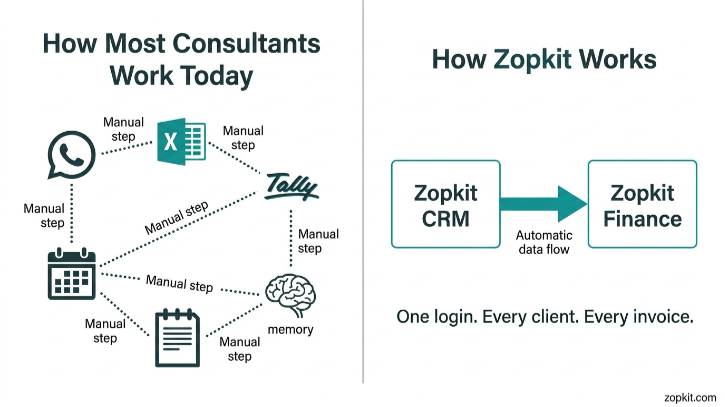
If you are a freelance consultant or a Chartered Accountant running your own practice in India, you are not really running a solo business. You are running five jobs at once. You are the salesperson, the delivery team, the accounts department, the follow-up engine, and the compliance manager. And you are doing all of that while the actual client work is still waiting on your desk.
The problem is not that you are unorganised. The problem is that the tools you are using were never designed for the way you actually work.
This article is about why Zopkit CRM combined with Zopkit Financial Accounting is the single most practical system a freelance consultant or CA professional in India can use to track clients, raise GST invoices, follow up on payments, and keep their practice running without depending on a full-time accountant or a patchwork of five different apps.
Table of Contents
- I. The Way Most Consultants and CAs Actually Manage Clients Right Now
- II. What That Fragmented System Is Actually Costing You
- III. What a Proper Client-to-Cash System Looks Like for Solo Professionals
- IV. Zopkit CRM: Built for Multi-Client Relationship Management
- V. Zopkit Financial Accounting: GST Invoicing and Collections Without an Accountant
- VI. How CRM and Finance Work Together as One System
- VII. Why This Fits Indian Consultants and CAs Specifically
- VIII. The Credit-Based Model: Pay for What You Actually Use
- IX. Where to Start
I. The Way Most Consultants and CAs Actually Manage Clients Right Now
Ask any freelance consultant or CA how they manage their clients and you will hear the same answer, described in slightly different ways.
There is a WhatsApp thread for every active client. There is a spreadsheet somewhere that is supposed to track who owes what and when. There is a folder of Word documents or a Tally file where invoices get raised, eventually. There is a mental to-do list of who needs to be followed up on that gets checked only when something feels overdue. And there is a running anxiety about whether the GST filings are lined up correctly against the invoices that were actually sent this month.
This is not a failure of discipline. This is what happens when the tools available were not built for how a solo professional runs a multi-client practice.

The tools are not technically wrong. The gaps between them are.

II. What That Fragmented System Is Actually Costing You
The visible cost is time. The invisible cost is revenue.
When your client tracking lives in WhatsApp threads, you cannot see which clients have gone quiet. You cannot see which prospect you met three weeks ago and never followed up with. You cannot see, without manually checking five places, whether a client paid last month's invoice or not.
What this fragmentation costs a solo professional every month:
- An average of 4 to 6 billable hours lost to administrative work that should be automated, including invoice creation, payment follow-up, and compliance reconciliation
- Late invoices, where billing that should happen on the 1st happens on the 12th because you had to gather the information manually first
- Missed GST input credits because vendor bills were not recorded in time or were tracked separately from the invoice system
- Prospects who were warm and are now cold because no follow-up system caught them
- Month-end stress every time a CA filing deadline approaches, because the invoices and the books are never quite in sync
For a CA professional managing 15 to 40 clients across compliance, advisory, and audit work, this fragmentation is not a minor inconvenience. It is a cap on how much you can grow without hiring more people.
The answer is not to hire an accounts assistant. The answer is a system that makes the assistant-level work happen automatically.
III. What a Proper Client-to-Cash System Looks Like for Solo Professionals
A proper system for a freelance consultant or CA does not need to be complex. It needs to do three things extremely well.
First, it needs to hold every client relationship in one place. That means contacts, communications, active engagements, notes, documents, and follow-up tasks tied to one record per client. Not scattered across email, WhatsApp, and your head.
Second, it needs to make invoicing and payment tracking frictionless. That means raising a GST-compliant invoice takes two minutes, the invoice is linked to the client record, and payment status is tracked automatically without a separate spreadsheet.
Third, it needs to keep compliance clean. That means GST is calculated correctly on every invoice, TDS is tracked where applicable, and you can generate a tax summary when filing time comes without rebuilding anything from scratch.
That is exactly what Zopkit CRM and Zopkit Financial Accounting deliver together.
IV. Zopkit CRM: Built for Multi-Client Relationship Management
Zopkit B2B CRM is not a pipeline tool for enterprise sales teams. For a freelance consultant or CA professional, it becomes a full client relationship system. Every prospect, every active client, and every past engagement lives in one place with full context available in seconds.
What it covers for solo professionals:
- Lead and contact management with pipelines, kanban views, and full contact history so every enquiry is tracked from first conversation to engagement letter
- Account records with a 360-degree view of every communication, document, invoice, and note tied to one client record. When a client calls, you open one screen and you have everything
- Opportunity pipeline with stage tracking so you can see at a glance which proposals are outstanding, which clients are about to renew, and which leads you have not followed up on
- Email sync with Gmail and Outlook so every email you send and receive from a client logs automatically to their record without you copying or pasting anything
- Tasks and activity timeline so follow-up reminders, document requests, and filing deadlines are attached directly to the client, not sitting in a separate to-do app
- Quotations and engagement letters generated directly from the client record, with PDF export, so the proposal process takes minutes not hours
- Embeddable web forms that push new enquiries from your website directly into the CRM as a lead, so no prospect gets lost in an email inbox
- AI assistant that can answer questions about your pipeline, flag clients you have not touched in 30 days, and draft follow-up emails in plain English
For a CA professional with 30+ active clients:


V. Zopkit Financial Accounting: GST Invoicing and Collections Without an Accountant
Most CRMs stop at the client relationship. They have no idea what you invoiced that client, whether they paid, or whether the GST was filed correctly. Zopkit Financial Accounting picks up exactly where the CRM ends.
For a freelance consultant or CA professional in India, this module is the difference between managing your own books confidently and depending on a CA or accounts assistant for routine invoicing and compliance work.
What it covers:
- Customer invoices with a full lifecycle from draft to approval to payment. Every invoice is linked to a customer record and generates a PDF immediately
- GST configuration with HSN/SAC codes, tax rates, place of supply rules, and TDS configuration all set up once and applied automatically to every invoice you raise
- Recurring invoices for retainer clients, set up once with a schedule and raised automatically every cycle without your involvement
- Accounts Receivable aging so you can see at any moment which clients owe you money, how long it has been outstanding, and what the total is
- Customer payments recorded against specific invoices so your books stay clean and reconciled without a manual process
- Banking with bank account management, transaction imports, and bank reconciliation so your bank statement and your books match without a spreadsheet
- GST reports and compliance calendar with GSTR-aligned tax reports generated directly from your invoices and filing deadline reminders built in
- TDS tracking for clients who deduct tax at source, with certificates and challans managed inside the platform
- Invoice OCR that reads a vendor bill image and auto-fills the fields, reducing manual entry for expenses
For a freelance consultant billing multiple clients on different arrangements:


VI. How CRM and Finance Work Together as One System
This is where Zopkit separates itself from any combination of separate tools.
When CRM and Finance run on the same platform, the client record in the CRM and the financial record in Accounting refer to the same entity. You do not create a customer in the CRM and then create the same customer again in your billing software. You do not have to confirm deal values before raising an invoice. You do not have a payment status in the bank and a separate invoice status in a spreadsheet.
The connected workflow for a CA professional:
- A new client enquiry comes through your website form and lands in the CRM as a lead
- You work the engagement through the pipeline, attach the proposal, and mark it won when the client signs
- The client account is created. All communications, documents, and notes from the sales process carry forward
- You set up a recurring invoice in Finance linked to this client. It raises on the 1st of every month automatically
- The client pays. You record the payment. AR aging updates. The books are clean
- At GST filing time, your GSTR report is generated directly from the invoices already in the system. There is nothing to reconcile or rebuild
What each part of your practice gains:


VII. Why This Fits Indian Consultants and CAs Specifically
Most CRM and accounting software available in India was either built for large enterprises or imported from a US or European market and retrofitted for Indian compliance. Neither option fits a solo professional well.
What makes Zopkit the right fit for Indian professionals specifically:
- GST is not an add-on. It is the default. Every invoice you raise carries the correct GST treatment based on the HSN/SAC codes you configure once. Place of supply, tax rates, and GSTR alignment are built into the transaction layer, not appended later. For a CA managing their own practice, this means the books are always GST-ready without a separate reconciliation step.
- TDS is handled natively. Many consultants and CA professionals receive payments with TDS deducted. Tracking TDS certificates, reconciling them with advance tax, and ensuring they match your books is a recurring compliance burden. Zopkit tracks TDS transactions, certificates, and challans inside the accounting module so the reconciliation happens automatically.
- Recurring retainer billing is a first-class feature. Most consultants and CAs bill monthly retainers to multiple clients. Zopkit's recurring invoice feature handles this automatically, raising the invoice on schedule and updating AR without your involvement. For a practice with 25 retainer clients, this alone saves hours every month.
- The credit-based model was designed for Indian business realities. Indian professionals do not have the same usage volume every month. Tax season is intense. The rest of the year is quieter. A per-seat pricing model charges you the same flat fee regardless of whether you invoiced two clients or twenty. Zopkit charges based on actual usage, which scales with your workload instead of against it.
- One login for the full practice. Whether you are reviewing a client pipeline, raising an invoice, checking payment status, or pulling a GST report, you are in the same system. There is no switching between platforms, no re-entering client information, and no reconciling data that should have been one record from the beginning.
VIII. The Credit-Based Model: Pay for What You Actually Use
Most SaaS tools charge by the seat. For a solo professional, that means paying the full per-user price for a tool even in months when activity is low or when a specific module is barely touched.
For freelance consultants and CA professionals, this model has a specific problem. Billing activity is not uniform across the year. Tax season, audit season, and year-end peaks mean some months are three times as active as others. A flat monthly fee does not reflect that reality.
Zopkit uses a credit-based consumption model:
- You buy credits
- Usage across all Zopkit tools consumes credits based on actual activity
- Quiet months consume fewer credits. Peak months consume more
- You start with CRM and Finance. You add other modules when you need them without renegotiating a contract
- Your credit balance and usage history are visible inside the platform at all times, so there are no surprises at renewal
For a solo professional or small CA practice, this means the cost of the software reflects the cost of running the practice, not a flat infrastructure charge that ignores how the business actually runs.
IX. Where to Start
You do not need to implement everything on day one. Most consultants and CA professionals start with the two modules that solve their most immediate pain and expand from there.

Because every Zopkit module shares one identity layer and one data system, adding a new module is not a new implementation project. It is activating a part of a platform your practice already runs on.
Start your free trial at zopkit.com and see what running your full practice on one connected system actually feels like.